

⏲️ Estimated reading time: 2 min
Table of Contents
The cPanel Address Importer is a powerful tool that allows users to add multiple email accounts quickly using CSV or Excel files. Learn how to use it efficiently to streamline your email management in cPanel.
What is the cPanel Address Importer?
Is a built-in tool that helps users bulk import email accounts and forwarders using CSV or Excel files. Instead of manually adding email addresses, this tool automates the process, saving time and effort.
You may also be interested in: Why Some Women Cheat and Show No Guilt
Benefits of Using Address Importer
- Saves Time – Quickly upload multiple addresses instead of entering them manually.
- Reduces Errors – Avoid mistakes when creating accounts.
- Efficient for Large Businesses – Ideal for companies managing multiple users.
- Supports CSV and Excel Files – Flexible formats for easy importing.
How to Use In cPanel
1: Access Address Importer
- Log in to your cPanel.
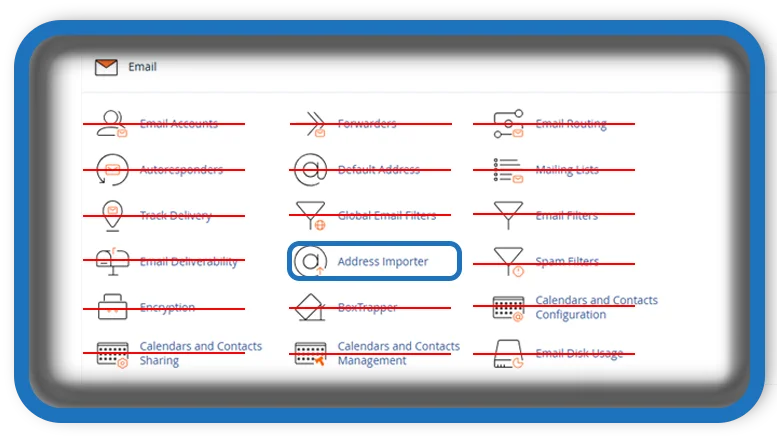
- Scroll down to the Email section.
- Click on Address Importer.
2: Upload Your File
- Choose whether to import Email Accounts or Forwarders.
- Click Browse and select your CSV or Excel file.
- Click Next to proceed.

3: Map Your Data
- Ensure the columns in your file match the required format:
- Password
- Quota (optional)
- Adjust column mapping if necessary.
- Click Next to continue.
4: Complete the Import
- Review the preview of imported accounts.
- Click Finish to complete the process.
- Check your email list to confirm the import.
Troubleshooting Tips
- File Format Issues – Ensure your CSV/Excel file follows the correct format.
- Invalid Credentials – Double-check usernames and passwords before importing.
- Missing Quota Limits – If no limit is set, default quotas may apply.
By using the cPanel Address Importer, you can efficiently manage multiple email accounts with ease. This tool is especially useful for web hosting providers, businesses, and IT administrators handling numerous email accounts.
Tags: cPanel #EmailManagement #WebHosting #cPanelTools #EmailAccounts #BulkImport #CSVImport #HostingTutorial #cPanelEmail
