

⏲️ Estimated reading time: 7 min
Table of Contents
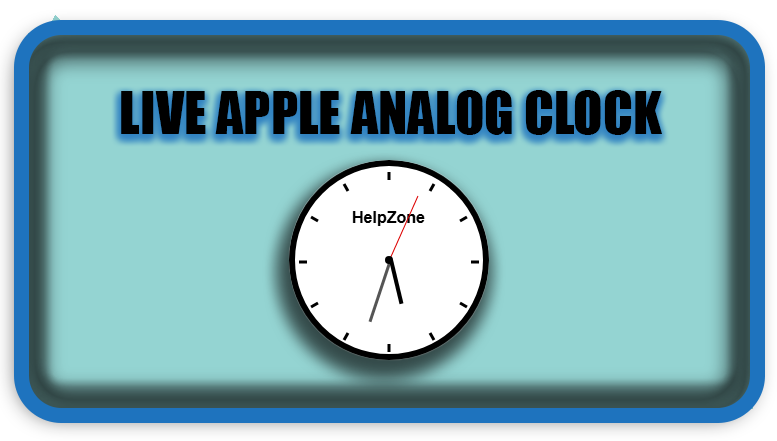
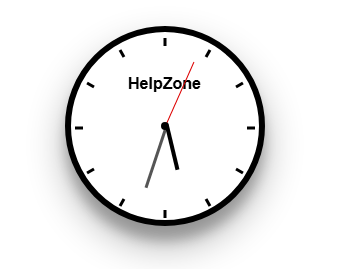
🧩 This post teaches you how to create a WordPress sidebar widget that displays a live, Apple-style analog clock showing Brussels time and your site name. Perfect for blogs, business sites, or news portals.
🕰 WordPress Sidebar Widget: Apple Analog Clock (Brussels Time)
🎯 What You’ll Build
A fully functional sidebar widget that shows:
- A live analog clock
- Time adjusted for the Brussels time zone
- Your site title displayed in the clock face
It runs on pure HTML, CSS, and JavaScript – no external dependencies.
See also: Not Everyone Who Reaches Out Has Pure Intentions
📜 Full Sidebar Widget Plugin Code
Save the following in a file called apple-clock-sidebar.php and place it in /wp-content/plugins/apple-clock-sidebar/.
<?php
/**
 * Plugin Name: Apple Analog Clock Sidebar Widget (Brussels Time)
 * Description: Displays an Apple-style analog clock in the sidebar with Brussels time and site branding.
 * Version: 1.1
 * Author: HelpZone
 */

class Apple_Analog_Clock_Widget extends WP_Widget {

    public function __construct() {
        parent::__construct(
            'apple_analog_clock_widget',
            __('🕰 Apple Analog Clock (Brussels Time)', 'text_domain'),
            array('description' => __('Apple-style analog clock with Brussels time for sidebars.', 'text_domain'))
        );
    }

    public function widget($args, $instance) {
        $site_name = get_bloginfo('name');
        echo $args['before_widget'];
        ?>
        <style>
            .hz-clock { width: 200px; height: 200px; background: #fff; border: 6px solid #000; border-radius: 50%;
                box-shadow: rgba(0, 0, 0, 0.3) 0px 19px 38px, rgba(0, 0, 0, 0.22) 0px 15px 12px;
                position: relative; margin: 0 auto 10px; }
            .hz-clock .center { width: 8px; height: 8px; background: #000; border-radius: 50%; position: absolute;
                top: 50%; left: 50%; transform: translate(-50%, -50%); z-index: 10; }
            .hz-hand { position: absolute; bottom: 50%; left: 50%; transform-origin: bottom; }
            .hz-hand.hour { height: 45px; width: 4px; background: #000; z-index: 4; }
            .hz-hand.minute { height: 65px; width: 3px; background: #555; z-index: 3; }
            .hz-hand.second { height: 70px; width: 1px; background: #d00; z-index: 2; }
            .hz-tick { position: absolute; width: 3px; height: 8px; background: #000; top: 6px; left: 50%;
                transform-origin: center 88px; transform: translateX(-50%) rotate(0deg); }
            .hz-brand-text { position: absolute; top: 40px; left: 50%; transform: translateX(-50%);
                font-size: 16px; color: #000; font-weight: bold; font-family: 'Arial', sans-serif;
                white-space: nowrap; text-align: center; }
            .hz-download-link { text-align: center; margin-top: 10px; }
            .hz-download-link a { color: #0073aa; text-decoration: none; font-weight: bold; }
            .hz-download-link a:hover { text-decoration: underline; }
        </style>

        <div class="hz-clock" id="hz-clock-widget">
            <div class="center"></div>
            <div class="hz-hand hour" id="hz-hourHand-widget"></div>
            <div class="hz-hand minute" id="hz-minuteHand-widget"></div>
            <div class="hz-hand second" id="hz-secondHand-widget"></div>
            <div class="hz-brand-text">
            <a href="https://helpzone.blog/live-apple-analog-clock-to-your-wordpress-widget-brussels-time/" target="_blank" style="color: #000; text-decoration: none;">
            <?php echo esc_html($site_name); ?>
            </a>
            </div>

        </div>

        <div class="hz-download-link">
            <a href="https://helpzone.blog/live-apple-analog-clock-to-your-wordpress-widget-brussels-time/">Download Analog Clock</a>
        </div>

        <script>
        (function(){
            const clock = document.getElementById('hz-clock-widget');
            for (let i = 0; i < 12; i++) {
                const tick = document.createElement('div');
                tick.className = 'hz-tick';
                tick.style.transform = `translateX(-50%) rotate(${i * 30}deg)`;
                clock.appendChild(tick);
            }
            const hourHand = document.getElementById('hz-hourHand-widget');
            const minuteHand = document.getElementById('hz-minuteHand-widget');
            const secondHand = document.getElementById('hz-secondHand-widget');

            function updateClock() {
                const now = new Date();
                const brusselsTime = new Date(now.toLocaleString('en-US', { timeZone: 'Europe/Brussels' }));
                const sec = brusselsTime.getSeconds();
                const min = brusselsTime.getMinutes();
                const hr = brusselsTime.getHours();
                secondHand.style.transform = `rotate(${sec * 6}deg)`;
                minuteHand.style.transform = `rotate(${min * 6 + sec * 0.1}deg)`;
                hourHand.style.transform = `rotate(${((hr % 12) + min / 60) * 30}deg)`;
            }
            setInterval(updateClock, 1000);
            updateClock();
        })();
        </script>
        <?php
        echo $args['after_widget'];
    }
}

function register_apple_analog_clock_widget() {
    register_widget('Apple_Analog_Clock_Widget');
}
add_action('widgets_init', 'register_apple_analog_clock_widget');🚀 How to Install (Step by Step)
- Go to
wp-content/plugins/ - Create a folder:
apple-clock-sidebar - Inside it, create
apple-clock-sidebar.php - Paste the code above
- In WordPress Admin → Plugins → Activate Apple Analog Clock Sidebar Widget
- Go to Appearance → Widgets or the Site Editor (block themes) and add the widget to your Sidebar or Footer area
🧠 Why Site Name is Used
We call get_bloginfo('name') to dynamically fetch and display your site’s title from WordPress Settings. This makes the clock instantly reflect your site's identity no hardcoding needed!
🎁 Final Insights
With this widget, you're not just adding functionality you're adding personality to your site. Whether it's for fun, branding, or just visual flair, this Apple-style clock fits neatly into any sidebar and reminds visitors of your professionalism.
⚠️ Disclaimer and Source Hygiene
This tutorial and accompanying code are provided for educational and informational purposes only. The implementation described is intended for users with technical knowledge of WordPress development. HelpZone and the author assume no responsibility or liability for any issues arising from the use, modification, or implementation of this code on your WordPress website.
Technical Considerations
- Compatibility: This widget has been tested with standard WordPress installations but may require adjustments for specific themes, plugins, or hosting environments.
- Performance Impact: The real-time JavaScript clock updates may affect page loading speed and performance on some servers or devices.
- Browser Support: The CSS and JavaScript used may have varying compatibility across different browsers and versions.
- Time Zone Accuracy: While the code attempts to display Brussels time (Europe/Brussels timezone), accuracy depends on server configuration and JavaScript execution environment.
Security Notes
- Always review code from third-party sources before implementing on your website
- The code provided does not include sanitization or escaping beyond basic examples
- Consider implementing additional security measures for production environments
- Keep the plugin updated as WordPress core changes
Legal and Branding
- "Apple-style" refers to aesthetic inspiration only
- This implementation is not affiliated with, endorsed by, or connected to Apple Inc.
- Users are responsible for ensuring compliance with their own branding guidelines
- The clock design may be subject to copyright considerations in some jurisdictions
No Warranty
This code is provided "as is" without warranty of any kind, either expressed or implied, including but not limited to the implied warranties of merchantability and fitness for a particular purpose. The entire risk as to the quality and performance of the code is with you.
Recommendations
- Backup: Always backup your WordPress site before installing new plugins or code
- Testing: Test the widget in a staging environment before deploying to production
- Updates: Monitor for conflicts with theme or plugin updates
- Customization: Consider consulting a WordPress developer for significant modifications
Support
While the author may provide guidance through comments, there is no guaranteed support or maintenance commitment for this free tutorial code.
By implementing this code on your WordPress website, you acknowledge that you understand these considerations and accept full responsibility for the implementation and its consequences on your website's functionality, performance, and security.
Last Updated: Feb 02, 2026
🔔 For more tutorials like this, consider subscribing to our blog.
📩 Do you have questions or suggestions? Leave a comment or contact us!
🏷️ Tags: WordPress widgets, analog clock, sidebar plugin, site title, Brussels time, Apple clock, real-time clock, frontend widget, wp_widget, timezone clock
📢 Hashtags: #WordPressWidgets, #AnalogClock, #SidebarDesign, #CustomBranding, #SiteTitle, #BrusselsTime, #FrontendTools, #MinimalWidgets, #HelpZone, #AppleStyleUI
