


⏲️ Estimated reading time: 5 min
Table of Contents
🛠️ Post Overview by Category: Best WordPress Dashboard Widget Example for Editors
Read also: Happy Birthday Chuck Norris: The Legend Turns 85
If you’re managing a content-heavy WordPress site, having a quick Post Overview of published posts by category is invaluable. This custom dashboard widget does just that offering admins and editors powerful insights at a glance.
📌 Why You Need a Content Overview in the WordPress Dashboard
WordPress is incredibly flexible, but when your site grows with hundreds or thousands of posts across different categories, keeping track of content distribution becomes a challenge. Editors often have to manually dig through categories or use plugins that are too bloated or slow.
This is where a lightweight, purpose-built dashboard widget comes into play.
✅ Best Example: “Post Overview by Category”
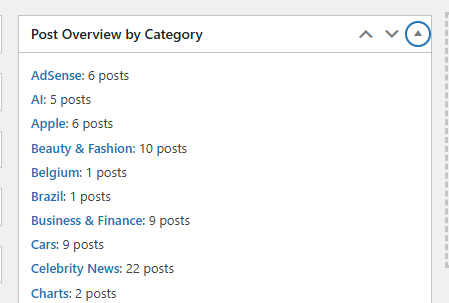
This widget shows the number of published posts under each category and provides direct links to the corresponding post listings. It’s clean, efficient, and very useful for editorial planning and auditing content balance.
🧩 Code Snippet: Add the Dashboard Widget
Below is the complete PHP code to add this functionality:
<?php
/**
 * Plugin Name: Dashboard Post Overview by Category
 * Description: Adds a dashboard widget that displays the count of published posts by category.
 * Version: 1.0
 * Author: HelpZone
 */

// Register the widget
add_action('wp_dashboard_setup', 'hz_dashboard_post_overview_widget');

function hz_dashboard_post_overview_widget() {
    wp_add_dashboard_widget(
        'hz_post_overview_widget',
        'Post Overview by Category',
        'hz_display_post_overview_by_category'
    );
}

// Display the widget
function hz_display_post_overview_by_category() {
    $categories = get_categories(array(
        'hide_empty' => false,
    ));

    if (empty($categories)) {
        echo '<p>No categories found.</p>';
        return;
    }

    echo '<ul>';
    foreach ($categories as $category) {
        $count = $category->count;
        $name = esc_html($category->name);
        $link = admin_url('edit.php?category_name=' . $category->slug);
        echo "<li><a href='{$link}'><strong>{$name}</strong></a>: {$count} posts</li>";
    }
    echo '</ul>';
}
🧪 How to Install This Widget
To use this snippet on your WordPress site:
Option 1: Use a Custom Plugin
- Open your local text/code editor.
- Paste the code into a new file and save it as
post-overview-dashboard-widget.php. - Upload this file into
/wp-content/plugins/. - Activate the plugin from Plugins > Installed Plugins in the admin area.
Option 2: Paste into Your Theme’s functions.php
- Open the
functions.phpfile of your current (or child) theme. - Scroll to the end and paste the code.
- Save the changes and refresh your admin dashboard.
📋 What You’ll See
Once installed, go to Dashboard > Home and locate the new widget titled “Post Overview by Category.”
It lists:
- Each WordPress category
- The number of published posts inside it
- A clickable link that filters your post editor by that category
🧠 Real Use Case: Why Editors Love This
Let’s say your editorial team publishes across 12 categories. You notice some, like Tech News or Food Reviews, are growing fast while others like DIY Hacks are empty. This widget immediately shows which categories need attention.
This is especially helpful for:
- Content strategy meetings
- Guest post management
- SEO content planning
- Category cleanup efforts
🛠️ Customization Tips
Here are a few useful tweaks you can apply to extend the functionality:
🔄 Count Only Draft Posts
'status' => 'draft'
🧾 Include Custom Post Types
'post_type' => ['post', 'your_custom_post_type']
📉 Sort Categories by Post Count
Use orderby => 'count' in the get_categories() call:
$categories = get_categories(array(
    'hide_empty' => false,
    'orderby' => 'count',
    'order' => 'DESC',
));
🔒 Lightweight and Secure
Unlike dashboard plugins that load dozens of scripts, this function is:
- Self-contained
- Fast to load
- Minimalist
- Does not rely on external APIs
It also uses native WordPress functions (get_categories, admin_url, wp_add_dashboard_widget), making it compatible with future updates.
📚 Pro Tip: Pair With These Widgets
To create a full editorial dashboard, consider pairing this widget with:
- Recent Post Updates
- Pending Reviews Counter
- Login Logs Widget
- Word Count Goal Tracker
Together, these widgets create a content manager’s dream dashboard.
🔔For more tutorials like this, consider subscribing to our blog.
📩 Do you have questions or suggestions? Leave a comment or contact us!
🏷️ Tags: wordpress admin, dashboard widget, category overview, content management, editors, plugin development, wp dashboard tips, content audit, blog organization, wordpress tutorial
📢 Hashtags: #WordPressTips, #WPAdmin, #DashboardWidget, #ContentManagement, #EditorTools, #WPPlugin, #CategoryManagement, #BloggingTools, #WPTutorial, #HelpZone
🧠 Final Thoughts
This small but powerful widget saves time, improves visibility into your content structure, and enhances your editorial workflow. Whether you’re a solo blogger or managing a team of writers, the Post Overview by Category widget belongs in your dashboard.
You can always extend it to include more advanced insights such as tags, custom taxonomy usage, or author post counts but even in its basic form, it adds real value.
