

⏲️ Estimated reading time: 7 min
Table of Contents
Fix Missing Image Descriptions via Dashboard in WordPress. Scan and fix missing image descriptions in your WordPress media library with a custom dashboard widget. Automatically fill empty descriptions using image titles, directly from your admin panel.
Fix Missing Image Descriptions via Dashboard in WordPress (Plugin + Theme Function)
If you’re managing a WordPress website with a large media library, it’s easy to overlook a critical element image descriptions. These descriptions (stored in the post_content field of image attachments) play a key role in SEO, accessibility, and content management. Yet, many images go without them.
In this tutorial, you’ll learn how to install a powerful but lightweight tool that identifies image attachments with missing descriptions and lets you auto-fill them with their titles. You’ll also get two options for integrating it: as a standalone plugin or by adding it to your theme’s functions.php file.
Why Descriptions Matter for Images
- 🧠 SEO Boost – Search engines use descriptions to understand image context.
- ♿ Accessibility – Visually impaired users rely on screen readers, which use image metadata.
- 🗂️ Editorial Management – Descriptions help teams organize and understand uploaded files.
This tool lets you fix missing descriptions in seconds all from the dashboard.
What This Tool Does
Once installed, this code will:
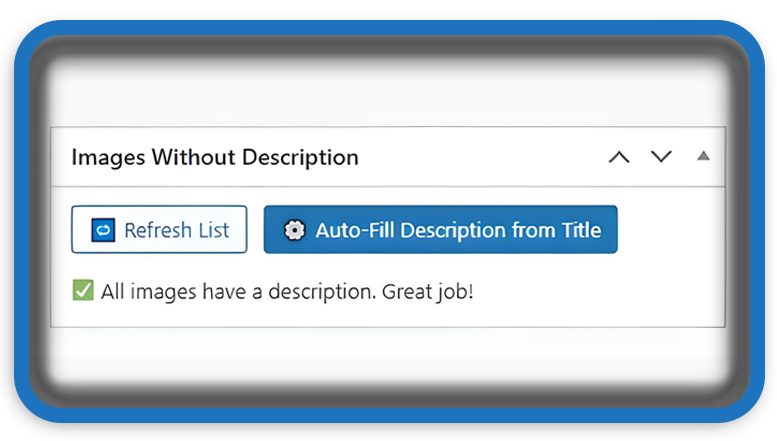
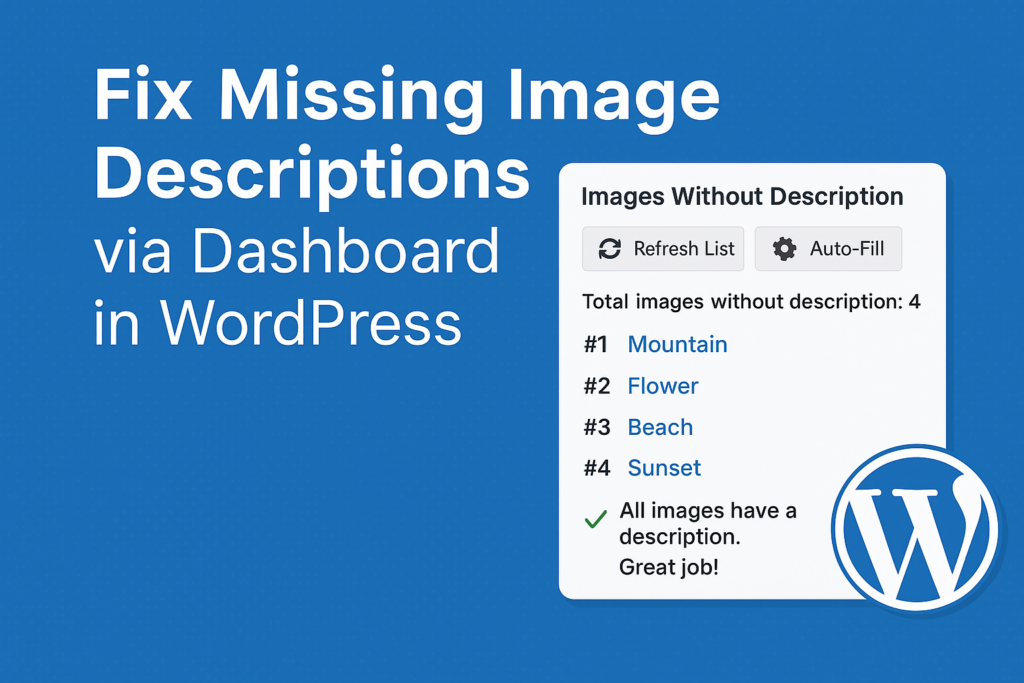
- Add a WordPress dashboard widget labeled “Images Without Description”.
- Display a list (up to 100) of images without any description.
- Offer two buttons:
- 🔁 Refresh List – to scan the media library.
- ⚙️ Auto-Fill – to populate the description field from each image’s title.
- Show each image with a thumbnail and a direct link to edit it.
Option 1: Use as a Standalone Plugin
This is the easiest and cleanest method.
🔧 Steps:
- Go to
/wp-content/plugins/in your WordPress installation. - Create a folder:
images-without-description - Inside the folder, create a file named:
images-without-description.php - Paste the plugin code below.
- In your WordPress admin, go to Plugins → Activate “Images Without Description”.
📦 Full Plugin Code:
<?php
/**
 * Plugin Name: Images Without Description
 * Description: Display image attachments missing description in the WordPress dashboard with auto-fill from title.
 * Version: 1.0
 * Author: HelpZone
 */

add_action('wp_dashboard_setup', 'dashboard_images_without_description_widget');

function dashboard_images_without_description_widget() {
    wp_add_dashboard_widget(
        'images_missing_description_widget',
        __('Images Without Description', 'images-desc'),
        'display_images_missing_description'
    );
}

function display_images_missing_description() {
    echo '<form method="post" style="margin-bottom: 10px;">';
    wp_nonce_field('images_desc_action', 'images_desc_nonce');
    submit_button('🔁 Refresh List', 'secondary', 'refresh_list', false);
    submit_button('⚙️ Auto-Fill Description from Title', 'primary', 'set_description_from_title', false, ['style' => 'margin-left:10px;']);
    echo '</form>';

    if (isset($_POST['set_description_from_title']) && check_admin_referer('images_desc_action', 'images_desc_nonce')) {
        set_description_from_titles();
        echo '<div class="updated"><p><strong>✅ Descriptions have been set from image titles.</strong></p></div>';
    }

    $args = [
        'post_type'      => 'attachment',
        'post_mime_type' => 'image',
        'post_status'    => 'inherit',
        'posts_per_page' => 100,
        'fields'         => 'all'
    ];

    $images = get_posts($args);
    $images_missing_desc = array_filter($images, fn($img) => empty(trim($img->post_content)));

    if (count($images_missing_desc) > 0) {
        echo '<p><strong>Total images without description:</strong> ' . count($images_missing_desc) . '</p>';
        echo '<ul style="max-height: 200px; overflow-y: auto; list-style: none; padding: 0;">';

        $count = 1;
        foreach ($images_missing_desc as $image) {
            $thumb = wp_get_attachment_image($image->ID, [50, 50], false, ['style' => 'margin-right:10px; vertical-align:middle; border-radius:4px;']);
            $edit_link = get_edit_post_link($image->ID);
            echo '<li style="margin-bottom:10px;"><strong>#' . $count++ . '</strong> ' . $thumb . '<a href="' . esc_url($edit_link) . '">' . esc_html($image->post_title) . '</a></li>';
        }

        echo '</ul>';
    } else {
        echo '<p>✅ All images have a description. Great job!</p>';
    }
}

function set_description_from_titles() {
    $args = [
        'post_type'      => 'attachment',
        'post_mime_type' => 'image',
        'post_status'    => 'inherit',
        'posts_per_page' => -1,
        'fields'         => 'all'
    ];

    $images = get_posts($args);

    foreach ($images as $image) {
        if (empty(trim($image->post_content))) {
            $description = sanitize_text_field($image->post_title);
            wp_update_post([
                'ID'           => $image->ID,
                'post_content' => $description
            ]);
        }
    }
}
Option 2: Add to Your Theme’s functions.php
If you prefer not to install a plugin, you can directly add this code to your theme.
📝 How to Use:
- Go to your active theme folder:
/wp-content/themes/your-child-theme/ - Open the
functions.phpfile. - Paste the following version without plugin headers at the end of the file:
// Dashboard Widget to Manage Missing Image Descriptions
add_action('wp_dashboard_setup', function() {
    wp_add_dashboard_widget(
        'images_missing_description_widget',
        __('Images Without Description', 'images-desc'),
        function() {
            echo '<form method="post" style="margin-bottom: 10px;">';
            wp_nonce_field('images_desc_action', 'images_desc_nonce');
            submit_button('🔁 Refresh List', 'secondary', 'refresh_list', false);
            submit_button('⚙️ Auto-Fill Description from Title', 'primary', 'set_description_from_title', false, ['style' => 'margin-left:10px;']);
            echo '</form>';

            if (isset($_POST['set_description_from_title']) && check_admin_referer('images_desc_action', 'images_desc_nonce')) {
                $images = get_posts([
                    'post_type' => 'attachment',
                    'post_mime_type' => 'image',
                    'post_status' => 'inherit',
                    'posts_per_page' => -1
                ]);

                foreach ($images as $image) {
                    if (empty(trim($image->post_content))) {
                        wp_update_post([
                            'ID' => $image->ID,
                            'post_content' => sanitize_text_field($image->post_title)
                        ]);
                    }
                }

                echo '<div class="updated"><p><strong>✅ Descriptions set from image titles.</strong></p></div>';
            }

            $images = get_posts([
                'post_type' => 'attachment',
                'post_mime_type' => 'image',
                'post_status' => 'inherit',
                'posts_per_page' => 100
            ]);

            $missing = array_filter($images, fn($img) => empty(trim($img->post_content)));

            if ($missing) {
                echo '<p><strong>Total images without description:</strong> ' . count($missing) . '</p><ul style="max-height:200px;overflow-y:auto;">';
                foreach ($missing as $i => $img) {
                    echo '<li>#' . ($i + 1) . ' ' . wp_get_attachment_image($img->ID, [50, 50], false, ['style' => 'margin-right:10px']) .
                         '<a href="' . get_edit_post_link($img->ID) . '">' . esc_html($img->post_title) . '</a></li>';
                }
                echo '</ul>';
            } else {
                echo '<p>✅ All images have a description.</p>';
            }
        }
    );
});
Benefits of This Tool
- ✅ Instant SEO and accessibility fixes
- ✅ Works from the dashboard no extra pages or plugins needed
- ✅ Can be implemented as a plugin or theme function
- ✅ Fast, clean, and no dependencies
🔔For more tutorials like this, consider subscribing to our blog.
📩 Do you have questions or suggestions? Leave a comment or contact us!
🏷️ Tags: WordPress plugins, dashboard widget, media library, SEO tools, accessibility, image descriptions, wp functions, plugin tutorial, image SEO, metadata
📢 Hashtags: #WordPressPlugin, #DashboardWidget, #ImageSEO, #AutoFill, #WordPressTips, #WPTutorial, #WPFunctions, #Accessibility, #SEOTools, #HelpZone
Final Overview
Image descriptions are small but powerful helping both humans and search engines understand your content. With this plugin or function in place, you can maintain a clean, accessible, and SEO-friendly media library with minimal effort. Try it today, and bring order to your WordPress image library!
See also: Vitamin B Does Not Cause Neuropathy: What Really Does?
