


⏲️ Estimated reading time: 20 min
Table of Contents
Fix Broken External Links in WordPress (Lightweight). This practical guide explains a lightweight “WP Broken Link Checker (Lite)” plugin that scans posts and pages for dead external links, schedules daily checks, adds a dashboard widget, and helps you recheck or replace bad URLs without heavy server load.
Why Broken Links Quietly Destroy SEO, UX, and Revenue
See also: 24-Hour Countdown Dashboard Widget Tutorial + Full Code
When a visitor clicks a link and lands on a 404 or a broken destination, trust erodes instantly. Search engines interpret that behavior as a quality signal. Consequently, broken outbound links can reduce crawl efficiency, hurt your Expertise–Experience–Authoritativeness–Trust (E-E-A-T) signals, and undermine affiliate conversions. Moreover, angry users rarely come back. You need a consistent maintenance routine that detects and fixes dead outbound links before they snowball into ranking losses and support tickets.
This post walks you through a compact, developer-friendly solution: “WP Broken Link Checker (Lightweight).” You will learn how it works, how to install and run scans, how to recheck and replace URLs, and how to extend the code for your exact needs all while staying fast, safe, and AdSense-friendly.
What This Lightweight Plugin Does and Why It’s Different
Most broken link tools are heavy. They parse every block, crawl your entire site, hook deeply into editors, and run continuous checks. That approach may feel thorough; however, it can spike resource usage and irritate hosting providers. By contrast, this lightweight plugin focuses on essentials:
- It scans only published posts and pages, not drafts or private content.
- It extracts likely URLs using fast regular expressions, including anchors and common shortcode patterns.
- It filters out internal links and keeps only external HTTP/HTTPS URLs.
- It tests URLs with a HEAD request and gracefully falls back to GET if needed.
- It stores results in a single WordPress option for a minimal footprint.
- It adds a dashboard widget for quick status and a Tools screen for full reports.
- It supports “Scan now,” “Recheck one,” and in-place “Replace” actions.
- It schedules a daily cron scan so you fix issues before users see them.
- It even includes optional WP-CLI commands for power users and CI jobs.
Because it avoids complex crawling, it stays fast and reduces false alarms from edge cases. Yet it still catches the vast majority of real-world broken outbound links.
How the Scanner Works Under the Hood (Step by Step)
This section explains the core flow so you can trust the results and customize behavior with confidence.
1) Query published content in small, predictable batches
The scanner uses a lean WP_Query with these characteristics:
- post_type: post and page
- post_status: publish
- posts_per_page: 200 (a safe batch size on typical hosts)
- fields: ids (faster; it only needs post IDs)
- no_found_rows: true (avoid pagination overhead)
This keeps memory use and database load controlled, even on shared hosting. If your site has tens of thousands of posts, you can reduce the batch size and run multiple scans.
2) Extract candidate URLs quickly and safely
The code performs a fast regex pass over the post_content to collect:
- links (primary target)
- references (some posts link directly to remote images)
- Generic shortcode attributes like url=”…” (useful for buttons and custom blocks)
Additionally, it looks for URLs in a few common meta fields, including Yoast’s canonical and meta description. You can easily extend that list if your theme or plugins store URLs elsewhere.
After extraction, the scanner deduplicates by URL and context to avoid redundant checks.
3) Keep only external, real web URLs
The filter step removes:
- Internal links to your own domain or subdomains
- mailto:, tel:, javascript:, and hash anchors (#something)
- Non-HTTP protocols
This ensures the checker focuses on external dependencies you do not control the ones most prone to rot.
4) Check each remote URL politely
For each external URL, the plugin:
- Fires a HEAD request with a short timeout and limited redirects
- Falls back to GET when HEAD is blocked or inconclusive
- Treats 200–399 as healthy; anything else is broken
- Waits ~0.12s between requests (usleep) to be polite to remote servers
The user agent string identifies the scanner, which reduces the chance of being mistaken for a malicious bot. The code sets sslverify to false to reduce false positives from misconfigured SSL endpoints; you may choose to enable verification later if your environment requires stricter security.
5) Save a compact, transparent report
Broken links are stored by post ID in a single option. Each item records:
- The broken URL
- The last observed HTTP status (or “timeout”)
- The context (content, image, shortcode, or meta key)
The “Last scan” timestamp is also saved so your editorial team can verify recency.
The Admin Experience: Dashboard Widget and Tools Page
Editors and site owners want clarity, not noise. The plugin provides two simple touchpoints:
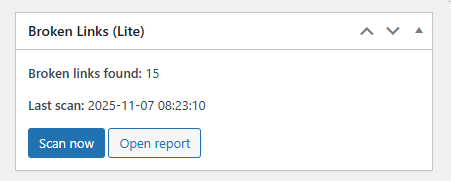
Dashboard widget (at-a-glance)
- Shows the total number of broken links currently recorded
- Displays the time of the last scan
- Includes a “Scan now” button (one click)
- Links to the full report on the Tools page
This widget helps teams catch problems during routine logins, without digging into menus.
Tools → Broken Links (full report)
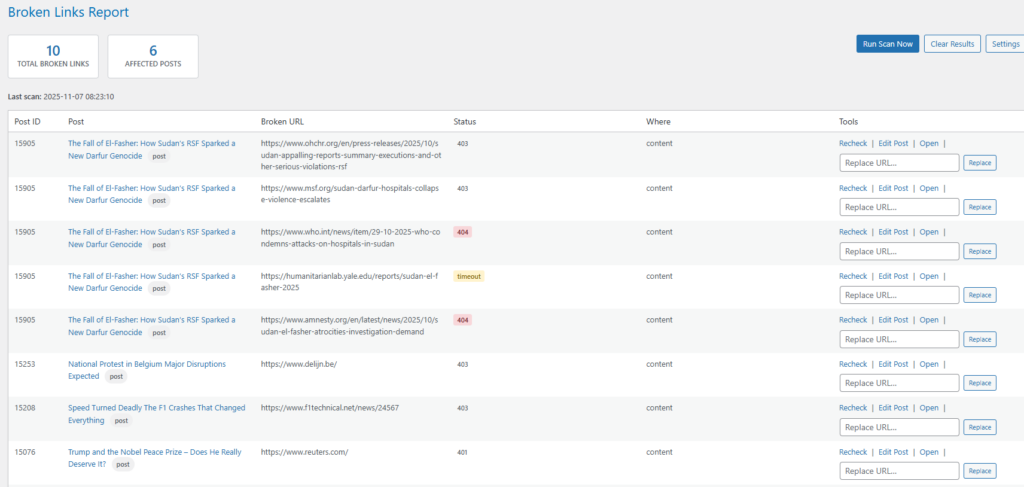
The Tools page presents a striped table that’s easy to scan:
- Post ID, Post title (with a quick permalink), and post type badge
- Broken URL (wrapped for long lines)
- Status (HTTP code or timeout)
- “Where” (content, image, shortcode, or a specific meta key)
- Tools: Recheck, Edit Post, Open, Replace
You can recheck a URL to verify if a temporary outage resolved. You can jump straight into the block editor. You can open the remote URL in a new tab. Finally, you can attempt a targeted in-place replace: paste the new URL and click “Replace.” The plugin performs a precise string substitution in the post content and then rechecks.
On-Demand Actions, Nonces, and Safety
All actions scan now, clear results, recheck one, and replace use nonces to prevent CSRF. Permissions are limited to manage_options, which means only administrators (or roles with that capability) can operate the tool.
Furthermore, the plugin uses wp_safe_redirect after actions so the admin is routed back to the Tools screen with a clear success notice or message.
Scheduled Scanning with WP-Cron (Set and Forget)
The activation hook schedules a recurring daily event. By default, it starts approximately one minute after activation and repeats daily at the same time (server time). If you prefer a fixed time for example, 03:20 Europe/Brussels you can change the scheduling logic to compute the next occurrence precisely.
Daily scans give you an early warning system. Instead of discovering broken links weeks later in Search Console or through angry comments, you get a daily snapshot you can remediate during normal editorial routines.
WP-CLI Support for Power Users and CI
If your environment supports WP-CLI, the plugin automatically registers two commands:
- wp blc-lite scan – Runs a full scan and prints the total broken link count
- wp blc-lite clear – Clears the stored results
You can add these to cron jobs at the system level or call them from CI pipelines as part of health checks before deployments. CLI output makes it trivial to alert on non-zero results.
Performance Philosophy: Fast Enough, Never Reckless
Broken link checks touch remote servers you do not control. That means you must stay polite and fail gracefully. This plugin adds a small delay between requests, sets a sane timeout, and limits redirections. Consequently, it avoids saturating your PHP workers or getting your IP flagged as abusive.
Moreover, it processes posts in batches and extracts URLs via regex instead of heavy DOM parsers. That trade-off favors speed. It may miss exotic edge cases inside complex shortcodes, but the practical coverage is high for standard content.
If you manage a massive archive, you can tune these parameters:
- posts_per_page: Lower this if memory is tight
- timeout: Increase slightly for slow remote servers, but do not exceed 15s
- redirection: Keep moderate; endless redirects are common on abandoned domains
- sleep duration: Increase if you encounter rate limits
- content sources: Add custom meta keys (builder fields, ACF, SEOPress, etc.)
Reducing False Positives and Negatives
Even good checkers can misclassify. Here is how to keep accuracy high:
HEAD-only failures
Some CDNs and WAFs block HEAD. The fallback GET in this plugin mitigates that. If you still see false positives, you can invert the order (try GET first), but expect a minor performance cost.
SSL handshake quirks
Old or misconfigured TLS stacks cause errors. The plugin disables SSL verification to reduce false positives. If security policies require verification, set ‘sslverify’ => true and watch for more strict failures.
Geo/IP blocking
Certain download hosts block specific countries or IP ranges. Tests might fail from your server while working for users elsewhere. If you suspect this, recheck from a different location or use a proxy during manual verification.
Transient outages
A single scan might catch a short downtime. Use “Recheck” before replacing, especially when the link belongs to a major publication or a partner domain.
Security Considerations: Capabilities, Nonces, and Data Handling
The plugin gates all actions behind manage_options and validates every request with a unique nonce. Data lives in WordPress options, not custom database tables. That makes install/uninstall simple and reduces attack surface.
When replacing URLs in post content, the plugin performs an exact, literal search and replace. It does not parse HTML with a DOM engine. That is fast and safe for most cases, but always confirm the result on complex layouts or builder shortcodes.
Editorial Workflow: From Detection to Resolution
Process beats heroics. Adopt a simple weekly routine:
- Run or confirm the daily scan.
- Open the report and sort by post relevance. Prioritize evergreen guides, best sellers, and top traffic pages.
- For each broken URL:
- Click Open to validate manually.
- If the destination moved, paste the new URL and click Replace.
- If the destination died, consider removing the link or pointing to a reputable alternative.
- For citations, try the publisher’s new page or a syndicated copy.
- For research links, consider an archived version (e.g., the Wayback Machine).
- Recheck to confirm it now passes.
- Update the post and republish if needed to trigger recrawl.
Document this routine as a Standard Operating Procedure (SOP) for your editors. Over time, you will shrink broken link counts toward zero, which helps rankings and revenue.
Anchor Text, Relevance, and AdSense Safety
While fixing links, also check anchor text and page relevance. Outbound links should provide context, not bait. Avoid linking to thin, ad-stuffed pages. Keep your link profile clean and human-first. AdSense reviewers look at overall page quality, including outbound link destinations. Clean links protect your monetization.
Customization Guide (Copy-Paste Friendly Tweaks)
You might want to adapt behavior for your stack. Here are common changes and where to apply them.
Scan additional post types
Change the ‘post_type’ array in run_scan() to include custom post types such as ‘product’, ‘docs’, or ‘portfolio’.
Expand meta scanning
Add keys to $meta_keys inside scan_post(): ACF fields, builder URLs, custom canonical fields, or your SEO plugin’s social URLs.
Scan comments or custom fields
You can fetch approved comments and parse comment_content with the same extract_links method. Similarly, you can iterate custom fields and apply filter_external on discovered URLs.
Tighten internal vs. external logic
The filter checks subdomains as internal. If you prefer to treat subdomains as external (common in multi-brand networks), modify is_subdomain_of() accordingly.
Stricter SSL verification
Set ‘sslverify’ => true in check_url(). If you do this, expect some increases in reported failures for misconfigured remotes.
User agent branding
Update the ‘user-agent’ to include your company name and a documentation URL. This improves goodwill with destination hosts.
Rate limiting and timeouts
If your host is sensitive, increase usleep() to 250–300ms and reduce posts_per_page to 100. Your scans will take longer but will stay invisible to hosting guards.
How to Install and Run Your First Scan
Follow these quick steps:
- Create a new folder in wp-content/plugins named wp-broken-link-checker-lite (or similar).
- Save the provided PHP file as wp-broken-link-checker-lite.php inside that folder.
- In WordPress Admin → Plugins, activate “WP Broken Link Checker (Lightweight).”
- Visit Tools → Broken Links and click “Run Scan Now.”
- Check the dashboard widget for a quick overview and click “Open report” to drill down.
- Use “Recheck” on questionable links, “Open” to verify manually, and “Replace” to fix immediately.
- Leave the daily WP-Cron schedule enabled so the system keeps watch automatically.
Troubleshooting Common Issues
Even robust tools need a little tuning. Use these tips when something feels off.
Scans time out or feel slow
Your host may throttle outgoing requests. Reduce posts_per_page to 100. Increase the usleep value to 200–300ms. If a specific domain always times out, recheck manually to confirm.
Too many false positives
Some CDNs block HEAD requests. To mitigate, switch order to GET first in check_url() or increase redirection limits. Confirm ‘sslverify’ behavior for your stack.
I want to scan only once per week
Change the scheduled recurrence to a weekly custom interval or disable cron scans and run only on demand or via WP-CLI.
I need CSV export for editors
Add a simple admin-ajax action that reads the results option and streams a CSV. Each row can include post ID, title, URL, status, and context.
I want email or Slack alerts
After run_scan(), if total_broken > 0, trigger wp_mail() or send a webhook. Keep alerts actionable: include the Tools page link and the number of broken URLs.
We use a headless or static front end
Great this plugin still works strictly in wp-admin. You can even wire the CLI scan into your build pipeline and fail builds if broken links exceed a threshold.
Editorial Quality Wins: What “Fix” Means in Practice
Fixing broken links is more than swapping a URL. While you work through your report, evaluate each link’s intent:
- Does an official source exist? Prefer it.
- Did the publisher move content? Update to the canonical destination.
- Did the resource disappear entirely? Consider a reputable alternative or remove the reference.
- Would an archived copy help the reader? If yes, clearly label it as an archived link.
- Is the anchor text still truthful and precise? Adjust it to match the new destination.
The outcome should be higher credibility, fewer bounces, stronger conversions, and safer monetization.
Developer Notes and Subtle Code Details
A few implementation details deserve a closer look:
Nonce and capability checks
Actions live behind current_user_can(‘manage_options’) and wp_verify_nonce(), which prevents unauthorized tampering.
Results storage
Using a single autoload-disabled option (update_option with false) keeps memory clean and avoids custom tables. For extremely large sites, you can switch to a transient per batch or a dedicated table later.
Subdomain handling
The helper treats subdomains as internal. If your architecture uses brand.example.com domains as separate properties, consider changing that behavior so you catch broken links between sibling brands.
Replacement strategy
The replace_in_post() method performs a literal search and replace with esc_url_raw on the new URL, then triggers a recheck. This is fast, but it assumes the old URL appears exactly once as a contiguous string. For complex markup, you may prefer a DOM-aware replacement to avoid touching unrelated attributes.
Politeness and rate limiting
The 120ms delay reduces the chance of WAF throttling. If you scan a huge archive, slow down further. Respect for remote servers ensures reliability.
HEAD→GET fallback
Many hosts disallow HEAD. Falling back to GET prevents unnecessary false alarms. Still, be mindful that GET typically returns more data and takes slightly longer.
SSL verification
Disabling verification reduces false positives at the cost of strictness. In regulated environments, enable ‘sslverify’ and handle the extra failures case by case.
Extending the Plugin (Roadmap Ideas You Can Implement Today)
You can keep the plugin simple or evolve it into a full operational tool. Here are practical extensions:
- Add a REST endpoint protected by a token so CI can fetch the current broken count.
- Provide a “Mark as ignored” action for links you intentionally keep (e.g., known intermittent mirrors).
- Offer “Replace across site” for global changes such as vendor rebrands.
- Add filters and search to the Tools table (by status code, domain, or context).
- Create a “Top offending domains” dashboard chip to identify systemic partner problems.
- Build a Quality Gate: block publishing if new outbound links are obviously broken.
- Auto-retry transient failures 3x with exponential backoff to reduce noisy results.
- Integrate a CSV/JSON export for auditing and quarterly link hygiene reviews.
Best Practices for Sustainable Link Hygiene
Good teams avoid firefighting by adding light process:
- Write editorial guidelines that forbid linking to unstable or spammy resources.
- Prefer official documentation, root pages, or DOI links for research.
- Avoid tracking parameters in permanent references.
- Periodically re-audit cornerstone pages even if scans look clean.
- Maintain a redirect map for your own brand and partner brands.
- Tag outbound affiliate links clearly and test them after every campaign change.
Practical Example: Fix a Broken Affiliate Link in Minutes
- Run Scan Now.
- Open the report and locate a product review with a 404 link.
- Click Open to verify the destination died or moved.
- Find the new official product URL or the correct affiliate deep link.
- Paste it into the Replace box, click Replace, then Recheck.
- Confirm the status turns 200.
- Update the post if the editor requires republishing to purge caches.
In under five minutes, you protected a revenue path and avoided a poor user experience.
How This Helps AdSense and Overall Site Quality
AdSense reviewers evaluate content quality holistically. Broken outbound links signal neglect. Even if your articles are 2,000+ words, dead references hint at low trust. By scanning daily and fixing issues promptly, you maintain a clean, usable experience. That translates into better engagement metrics, which indirectly support rankings and monetization approvals. Clean sites earn more.
Who Owns the Broken Link Number?
Assign a single owner. Give your SEO lead or managing editor explicit responsibility for keeping the broken link count under a threshold ideally zero on all cornerstone content and below five site-wide. Add the number to your weekly content ops report. What gets measured gets improved.
Simple Tool, Outsized Impact
The “WP Broken Link Checker (Lightweight)” proves that simplicity wins. It gives you a dependable daily signal, quick triage, and just-enough automation to stay ahead of link rot. You will preserve user trust, search equity, and monetization without overloading your server or your team.
FAQs – Your Questions Answered
How often should I run the broken link scan?
Run it daily. The plugin schedules a WP-Cron event once per day so you catch issues early. You can also run “Scan now” after publishing critical pages, fixing redirects, or migrating content.
Will it slow down my site or overload my host?
No, not under normal circumstances. The scan runs in the admin context, uses batches, adds a small delay between remote checks, and only processes published posts and pages. You can further reduce batch size and increase delays on constrained hosts.
Can I scan custom post types or additional meta fields?
Yes. Update the post_type array in the run_scan() query to include your CPTs, such as products or documentation. Extend the $meta_keys list in scan_post() to scan builder or SEO fields that store URLs.
What should I do when a critical link is dead?
First, verify manually with “Open.” If the destination moved, replace it with the new canonical URL. If it died, remove the link or choose a reputable alternative. For research or historical references, consider an archived version and label it clearly.
Does it check internal links or media files hosted on my domain?
By default, no. The checker filters out internal URLs and limits itself to external HTTP/HTTPS links. That keeps the scan focused and fast. You can change that behavior if you want to audit internal links or self-hosted assets.
How accurate is the HEAD/GET approach?
It’s accurate for the vast majority of cases. Some hosts block HEAD, so the plugin falls back to GET. Timeouts and unusual TLS configurations can still cause false positives. Use “Recheck” to confirm transient issues before replacing.
Can I trigger scans or clear results from the command line?
Yes. If WP-CLI is available, run wp blc-lite scan to start a scan and wp blc-lite clear to reset results. That makes it easy to integrate the tool with CI or external monitoring.
Guard Your Rankings: Small Habits, Big Wins
Broken links are silent credibility killers. They frustrate readers, reduce crawl efficiency, and jeopardize monetization. Fortunately, you do not need a heavy crawler or complex dashboards. A lightweight, daily scan with quick triage recheck, open, replace keeps your content healthy. Adopt a simple routine, enforce editorial guidelines, and assign clear ownership. The result is a cleaner site, stronger E-E-A-T, and steadier revenue. Small habits compound. Start today.
⚠️ DISCLAIMER
Important Disclaimer
The “WP Broken Link Checker (Lightweight)” plugin described in this post is provided as-is and free of charge (accessible after an optional donation). It is released under the GNU General Public License (GPL) v2 or later, compatible with WordPress.
No Warranty:
This plugin is distributed in the hope that it will be useful, but WITHOUT ANY WARRANTY; without even the implied warranty of MERCHANTABILITY or FITNESS FOR A PARTICULAR PURPOSE. Use it at your own risk. The author is not responsible for any data loss, site downtime, security issues, conflicts with other plugins/themes, performance impacts, or any other direct or indirect damages arising from its use, modification, or distribution.
Testing Recommended:
Always test the plugin on a staging site or backup your live site before installation and activation. Review and customize the code to fit your specific environment, as it may require adjustments for certain hosts, themes, builders, or plugins (e.g., ACF fields, custom shortcodes, or additional post types).
No Guaranteed Support:
While the post provides guidance and customization tips, no ongoing support, updates, or bug fixes are guaranteed. The donation is voluntary and does not entitle you to support or create any obligation.
Compatibility:
The plugin has been designed for standard WordPress installations but may not work perfectly with all setups, including multisite, headless configurations, or heavily customized environments.
By downloading, installing, or using this plugin, you agree to these terms and accept full responsibility for its implementation and results.
🔔 For more tutorials like this, consider subscribing to our blog.
📩 Do you have questions or suggestions? Leave a comment or contact us!
🏷️ Tags: WordPress SEO,broken links,link rot,WP-CLI,WP-Cron,site maintenance,editorial workflow,Yoast SEO,technical SEO,admin tools
📢 Hashtags: #WordPress, #BrokenLinks, #SEOTips, #ContentOps, #WPCron, #WPCLI, #SiteMaintenance, #AdSense, #TechnicalSEO, #WebPerf
