

⏲️ Estimated reading time: 9 min
Table of Contents
The “More than 4 preconnect connections were found” warning is a common Lighthouse recommendation that can affect your WordPress site’s loading strategy. Learn what it means, why it appears, and how to optimize preconnect hints without hurting performance.
See also: International Day for the Total Elimination of Nuclear Weapons 2026 (UN)
Understanding the Network Dependency Tree in WordPress
When you analyze your WordPress website with Google Lighthouse, PageSpeed Insights, or Chrome DevTools, you may encounter the following warning:
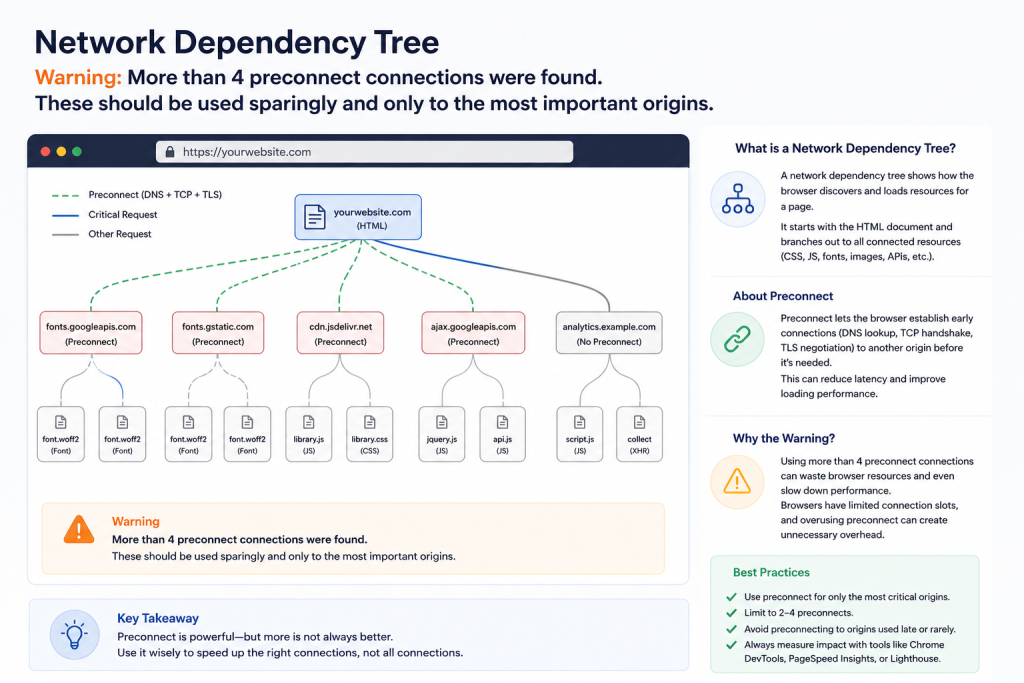
Warnings: More than 4 preconnect connections were found. These should be used sparingly and only to the most important origins.
At first glance, this warning may seem alarming. However, it does not necessarily mean your website is slow. Instead, it indicates that your browser is being instructed to establish connections with too many external domains before they are actually needed.
Understanding how the Network Dependency Tree works helps you identify unnecessary requests, improve loading priorities, and achieve a better Core Web Vitals score.
What Is the Network Dependency Tree?
The Network Dependency Tree is a visual representation of how browser requests depend on one another while loading a webpage.
Imagine your website as a chain of events.
- The browser downloads HTML.
- HTML references CSS.
- CSS references fonts.
- JavaScript loads additional scripts.
- Images load after layout calculations.
- External services request their own files.
Each request becomes a branch in the dependency tree. A smaller tree generally loads faster because the browser spends less time waiting for additional resources.
What Is Preconnect?
Preconnect is a browser resource hint.
Example:
<link rel="preconnect" href="https://fonts.googleapis.com">Instead of waiting until a resource is requested, the browser prepares the connection ahead of time.
It performs:
- DNS lookup
- TCP handshake
- TLS negotiation
When the actual resource is requested later, everything is already prepared.
This can save several hundred milliseconds.
Why Preconnect Exists
Without preconnect:
Request Font
↓

DNS Lookup
↓

TCP Connection
↓

TLS Handshake
↓

Download Font
With preconnect:
Page Starts
↓

Connection Prepared

↓

Font Requested

↓

Immediate Download
The result is faster rendering.
Why Lighthouse Shows This Warning
Many WordPress themes and plugins automatically add preconnect hints.
For example:
fonts.googleapis.com
fonts.gstatic.com
googlesyndication.com
googleads.g.doubleclick.net
pagead2.googlesyndication.com
cdnjs.cloudflare.com
cdnjs.com
youtube.com
If ten different plugins each add their own preconnect tag, Lighthouse detects excessive resource hints. Instead of helping performance, too many preconnects create unnecessary work.
Why More Than Four Preconnects Can Hurt Performance
Every preconnect requires:
- DNS lookup
- TCP connection
- TLS encryption
- Memory allocation
- CPU time
Even if the resource is never used.
Imagine opening ten phone calls before knowing whether you actually need to speak to those people. The browser wastes resources preparing connections that may never be used.
Google’s Recommendation
Google generally recommends using preconnect only for resources that are:
- Critical
- Above the fold
- Used immediately
- Essential for first paint
Typical examples include:
- Google Fonts
- Critical CDN
- Image CDN
- Payment gateway (only when immediately needed)
Common WordPress Plugins That Add Preconnect
Many optimization plugins inject these hints automatically.
Examples include:
- LiteSpeed Cache
- WP Rocket
- FlyingPress
- Perfmatters
- Autoptimize
- Asset CleanUp
- Elementor
- Google Fonts plugins
- Cookie Consent plugins
- AdSense optimization plugins
Sometimes several plugins duplicate the same preconnect.
Example of Too Many Preconnects
Bad example:
<link rel="preconnect" href="https://fonts.googleapis.com">
<link rel="preconnect" href="https://fonts.gstatic.com">
<link rel="preconnect" href="https://cdnjs.cloudflare.com">
<link rel="preconnect" href="https://pagead2.googlesyndication.com">
<link rel="preconnect" href="https://googleads.g.doubleclick.net">
<link rel="preconnect" href="https://youtube.com">
<link rel="preconnect" href="https://i.ytimg.com">
<link rel="preconnect" href="https://analytics.google.com">
This creates eight simultaneous connection preparations.
Better Example
<link rel="preconnect" href="https://fonts.gstatic.com" crossorigin>
<link rel="preconnect" href="https://pagead2.googlesyndication.com">
<link rel="preconnect" href="https://www.googletagmanager.com">
Only the truly critical domains remain.
Which Origins Usually Deserve Preconnect?
Every website is different, but these are commonly worthwhile:
Google Fonts
fonts.gstatic.comGoogle Tag Manager
www.googletagmanager.comGoogle AdSense
pagead2.googlesyndication.comCloudflare Images or CDN
Only if your CSS, JavaScript, or hero images are served there.
Origins That Usually Do NOT Need Preconnect
Many sites unnecessarily preconnect to:
youtube.comunless a video appears immediately.
googleads.g.doubleclick.netif ads load later.
analytics.google.combecause Analytics isn’t render-blocking.
facebook.comunless Facebook content loads immediately.
How to Find All Preconnect Tags
Open Chrome DevTools.
Press:
F12Open:
ElementsSearch:
preconnector
Ctrl + Shift + FSearch:
rel="preconnect"You’ll immediately see every origin.
Finding the Plugin Responsible
A good troubleshooting process is:
- Disable one optimization plugin.
- Refresh.
- Check source code.
- Repeat until the duplicate disappears.
Typical offenders include:
- Theme optimization
- Cache plugin
- Google Fonts plugin
- Ad plugin
- Cookie plugin
Using PageSpeed Insights
After scanning your website:
Expand
DiagnosticsLook for:
Network Dependency TreeYou’ll often see:
Too many preconnectsalongside a list of origins.
Understanding the Network Waterfall
The waterfall displays request timing.
Each resource shows:
- DNS
- Connect
- SSL
- Waiting
- Download
Multiple long connection phases often indicate unnecessary preconnects.
Should You Remove Every Preconnect?
- No.
- Removing all of them can actually slow your website.
- Keep only those required during initial rendering.
- Think quality rather than quantity.
WordPress Example
Suppose your homepage uses:
- Google Fonts
- Google AdSense
- Google Tag Manager
Your preconnects could simply be:
<link rel="preconnect" href="https://fonts.gstatic.com" crossorigin>

<link rel="preconnect" href="https://pagead2.googlesyndication.com">

<link rel="preconnect" href="https://www.googletagmanager.com">
No additional domains are needed during the first paint.
How GeneratePress Users Can Optimize Preconnects
GeneratePress is lightweight by design, but third-party plugins often introduce unnecessary resource hints. If you use GeneratePress together with AdSense, Google Fonts, analytics tools, and optimization plugins, review which component is injecting each <link rel="preconnect"> tag.
A practical approach is to centralize these hints in one place, such as a custom MU plugin or a GeneratePress Hook Element, while disabling duplicate preconnect options in caching or performance plugins. This keeps your HTML cleaner and makes future maintenance much easier.
AdSense and Preconnect
Google AdSense typically benefits from a small number of preconnect hints because ads are often loaded early on content-heavy sites.
However, avoid preconnecting to every Google advertising domain. In most cases, only the primary AdSense origin is necessary for improving the initial connection.
If your ads load lazily after the page becomes interactive, additional preconnect hints may provide little or no benefit.
Common Mistakes
Many WordPress administrators accidentally reduce performance by:
Using multiple optimization plugins
Each plugin may inject its own resource hints.
Preconnecting to every external domain
Not every third-party script deserves an early connection.
Keeping unused plugins active
Inactive features may still output optimization code.
Ignoring duplicate hints
Two plugins may generate identical preconnect entries.
Best Practices
For most WordPress websites:
- Keep no more than 3–4 preconnect hints.
- Reserve them for critical third-party resources.
- Remove duplicates created by plugins.
- Audit your site’s source code regularly.
- Test after every optimization change using Lighthouse or PageSpeed Insights.
- Recheck Core Web Vitals after removing or adding resource hints.
Frequently Asked Questions
What does the “More than 4 preconnect connections were found” warning mean?
It means your website is preparing connections to too many external domains before they are needed. This can increase browser overhead and reduce performance efficiency.
Is this warning a critical error?
No. It is an optimization recommendation rather than a failure. Your site can still perform well, but reducing unnecessary preconnects may improve loading efficiency.
How many preconnect tags should I use?
Most websites perform best with between two and four carefully selected preconnect hints.
Does AdSense require preconnect?
Usually yes, but only for the main AdSense origin if ads are loaded early in the page lifecycle.
Can too many preconnect tags slow down a website?
Yes. Every preconnect consumes network and browser resources, even if the connection is never used.
Does GeneratePress create this warning?
GeneratePress itself rarely does. The warning is more commonly caused by third-party plugins and external services.
Should I remove Google Fonts preconnect?
No, if Google Fonts are used during the initial page render. The preconnect helps reduce font loading latency.
How do I know which plugin added a preconnect?
Inspect the page source and temporarily disable optimization plugins one at a time until the extra resource hint disappears.
Will fixing this improve my Lighthouse score?
It can improve the Diagnostics section and, in some cases, contribute to better overall performance metrics.
Is preconnect better than preload?
They serve different purposes. Preconnect prepares a network connection, while preload instructs the browser to fetch a specific resource as early as possible.
Smarter Resource Loading Starts Here
The “More than 4 preconnect connections were found” warning is not a sign that your WordPress website is broken. Instead, it highlights an opportunity to refine how your browser prepares external network connections.
Rather than adding preconnect hints everywhere, focus on the resources that matter most during the initial page render. Keeping your Network Dependency Tree clean, minimizing duplicate resource hints, and regularly auditing third-party plugins can improve browser efficiency, reduce unnecessary connection overhead, and contribute to stronger Core Web Vitals.
Performance optimization is about making intentional choices not simply adding more optimizations. A lean, well-planned loading strategy almost always outperforms an overloaded one.
⚠️ Disclaimer and Source Hygiene
This article is intended for educational purposes only. Performance recommendations may vary depending on your hosting environment, caching configuration, CDN setup, theme, and plugins. Always test changes on a staging website before deploying them to a production environment.
🔔 For more tutorials like this, consider subscribing to our blog.
📩 Do you have questions or suggestions? Leave a comment or contact us!
🏷️ Tags: Network Dependency Tree, WordPress Performance, Preconnect, Core Web Vitals, Lighthouse, Google PageSpeed Insights, GeneratePress, Website Speed, Browser Resource Hints, WordPress Optimization
📢 Hashtags: #WordPress #PageSpeed #CoreWebVitals #GeneratePress #Lighthouse #Performance #SEO #WebPerformance #GooglePageSpeed #WebDevelopment
Sources and References
Primary Sources
- Google Chrome Developers – Resource Hints
- Google Lighthouse Documentation
- web.dev – Network Performance Optimization
- MDN Web Docs – Resource Hints Specification
- HTML Living Standard (WHATWG)
Secondary Sources and Testimonials
- WordPress Performance Team recommendations
- GeneratePress community discussions
- Performance engineers from leading hosting providers
- Real-world optimization case studies from Lighthouse and PageSpeed Insights
Have you encountered the Network Dependency Tree warning on your WordPress website? Share your PageSpeed Insights results, optimization techniques, or questions in the comments below we’d love to hear about your experience.
