

⏲️ Estimated reading time: 2 min
Table of Contents
cPanel Global Email Filters: How to Manage Spam Efficiently. Managing spam and unwanted emails is crucial for maintaining a clean inbox. In this guide, we’ll explore how to use cPanel’s Global Email Filters to block spam, filter messages, and automate email management for better security and efficiency.

What Are cPanel Global Email Filters?
cPanel GEF allow users to apply email filtering rules to all email accounts under a domain. This helps in managing spam, blocking specific senders, and organizing emails automatically before they reach individual inboxes.
How to Access GEF in cPanel
- Log into your cPanel dashboard.
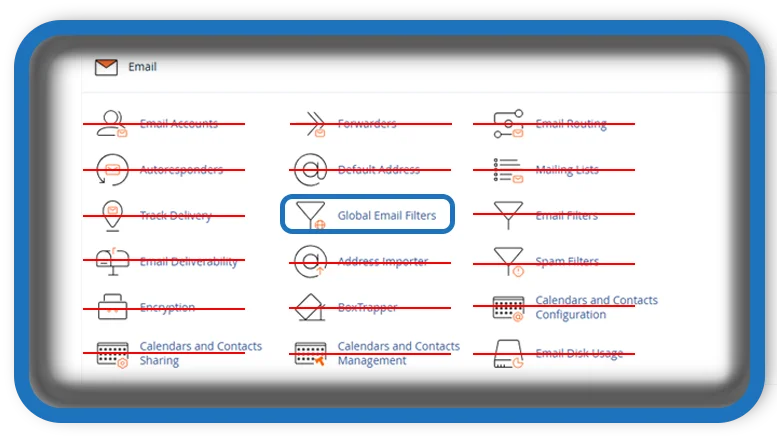
- Navigate to Email > GEF.
- Click Create a New Filter to set up a new rule.
Setting Up a Global Email Filter
To create an effective filter:
See also: What Does It Mean When You Dream About a Person
- Filter Name: Choose a recognizable name.
- Rules: Define conditions such as sender, subject, or keywords.
- Actions: Decide what happens to filtered emails (delete, move to folder, etc.).
Example: Blocking Spam Emails
- Create a new filter and name it Spam Blocker.
- Under Rules, select “Subject” and enter keywords like “win,” “prize,” or “free money.”
- Under Actions, choose “Discard Message” or “Send to Junk Folder”.
Managing and Editing Existing Filters
- Click Edit to modify a filter.
- Use Delete to remove unnecessary filters.
- Test filters by sending test emails to ensure they work as expected.
Conclusion
Using cPanel’s GEF improves email management by preventing spam, blocking unwanted senders, and automating message sorting. Regularly updating filters ensures a secure and clutter-free inbox.
Tags: #cPanel, #emailfilters, #spammanagement, #globalemailfilters, #webhosting, #emailsecurity, #cPaneltutorial, #vpshosting, #emailmanagement, #cPaneltips, #wordpresshosting.
