


⏲️ Estimated reading time: 8 min
Table of Contents
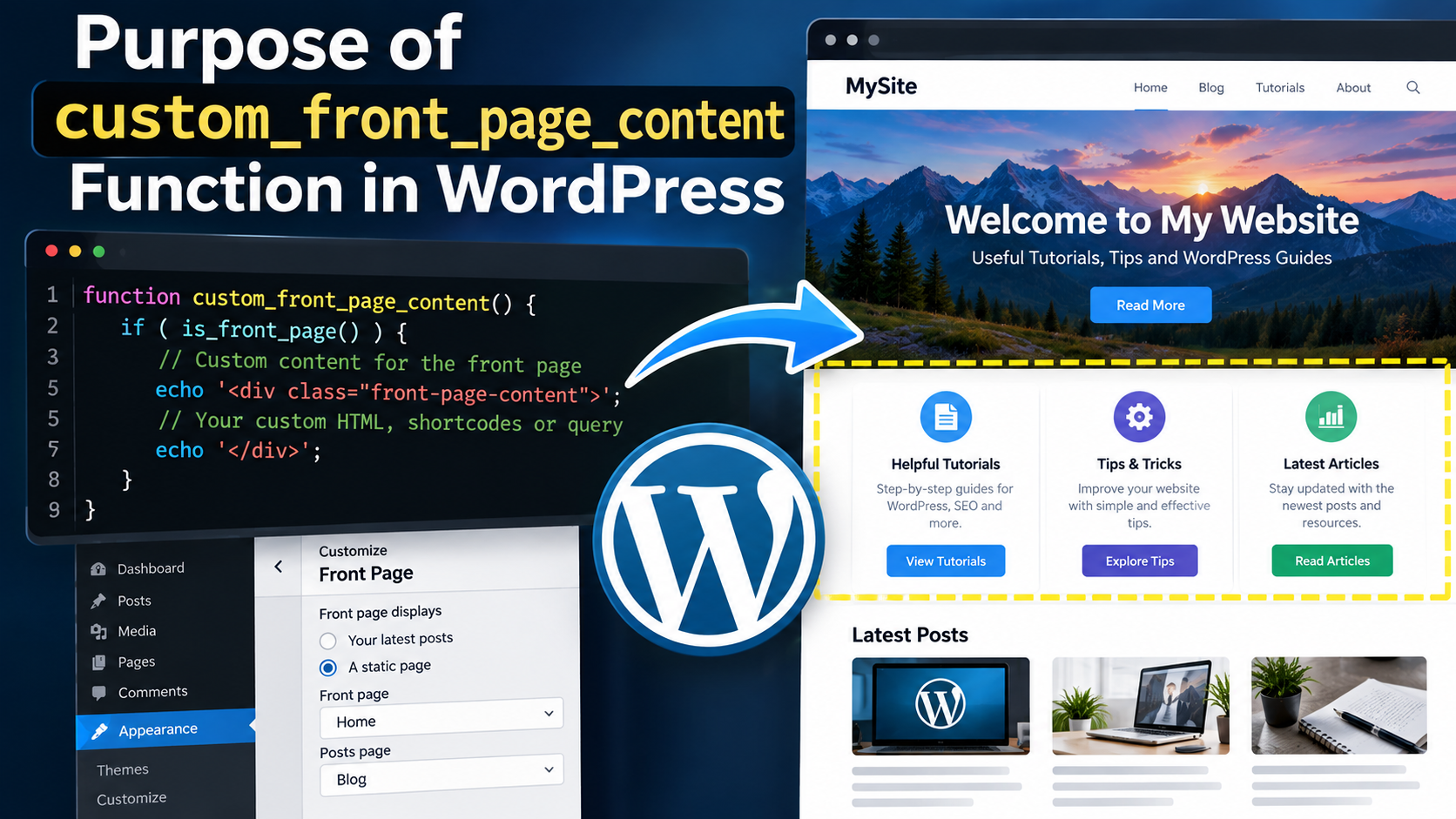
The custom_front_page_content function in a WordPress plugin defines how the homepage displays dynamic or custom information. It replaces or modifies the default front-page content, helping developers personalize website layouts and improve user engagement without altering theme files.
Understanding the Purpose of the custom_front_page_content Function in a WordPress Plugin
When developing a WordPress plugin to customize your site’s homepage, the function custom_front_page_content plays a central role. It’s often created to generate or replace the content that appears on the front page dynamically offering site owners more flexibility without editing their theme templates directly.
This article will explore what the function does, why it matters, and how you can modify or expand it for your own projects.
Why You Might Need a Custom Front Page Function
WordPress themes generally manage homepage content using templates like front-page.php or home.php. However, when you want to add plugin-level customization, it’s better to avoid editing those theme files.
A function like custom_front_page_content allows you to:
- Inject custom HTML, PHP, or dynamic data directly into the homepage.
- Display featured posts, recent updates, or API-driven data.
- Maintain customization even after changing themes.
- Control content visibility based on user roles or login status.
By keeping these changes inside a plugin, you make your site more modular, portable, and upgrade-friendly.
How the Function Works in Practice
In the example plugin, the function might look like this:
function custom_front_page_content() {
    if ( is_front_page() ) {
        echo '<div class="custom-home">';
        echo '<h1>Welcome to Our Website!</h1>';
        echo '<p>This front page is powered by a custom plugin function.</p>';
        echo '</div>';
    }
}
add_action( 'wp_head', 'custom_front_page_content' );
Let’s break it down:
is_front_page()checks if the current page is the homepage.- The function then outputs HTML content, which may include text, media, or other elements.
- Finally, it’s hooked to a WordPress action (
wp_headin this example), meaning it runs automatically when that part of the page is loaded.
This way, the function overrides or enhances the default content without changing theme templates.
Hooking Into WordPress Properly
Hooks are crucial to how WordPress plugins work. The add_action() function connects your custom function to a specific event in WordPress’ page-rendering process.
Common hooks for front-page customization include:
the_content– modifies existing content output.wp_head– injects data into the<head>section.wp_footer– adds scripts or content at the bottom of pages.
For example, if you want to replace content instead of just adding to it, you could hook into the_content:
add_filter( 'the_content', 'custom_front_page_content' );

function custom_front_page_content( $content ) {
    if ( is_front_page() ) {
        $content = '<h2>Custom Homepage Content</h2><p>This replaces the default text.</p>';
    }
    return $content;
}
This approach ensures clean, SEO-friendly, and dynamic homepage management.
Real-World Example: Custom Homepage Layout
Let’s say you’re building a website for a small business. You want the front page to show:
- A custom welcome message.
- A section with the latest blog posts.
- A featured service or product area.
Using the same function, you can dynamically output each part using WordPress functions:
function custom_front_page_content( $content ) {
    if ( is_front_page() ) {
        ob_start();
        ?>
        <section class="welcome">
            <h1>Welcome to Our Business</h1>
            <p>We’re glad you’re here! Explore our latest updates below.</p>
        </section>

        <section class="latest-posts">
            <h2>Recent Articles</h2>
            <ul>
                <?php
                $recent_posts = wp_get_recent_posts( array( 'numberposts' => 3 ) );
                foreach( $recent_posts as $post ) {
                    echo '<li><a href="' . get_permalink($post["ID"]) . '">' . $post["post_title"] . '</a></li>';
                }
                ?>
            </ul>
        </section>
        <?php
        $content = ob_get_clean();
    }
    return $content;
}
add_filter( 'the_content', 'custom_front_page_content' );
This version dynamically pulls the three most recent posts and displays them neatly on the homepage.
Benefits of Using a Custom Function for Homepage Content
1. Theme Independence:
Your content logic remains functional, even if you switch themes.
2. Easier Maintenance:
You can update, disable, or modify homepage content without touching core theme files.
3. SEO Optimization:
A plugin-managed homepage can include meta descriptions, schema markup, or custom titles without affecting the theme’s SEO structure.
Read also: Narcissism: A Disorder or a Chosen Behavior?
4. Reusable Across Sites:
Once written, you can copy the plugin to other WordPress sites and instantly reuse your layout or features.
Extending the Function with Conditional Logic
You can enhance the function’s flexibility with simple conditions:
if ( is_user_logged_in() ) {
    echo '<p>Welcome back, valued user!</p>';
} else {
    echo '<p>Sign up for exclusive content.</p>';
}
Such conditions make your homepage personalized and interactive boosting engagement and user experience.
Adding Styles and Scripts
The custom function can also enqueue CSS or JavaScript files:
function custom_front_page_styles() {
    if ( is_front_page() ) {
        wp_enqueue_style( 'custom-front-page', plugin_dir_url( __FILE__ ) . 'css/front-page.css' );
    }
}
add_action( 'wp_enqueue_scripts', 'custom_front_page_styles' );
This way, your homepage design remains elegant and responsive while keeping styles organized in your plugin folder.
Common Mistakes to Avoid
- Using
echoinside filters incorrectly: Always return$contentinstead of printing it directly. - Not checking
is_front_page(): Without this check, your function could affect every page. - Hardcoding links or data: Use WordPress functions like
get_permalink()orhome_url()instead. - Not sanitizing output: When displaying dynamic data, use
esc_html()orwp_kses_post()for safety.
Recommended Best Practices
- Always prefix your functions (e.g.,
hz_custom_front_page_content) to avoid naming conflicts. - Store HTML in templates using
includestatements for cleaner PHP. - Add settings options so users can toggle or configure front-page behavior via the WordPress dashboard.
- Keep performance in mind: Use caching or limit database queries.
Example: Combining with Shortcodes
You can even allow content editors to insert the front-page layout manually:
function custom_front_page_shortcode() {
    ob_start();
    custom_front_page_content('');
    return ob_get_clean();
}
add_shortcode( 'custom_front_page', 'custom_front_page_shortcode' );
This way, editors can type [custom_front_page] into any page to load the same layout offering flexibility between code and content management.
Turning It into a Complete Plugin
Here’s how your custom-front-page.php file might look:
<?php
/**
 * Plugin Name: Custom Front Page
 * Description: Displays dynamic homepage content using the custom_front_page_content function.
 * Version: 1.0
 * Author: Your Name
 */

if ( ! defined( 'ABSPATH' ) ) exit;

function custom_front_page_content( $content ) {
    if ( is_front_page() ) {
        ob_start();
        ?>
        <div class="custom-front">
            <h1>Welcome to Our Custom Homepage</h1>
            <p>This content is generated dynamically through a plugin.</p>
        </div>
        <?php
        $content = ob_get_clean();
    }
    return $content;
}
add_filter( 'the_content', 'custom_front_page_content' );
Once activated, this plugin automatically replaces the default homepage content with your new design.
Frequently Asked Questions
1. Can I use this function with any theme?
Yes. As long as the theme uses the_content() for the front page, your function will work.
2. Will this affect other pages?
No, because it includes the condition is_front_page(), ensuring it runs only on the homepage.
3. Can I include images, videos, or forms?
Absolutely. Just include your HTML elements inside the function even shortcode outputs will work.
4. Is this SEO-friendly?
Yes, especially when you structure your HTML properly and use schema or meta tags where needed.
5. Can I disable the feature later?
Yes, simply deactivate the plugin, and your homepage will return to its original theme layout.
Building Smarter Homepages
The custom_front_page_content function isn’t just a coding exercise it’s a gateway to total creative freedom in WordPress. By mastering it, you can design flexible, theme-independent homepages that highlight your content dynamically.
Whether you’re a beginner developer or an experienced WordPress designer, using this function effectively can transform the way you structure your site.
🔔 For more tutorials like this, consider subscribing to our blog.
📩 Do you have questions or suggestions? Leave a comment or contact us!
🏷️ Tags: WordPress plugin, homepage customization, front page content, custom PHP function, WordPress development, hooks and filters, theme independence, SEO optimization, dynamic homepage, web design tips
📢 Hashtags: #WordPress, #PluginDevelopment, #CustomFunction, #FrontPage, #WebDesign, #PHP, #SEO, #WordPressTutorial, #WPDev, #Homepage
Crafting the Perfect WordPress Front Page
Every great website begins with a strong first impression your homepage.
By understanding and customizing the custom_front_page_content function, you gain full control over how visitors experience your site. It’s not just code; it’s the bridge between creativity and functionality in WordPress.
