

⏲️ Estimated reading time: 8 min
Table of Contents
Loading advertising or consent scripts in the correct order is critical for compliance and performance. This in-depth guide explains how to add an ad script as the very first element in WordPress, using safe methods such as header.php, functions.php, and GeneratePress hooks, with troubleshooting and verification steps included.
Why Script Load Order Matters More Than Ever
See also: Every man dies, but not every man truly lives
Modern websites rely heavily on third-party scripts. Advertising networks, analytics platforms, consent management tools, and tracking pixels are now essential parts of most WordPress installations.
However, script load order is not optional anymore.
Some tools especially consent management platforms like Usercentrics Autoblocker, Cookiebot, or custom CMPs must load before any other script or markup. If they do not, they cannot correctly block cookies or trackers, leading to:
- Compliance warnings
- GDPR or ePrivacy violations
- Broken ads or analytics
- Reduced trust from ad partners
Many users encounter warnings like:
WARNING: The Autoblocker script tag must be the first to load for auto-blocking to work correctly.
WordPress, by default, outputs multiple elements inside the <head> tag:
- Meta tags
- Stylesheets
- Emoji scripts
- Plugin scripts
- Theme scripts
If your ad or consent script loads after any of these, it may fail.
This guide shows exactly how to ensure your script loads first, using methods that are safe, upgrade-proof, and compatible with modern WordPress setups.
Understanding “First Element to Load” in WordPress
Before jumping into code, it is important to understand what “first element” actually means in a WordPress context.
What “First” Really Means
When a browser parses HTML, it reads from top to bottom.
The very first element inside <head> is parsed before anything else.
For compliance scripts, this usually means:
- Immediately after
<head> - Before meta tags
- Before stylesheets
- Before WordPress hooks output content
Why wp_head Alone Is Not Always Enough
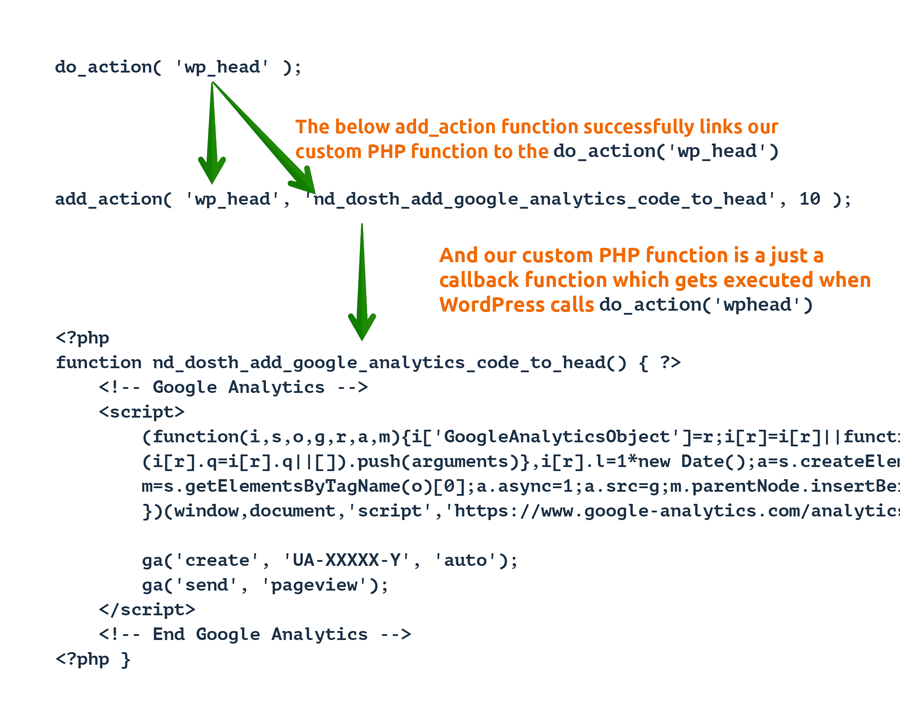
WordPress uses the wp_head action hook to output most scripts and styles.
However:
- Themes may print markup before
wp_head - Plugins may inject inline scripts early
- Some optimization plugins reorder scripts
That is why placement matters so much.
Common Use Cases That Require First-Load Scripts
Not every script needs this level of control. The following do:
Consent and Compliance Tools
- Usercentrics Autoblocker
- Cookiebot
- OneTrust
- IAB TCF frameworks
These tools must run before any cookie-setting script.
Advertising and Monetization Scripts
- Custom ad networks
- Header bidding frameworks
- Pre-bid scripts
- Google Ad Manager (advanced setups)
Incorrect placement can reduce revenue or violate policies.
Tracking and Attribution Tools
- Custom analytics loaders
- Affiliate attribution scripts
- Fraud prevention scripts
Example: A Typical Early-Load Ad Script
Most ad or compliance scripts look similar to this:
<script async src="https://example-ad-network.com/script.js"></script>
Some may include inline configuration:
<script>
window.adConfig = { consent: true };
</script>
<script async src="https://example-ad-network.com/script.js"></script>
The key requirement is placement not the script content itself.
Method 1: Editing header.php (Most Reliable)
Why This Method Works Best
Editing header.php ensures:
- Absolute first position
- No interference from plugins
- Full browser control
- No dependency on hooks
If compliance is critical, this is the gold standard.
Important Safety Rule
Always edit the child theme, never the parent theme.
Step-by-Step Instructions
Step 1: Open the Theme File Editor
From the WordPress dashboard:
Appearance → Theme File Editor
Select your child theme.
Step 2: Open header.php
Locate:
header.php
Step 3: Find the <head> Tag
You will usually see:
<!DOCTYPE html>
<html <?php language_attributes(); ?>>
<head>
Step 4: Insert Script Immediately After <head>
Paste your script directly below <head>:
<!DOCTYPE html>
<html <?php language_attributes(); ?>>
<head>
    <script async src="https://example-ad-network.com/script.js"></script>
That is it.
Why This Guarantees First Load
- Browser reads script before WordPress outputs anything
- No hooks involved
- No plugin can override it
- No priority conflicts
Method 2: Using functions.php with wp_head Priority 0
When to Use This Method
This method is useful if:
- You want upgrade safety
- You prefer hooks over templates
- You control plugin conflicts
However, it does not guarantee absolute first position if the theme outputs markup before wp_head.
Code Example
Add this to your child theme’s functions.php:
function insert_ad_script_first() {
    echo '<script async src="https://example-ad-network.com/script.js"></script>';
}
add_action('wp_head', 'insert_ad_script_first', 0);
Understanding Priority 0
Lower numbers run first.
- Default priority:
10 - Early priority:
0
This ensures your script runs before:
- Theme styles
- Plugin scripts
- SEO plugin outputs
Limitations of This Method
- Some themes print content before
wp_head - Some plugins inject scripts via output buffering
- Optimization plugins may reorder output
For strict compliance tools, prefer header.php.
Method 3: GeneratePress Hook Element (Clean & Upgrade-Safe)
If you are using GeneratePress, this is one of the cleanest solutions available.
Why GeneratePress Hooks Are Excellent
- No file editing
- Stored in database
- Child-theme independent
- Easy to disable or move
- Fully priority-controlled
Step-by-Step Setup
Step 1: Go to Elements
Appearance → Elements → Add New
Step 2: Choose “Hook”
Select Hook as the element type.
Step 3: Paste Your Script
<script async src="https://example-ad-network.com/script.js"></script>
Step 4: Configure Hook Settings
- Hook:
wp_head - Priority:
0 - Location: Entire Site
Step 5: Publish
Click Publish.
Why This Method Is Upgrade-Safe
- Survives theme updates
- Easy to manage
- No risk of syntax errors in PHP files
For GeneratePress users, this is often the best balance between safety and control.
Method 4: Why Plugins Usually Fail This Requirement
Many users attempt to add scripts using:
- Header & Footer plugins
- Ad insertion plugins
- Tag manager plugins
Why These Often Fail
- They hook into
wp_headat default priority - They load after meta tags
- They may defer or delay scripts
- Caching plugins may reorder output
If a script must be first, plugins are rarely sufficient.
How to Verify the Script Loads First
Never assume. Always verify.
Method 1: Chrome DevTools – Elements Tab
- Open your website
- Press F12
- Go to Elements
- Expand
<head>
Your script should appear immediately after <head>.
Method 2: Network Tab
- Open Network
- Reload the page
- Sort by Start Time
Your script should be among the first requests.
Method 3: View Source
Right-click → View Page Source
Search for your script URL.
Check its position inside <head>.
Clearing Cache and CDN Layers
Caching can hide correct placement.
After adding your script:
- Clear WordPress cache
- Clear hosting cache
- Purge CDN (Cloudflare, Fastly)
- Disable optimization plugins temporarily
Common Problems and Solutions
| Issue | Cause | Solution |
|---|---|---|
| Autoblocker warning | Script not first | Move to header.php |
| Script missing | CSP blocking | Update CSP headers |
| Script reordered | Cache plugin | Disable optimization |
| Script delayed | Async/defer conflict | Remove defer |
| Plugin conflict | Early injection | Disable conflicting plugin |
Content Security Policy Considerations
If your site uses CSP headers, you must allow:
- Script source domain
- Inline scripts (if used)
- Async loading
Example:
Content-Security-Policy: script-src 'self' https://example-ad-network.com;
Performance Considerations
Loading scripts early does not mean loading everything early.
Best practices:
- Only load required script
- Avoid inline heavy logic
- Let secondary scripts load later
- Monitor Core Web Vitals
SEO and Compliance Impact
Correct placement:
- Prevents consent violations
- Improves ad network trust
- Reduces compliance warnings
- Avoids analytics misfires
Incorrect placement can:
- Trigger GDPR penalties
- Break monetization
- Cause tag duplication
Final Thoughts: Choose the Right Method
Recommended Priority Order
- header.php (Child Theme) – Maximum control
- GeneratePress Hook Element – Best modern solution
- functions.php with priority 0 – Acceptable alternative
Avoid relying on plugins for strict first-load requirements.
Frequently Asked Questions
Does async affect script order?
Async affects execution timing, not HTML placement. Placement still matters.
Can multiple scripts be first?
No. Only one script can be physically first.
Should I remove wp_head entirely?
No. That will break WordPress functionality.
Is this safe for AdSense?
Yes, when used correctly and not manipulating ads.
Can caching plugins override this?
Yes. Always test with cache disabled.
Is this compatible with Google Tag Manager?
Yes, but GTM itself may load other scripts later.
Can I conditionally load scripts?
Yes, but be careful with compliance tools.
Does this work with multisite?
Yes, with network-enabled themes or elements.
Key Takeaways That Actually Matter
- Some scripts must load first
- WordPress does not guarantee first position by default
- header.php is the most reliable method
- GeneratePress hooks offer a clean alternative
- Verification is mandatory, not optional
🟦Disclaimer and Source Hygiene
This article is based on practical WordPress development experience, official WordPress documentation, browser behavior standards, and compliance tool requirements. Always consult legal or compliance professionals when implementing consent or advertising systems.
🔔 For more tutorials like this, consider subscribing to our blog.
📩 Do you have questions or suggestions? Leave a comment or contact us!
🏷️ Tags: WordPress, ad script, wp_head, header.php, GeneratePress, Usercentrics, Autoblocker, JavaScript load order, theme customization, website monetization
📢 Hashtags: #WordPressTips, #WebDevelopment, #AdTech, #GDPRCompliance, #GeneratePress, #WordPressHooks, #JavaScript, #WebsiteOptimization, #ConsentManagement, #Monetization
