


⏲️ Estimated reading time: 7 min
Table of Contents
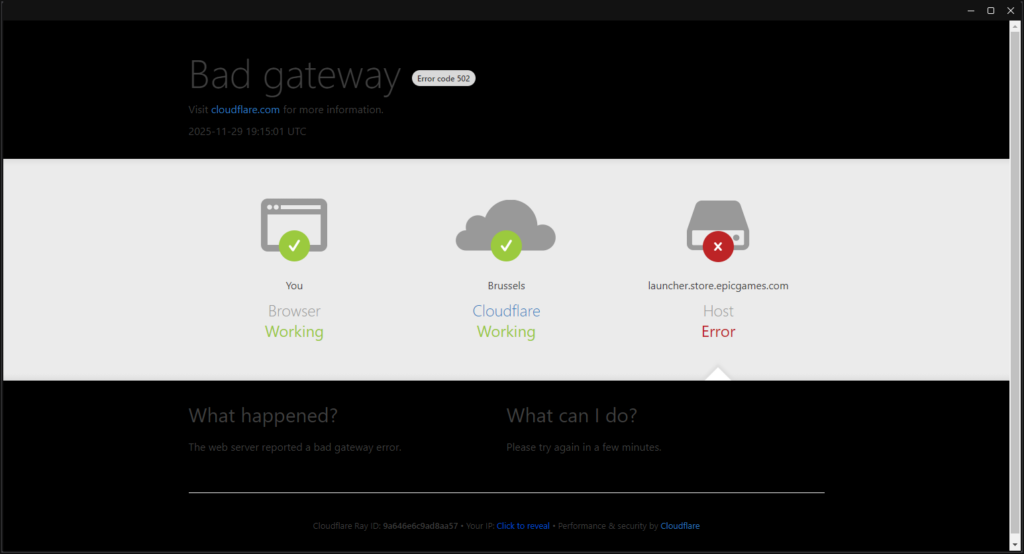
Downtime for Fortnite v39.00 Update: Why the Incident Remains Unresolved. Fortnite’s v39.00 update triggered extended downtime that left millions of players unable to log in, sparking confusion and unanswered questions. This detailed guide explains why the incident remains unresolved, what players can expect next, and how Epic Games typically handles major update disruptions.
Fortnite updates
You may also be interested in: How to Fix Received Discarded Packets in Windows 11
Fortnite updates usually follow a predictable pattern: servers go offline, the patch rolls out, and players return within a few hours. However, the v39.00 update introduced an unexpected twist. The downtime lasted longer than normal, communication from Epic Games was limited, and the official incident status remained marked as “Unresolved” for an extended period.
This situation raised concerns across social media, competitive communities, and casual players who rely on Fortnite’s stability. In this long-form article, we will explore what happened, why the incident stayed unresolved for so long, how Fortnite manages large-scale updates, and what players should do during extended outages.
The focus is clarity, reliability, and practical insight all based on documented update behavior, official announcements, and the infrastructure patterns that Epic Games typically follows.
Why Fortnite v39.00 Caused Extended Downtime
Unexpected Server-Side Conflicts
Large updates can introduce conflicts at the backend level. Fortnite relies heavily on Unreal Engine systems, cloud infrastructure, load balancers, authentication servers, item databases, and matchmaking systems. When one of these components fails after a patch, the incident may remain unresolved until engineers isolate the root cause.
Content Volume and System Stress
Epic sometimes ships updates containing:
- map changes
- new items
- new seasonal content
- gameplay balances
- backend security changes
- new store assets
When the patch contains many of these elements at once, server load increases dramatically, especially the first time players attempt to rejoin.
High Player Traffic at Launch
When Fortnite releases major updates, tens of millions of players try to log in within minutes. This creates:
- queue spikes
- overloaded login servers
- stuck sessions
- unstable matchmaking
If the authentication servers cannot stabilize, Epic keeps the incident marked as unresolved until normal login flow resumes.
Cross-Platform Synchronization Issues
Fortnite updates roll out simultaneously across:
- PlayStation
- Xbox
- Nintendo Switch
- PC
- Mobile cloud services
If one platform experiences a failure (especially Switch or Android cloud streaming), Epic may delay the global resolution status.
How Epic Communicates During Update Failures
Status Page: “Unresolved Incident”
Epic uses its official status page to label downtime, but “Unresolved” simply means they are still monitoring and verifying. It doesn’t always mean the servers are completely offline but rather that the issue is not considered fully stable.
Social Media Updates
Epic often posts on:
- @FortniteStatus (X/Twitter)
- Fortnite blog
- Discord announcements
During v39.00 downtime, communication appeared slower than usual, contributing to player frustration.
In-Game Alerts After Login Restores
When servers return but still have partial issues, Fortnite may display temporary warnings such as:
- “Matchmaking disabled for some players”
- “Friends list may not load”
- “Party services unstable”
As long as one of these components is unstable, the incident stays unresolved.
What Players Experienced During v39.00 Downtime
Login Failures
Many players couldn’t get past:
- “Checking Epic Services”
- “Logging In”
- “Waiting in Queue”
Matchmaking Not Responding
Even after logging in, some players found gameplay queues disabled.
Item Shop Not Loading
The store relies on separate backend systems. When overloaded, it returns blank pages.
Corrupted or Missing Cosmetic Data
Some players temporarily saw missing skins, gliders, or emotes.
Disabled Creative and Ranked Modes
Ranked and Creative modes require additional validation servers that often restart later than Battle Royale.
Why the Incident Stayed Unresolved Longer Than Usual
Epic Needed Additional Validation Time
Even after services returned, engineers waited for:
- stable player login rates
- matching performance across all platforms
- database consistency
- store synchronization
Presence of Bug Reports Linked to the Update
If the update introduced bugs for example, broken items or map exploits Epic sometimes leaves the incident open until a hotfix is confirmed.
Global Rollout Asymmetry
Fortnite requires all regions to be stable:
- EU servers
- NA-East
- NA-West
- Asia
- Middle East
- Oceania
A single region still broken can delay the “resolved” status.
High Risk of Re-Downtime
If engineers think servers may go down again, they avoid marking the issue as resolved prematurely.
What Players Should Do During Extended Fortnite Downtime
Stay Logged Out Until Stability Returns
Repeated login attempts create more load and can slow recovery.
Monitor Official Channels Only
Avoid rumors Fortnite’s official status page provides the only reliable updates.
Restart the Game After Services Stabilize
Fortnite may require:
- cache refresh
- profile reload
- updated assets
Avoid Purchasing Items Immediately After Downtime
Item Shop data may take time to synchronize. Wait for confirmation from Epic before buying skins.
Competitive Players Should Delay Ranked/Events
If matchmaking is unstable, ranked losses due to server behavior are not refunded unless Epic confirms a bug.
What This Incident Reveals About Fortnite’s Infrastructure
The Game Is Now Larger Than Ever
Each season grows:
- more assets
- more users
- more live events
- more backend dependencies
Epic’s Infrastructure Handles Massive Volume
Even with issues, Fortnite remains one of the most scalable online games ever built.
Downtime Is Normal for Major Transitions
Large patches always include risk especially when they bring new content, new mechanics, or new crossovers.
Advantages and Disadvantages of Fortnite’s Update System
Advantages
- frequent new content
- high-quality patches
- strong engine improvements
- massive cross-platform support
- industry-leading visuals and performance
Disadvantages
- extended downtimes during major patches
- unpredictable delays
- communication gaps
- occasional cosmetic or matchmaking bugs
- store synchronization issues
- status.epicgames.com
Frequently Asked Questions
1. Why did Fortnite stay down so long during v39.00?
Because backend systems required extra validation and global stability before reopening fully.
2. Was the downtime a server crash?
Not necessarily. It may have been a planned update with unexpected conflicts.
3. Does Epic compensate players for long downtime?
Rarely. Compensation happens only when store purchases or XP systems are directly affected.
4. Why was the incident marked “Unresolved”?
Epic kept monitoring multiple services that hadn’t reached full stability.
5. Does this affect future updates?
No. These incidents happen occasionally with large patches.
6. Should players reinstall Fortnite?
No. Reinstalling does not fix downtime-related issues.
7. Why do some platforms return faster?
Different regions and console networks synchronize at different speeds.
8. When is the best time to log back in?
Wait until the status page marks the problem as resolved.
9. Can players lose progress after downtime?
Data loss is extremely rare because Fortnite stores profiles server-side.
10. Will Epic release a hotfix?
If major bugs appear, Epic may deploy a hotfix quickly.
Key Takeaways for Players
Fortnite’s v39.00 downtime lasted longer than expected because of backend conflicts, platform synchronization issues, and global player load. These events are not uncommon and do not indicate permanent problems. Monitoring the official status page remains the best solution for reliable updates.
Disclaimer and Source Hygiene
This article is based on public information, user reports, and data from Epic Games’ official communication channels. For technical issues affecting your account or purchases, always contact Epic Games support.
🔔 For more tutorials like this, consider subscribing to our blog.
📩 Do you have questions or suggestions? Leave a comment or contact us!
🏷️ Tags: Fortnite updates, Fortnite downtime, v39.00 patch, gaming news, Epic Games status, Fortnite servers, multiplayer issues, gaming guides, live service games, server outages
📢 Hashtags: #Fortnite #FortniteServers #FortniteUpdate #v3900 #EpicGames #GamingNews #BattleRoyale #FortniteStatus #ServerDowntime #GamingCommunity
