


⏲️ Estimated reading time: 7 min
Table of Contents
Digital Clock with “Flying Seconds” – WordPress Shortcode. Want a unique digital clock for WordPress? This guide shows how to display hours and minutes in neon pink while each second appears randomly on the screen and flies toward the display. Includes ZIP plugin, shortcode, setup steps, and SEO-friendly tips.
Flying Seconds
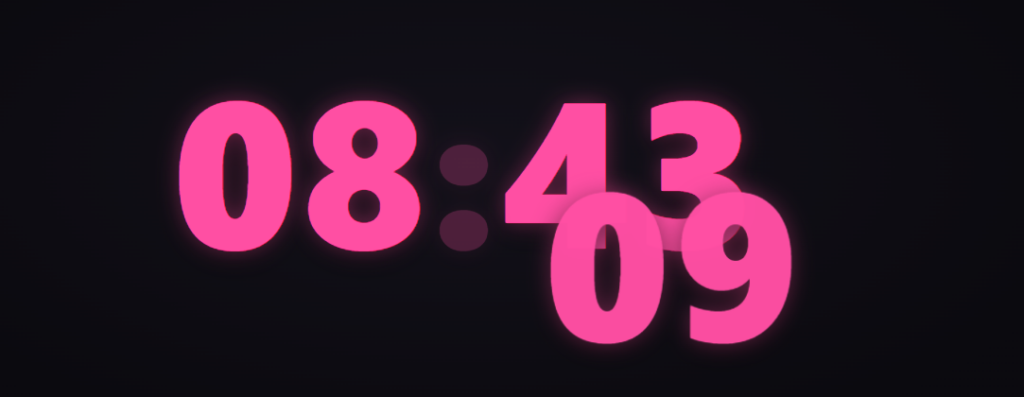
A clock doesn’t have to be static. It can become a stylish, animated centerpiece that gives your page life. This post introduces a “Flying Seconds” digital clock effect each second appears in a random spot on the screen and smoothly flies into place next to the hour and minute display.
All digits are exactly the same size, creating a cohesive and elegant look.
Below, you’ll learn how it works, how to install the shortcode plugin on WordPress, how to customize the style, and how to keep your page AdSense-safe and SEO-optimized.
What the Effect Does and Why It Looks Great
The idea is simple yet visually powerful. Hours and minutes stay static, large, and bright. Every new second spawns somewhere randomly in the viewport and glides into position beside the main time display. The animation feels alive but never distracting smooth enough to feel premium, short enough to keep attention.
This “flying” behavior adds gentle motion and rhythm to your page. The digits glow in neon pink, casting soft shadows on a radial dark background. The result is futuristic and elegant a perfect match for tech, gaming, or modern design themes.
How the Layout and CSS Work
The design uses CSS variables for easy theming and scaling.
--dcfs-sizesets one consistent size for all numbers.--dcfs-gap-emdefines the distance between the HH:MM and the seconds target.- The background uses a radial gradient for depth.
font-variant-numeric: tabular-numsensures the digits align perfectly.- A blinking colon adds realism and rhythm.
The clamp() function keeps the clock responsive. On mobile screens, the digits resize automatically, staying readable without breaking the layout.
How the “Flying Seconds” Animation Works
Every second, JavaScript creates a .dcfs-flyer element that displays the current second value.
It appears at a random position and then transitions toward its target just to the right of the HH:MM display. Once the transition ends, it fades out and is removed from the DOM.
The motion uses smooth cubic-bezier curves, and each transition lasts under one second. The result feels dynamic but light.
No heavy libraries, no lag, no memory buildup the script cleans up each element after it flies.
WordPress-Friendly, Namespaced, and Conflict-Free
All styles and classes are safely prefixed (dcfs-) to avoid conflicts with your theme or other plugins.
The plugin auto-detects all digital_clock_flying_seconds shortcodes on a page and initializes each one independently.
It works with any theme, including GeneratePress, Astra, or custom child themes.
No external dependencies, no jQuery only native CSS and JavaScript for top performance and safety.
Installation Steps
- Donate for Downloading the ZIP file: digital-clock-flying-seconds.zip
- Go to WordPress → Plugins → Add New → Upload Plugin.
- Upload the ZIP, click Install Now, then Activate.
- Open a page or post and insert the shortcode:
digital_clock-flying_seconds - Update and preview your page your animated clock will appear!
You can add multiple clocks to the same page; each one will work independently.
Quick CSS Customization
Want to change colors or size? Add custom CSS to your theme or Customizer:
:root{
  --dcfs-pink: #7cf5ff; /* cyan blue */
  --dcfs-size: clamp(72px, 14vw, 200px);
  --dcfs-gap-em: 0.22;
}
Prefer a softer, static look?
.dcfs-display{ text-shadow: none; }
.dcfs-colon{ animation: none; opacity: .6; }
Change font style easily:
.dcfs-stage{
  font-family: "Inter", ui-sans-serif, system-ui, -apple-system, "Segoe UI", Roboto, Arial;
}
Adjusting Transition Speed
The flying animation lasts 900 ms by default.
You can shorten or lengthen it directly from CSS:
.dcfs-flyer{
  transition-duration: 750ms;
  transition-timing-function: cubic-bezier(.25,.8,.25,1);
}
Add or remove glow using:
.dcfs-flyer{ text-shadow: none; opacity: .95; }
Performance Notes
The effect triggers once per second.
Each animation creates a small temporary element, moves it, then removes it keeping memory clean and CPU usage low.
It doesn’t rely on heavy requestAnimationFrame loops, just timed transitions.
Tips for maximum speed:
- Keep your background lightweight.
- Avoid overlapping multiple heavy effects nearby.
- Don’t overlay the clock with ads or videos.
- Use caching and a CDN as usual.
Accessibility & Readability
Digits are monospaced and high-contrast against a dark background.
If needed, you can tone down brightness or stop the colon’s blink for users sensitive to motion.
Example:
See also: WPZone Neon Clock – Digital Clock for WordPress
.dcfs-colon{ animation:none; opacity:.7; }
You can also add an aria-label describing the time in context if the clock has real meaning (e.g., countdown or live stream indicator).
Where You Can Use It
- Landing pages that need a futuristic centerpiece.
- Coming Soon or Maintenance Mode pages.
- Tech and AI blogs for dynamic design flair.
- Event pages that visually show live time.
- Hero sections to add motion without video.
Used sparingly, it improves engagement and user retention.
Integrating in Templates or Hooks
If you prefer to add the clock inside your theme PHP template:
echo do_shortcode('[digital_clock flying_seconds]');
Use theme hooks (like GeneratePress’s after_header) to place it globally at the top of your layout.
Troubleshooting
If the seconds aren’t flying:
- Ensure your theme calls
<?php wp_footer(); ?>before</body>. - Disable aggressive “defer/delay” from optimization plugins for
dcfs.js. - Clear cache and reload.
- Check that no global CSS overrides
.dcfs-*classes. - On mobile, a few seconds may spawn slightly off-screen that’s normal.
Security & Clean Code
No external connections, no tracking, no analytics.
The plugin uses only standard WordPress functions, safe DOM manipulation, and memory cleanup through mutation observers.
When to Use It and When Not To
✅ Use it when:
- You want visual rhythm on modern, creative pages.
- The design is dark or neon themed.
- You want to catch user attention gently.
❌ Avoid it when:
- The page focuses purely on conversions or forms.
- Heavy ad blocks or popups sit nearby.
- The tone must remain formal or static.
Future Ideas
- AM/PM or 12-hour toggle
- Custom color themes via shortcode
- Speed controls
- Pause on hover
- Automatic light/dark mode
You can easily extend the plugin for these features.
FAQ
How do I insert the clock?
Use shortcode inside any post or page.
Can I add multiple clocks?
Yes, each works independently.
How do I change the color?
Add custom CSS to modify --dcfs-pink.
Does it affect performance?
Minimal impact. Each second element disappears after transition.
Can I disable the blinking colon?
Yes: .dcfs-colon{ animation:none; }
Does it work with caching and minifiers?
Yes, but exclude the script from extreme defer/delay settings.
Can I resize for mobile?
Yes use clamp() or media queries to scale it down.
Any external libraries?
No, pure CSS and vanilla JS.
AdSense safe?
Yes, as long as you follow placement best practices.
