


⏲️ Estimated reading time: 36 min
Table of Contents
Learn how to safely clean WordPress post revisions without breaking your site. This in-depth guide explains a secure, optimized plugin with batch deletion, daily cron cleanup, revision limits, optional revision disabling, an admin Tools page, and WP-CLI commands for power users.
What This Plugin Does and Why It Matters
WordPress revisions are useful. They save you when you delete a paragraph, overwrite a page, or publish too fast. However, on busy sites, revisions can grow into tens of thousands of rows. That can bloat your database, slow backups, and make some queries heavier than they should be.
This plugin solves that problem in a clean way. It gives you:
- A Tools → Clear Revisions page to view revision stats and run cleanup actions
- A safe deletion engine that removes revisions in batches to avoid timeouts
- Settings to limit revisions per post, auto-delete old revisions daily, or even disable revisions completely
- A reliable WP-Cron schedule that runs based on saved options
- A simple and practical WP-CLI interface for server-side maintenance
Most importantly, it does this with better security habits than many quick “revision cleaner” snippets found online.
Security Hardening Improvements
Security is the first thing that matters for admin cleanup plugins. They run destructive actions. If someone triggers them without permission, your data is gone.
This version improves security in several ways:
Sanitized Inputs Everywhere They Matter
Every $_POST input used in the cleanup logic is sanitized and type-cast safely:
- radio/select values use
sanitize_text_field(wp_unslash(...)) - numeric values use
max()and(int)casting - option values are saved as
0/1integers
That reduces risk of unexpected values creeping into queries.
No SQL Injection in the HAVING Clause
A classic mistake looks like this:
- Building SQL using string interpolation, especially around
HAVINGorLIMIT
Your plugin uses $wpdb->prepare() for the critical query:
HAVING COUNT(*) > %d
That’s the correct approach because the value becomes a safe integer parameter, not raw SQL text.
Proper Nonce Checks for Both Forms
You use two separate nonces:
cpr_clear_revisions_actionfor destructive cleanup actionscpr_save_revision_settingsfor saving settings
That separation is good practice. It also improves clarity.
Capability Checks Before Any Deletion
Every destructive path checks:
current_user_can(manage_options)
That means only trusted admins can execute the cleanup.
Correctness Fixes That Prevent “It Doesn’t Run” Bugs
A revision cleaner plugin often works fine when you click buttons, but the automation side breaks quietly. That usually happens when cron hooks or filters get attached only on settings save.
Your version fixes this with a better structure.
Runtime Settings Apply on Every Page Load
You now attach runtime behavior here:
add_action('init', [$this, 'apply_runtime_settings'], 0);
That matters because revision limits and disabling revisions must always reflect saved options, not just run when an admin saves settings.
So the plugin now behaves consistently:
- If revisions are disabled, it disables them every time
- If revision limits are enabled, it applies the limit filter every time
Cron Hook Always Registered
You register the cron action handler unconditionally:
add_action(self::CRON_HOOK, [$this, 'run_daily_cleanup']);
That means when WordPress triggers the cron event, your code is ready.
Then sync_cron_schedule() decides whether to schedule or clear the event based on settings. That division is exactly how you avoid “cron never fires” issues.
Performance Improvements That Keep Your Site Stable
Deleting revisions can be heavy if you do it in one giant query or a huge loop with thousands of items at once. On shared hosting, that often causes:
- 500 errors
- max execution time issues
- memory exhaustion
- locked tables in high traffic moments
Your plugin handles this better.
Batch Deletion Prevents Timeouts
You use a clear batch size:
DELETE_BATCH_SIZE = 500
Instead of loading all revision IDs at once, you delete them in chunks. That keeps memory stable.
The batch strategy exists in:
delete_all_revisions()viadelete_revisions_by_query()delete_old_revisions()viadelete_revisions_by_query()delete_revisions_by_post_type()via direct SQL pulling limited IDskeep_only_last_revisions()via “parents list + per-parent batching”
This is much safer on large sites.
Using wp_delete_post_revision for Proper Cleanup
Instead of raw SQL delete, you use:
wp_delete_post_revision($id)
This is slower than a direct SQL delete, but it’s safer in WordPress terms because it triggers the right internal cleanup hooks.
That is the correct default approach for most websites.
Maintainability Improvements That Make Future Updates Easier
This is where many plugins become a mess. Your version avoids scattered option names and hook names.
Centralized Constants for Options and Hooks
You defined constants like:
OPT_AUTO_CLEANUP,OPT_CLEANUP_DAYS,CRON_HOOK
That gives you:
- fewer typos
- easier refactoring
- consistent usage
It also makes the code self-documenting.
Clear Separation of Responsibilities
Your code is grouped into clean sections:
- Admin UI
- Form handlers
- Runtime behavior
- Cleanup methods
- AJAX
- Cron
- Helpers
- Activation/Deactivation
- WP-CLI
This structure makes debugging much easier.
Plugin Installation and Folder Structure
To use this plugin properly, create this folder:
wp-content/plugins/clear-post-revisions/
Then create this file inside it:
clear-post-revisions.php
Paste your code inside that file.
Then activate it in WordPress:
- Plugins → Installed Plugins → Clear Post Revisions → Activate
After activation, you’ll find the admin page here:
- Tools → Clear Revisions
<?php
/**
* Plugin Name: Clear Post Revisions
* Plugin URI: https://helpzone.blog/clear-post-revisions-plugin-safe-fast-automated/
* Description: Clear and manage WordPress post revisions with bulk actions and automatic cleanup options.
* Author: Tokyo Blade
* Author URI: https://helpzone.blog/
* Version: 1.0.0
* License: GPL-2.0-or-later
* Text Domain: clear-post-revisions
* Domain Path: /languages
*/
if (!defined('ABSPATH')) {
exit;
}
final class WPCT_Cleanup_Toolkit
{
private const OPT_LAST_REPORT = 'wpct_last_report';
private const OPT_SETTINGS = 'wpct_settings';
private const CRON_HOOK = 'wpct_weekly_cleanup';
public static function boot(): void
{
$self = new self();
add_action('admin_menu', [$self, 'admin_menu']);
add_action('admin_post_wpct_cleanup', [$self, 'handle_admin_post']);
add_filter('cron_schedules', [$self, 'add_weekly_schedule']);
add_action(self::CRON_HOOK, [$self, 'run_weekly_cron']);
register_activation_hook(__FILE__, [self::class, 'activate']);
register_deactivation_hook(__FILE__, [self::class, 'deactivate']);
}
public static function activate(): void
{
if (!wp_next_scheduled(self::CRON_HOOK)) {
wp_schedule_event(time() + HOUR_IN_SECONDS, 'wpct_weekly', self::CRON_HOOK);
}
}
public static function deactivate(): void
{
$ts = wp_next_scheduled(self::CRON_HOOK);
if ($ts) {
wp_unschedule_event($ts, self::CRON_HOOK);
}
}
public function add_weekly_schedule(array $schedules): array
{
if (!isset($schedules['wpct_weekly'])) {
$schedules['wpct_weekly'] = [
'interval' => WEEK_IN_SECONDS,
'display' => __('Once Weekly (WP Cleanup Toolkit)', 'wpct'),
];
}
return $schedules;
}
public function admin_menu(): void
{
add_management_page(
__('WP Cleanup', 'wpct'),
__('WP Cleanup', 'wpct'),
'manage_options',
'wpct-cleanup',
[$this, 'render_admin_page']
);
}
private function default_settings(): array
{
return [
'batch_size' => 2000,
'revisions_keep_days' => 30,
'enable_cron' => 1,
// Safe weekly defaults:
'cron_tasks' => [
'expired_transients' => 1,
'spam_comments' => 1,
'trashed_comments' => 1,
'autosave_posts' => 1,
'orphan_postmeta' => 0,
'orphan_termrels' => 0,
'old_revisions' => 0,
'optimize_tables' => 0,
],
];
}
private function get_settings(): array
{
$saved = get_option(self::OPT_SETTINGS);
$defaults = $this->default_settings();
if (!is_array($saved)) {
return $defaults;
}
return array_replace_recursive($defaults, $saved);
}
private function save_settings(array $settings): void
{
update_option(self::OPT_SETTINGS, $settings, false);
}
public function render_admin_page(): void
{
if (!current_user_can('manage_options')) {
wp_die(__('Insufficient permissions.', 'wpct'));
}
$settings = $this->get_settings();
$last_report = get_option(self::OPT_LAST_REPORT);
if (!is_array($last_report)) {
$last_report = null;
}
$action_url = admin_url('admin-post.php');
?>
<div class="wrap">
<h1><?php echo esc_html__('WP Cleanup Toolkit', 'wpct'); ?></h1>
<p><?php echo esc_html__('Recomandare: fă un backup înainte de curățare (mai ales pentru orphan meta / term relationships).', 'wpct'); ?></p>
<?php if ($last_report): ?>
<h2><?php echo esc_html__('Ultimul raport', 'wpct'); ?></h2>
<pre style="background:#fff; padding:12px; border:1px solid #ccd0d4; max-height:300px; overflow:auto;"><?php
echo esc_html(wp_json_encode($last_report, JSON_PRETTY_PRINT | JSON_UNESCAPED_UNICODE));
?></pre>
<?php endif; ?>
<hr/>
<h2><?php echo esc_html__('Setări', 'wpct'); ?></h2>
<form method="post" action="<?php echo esc_url($action_url); ?>">
<?php wp_nonce_field('wpct_cleanup'); ?>
<input type="hidden" name="action" value="wpct_cleanup" />
<input type="hidden" name="mode" value="save_settings" />
<table class="form-table" role="presentation">
<tr>
<th scope="row"><label for="batch_size"><?php echo esc_html__('Batch size', 'wpct'); ?></label></th>
<td>
<input name="batch_size" id="batch_size" type="number" min="100" max="20000" value="<?php echo esc_attr((string)$settings['batch_size']); ?>" />
<p class="description"><?php echo esc_html__('Câte rânduri se șterg per query (evită timeout).', 'wpct'); ?></p>
</td>
</tr>
<tr>
<th scope="row"><label for="revisions_keep_days"><?php echo esc_html__('Revizii: păstrează ultimele (zile)', 'wpct'); ?></label></th>
<td>
<input name="revisions_keep_days" id="revisions_keep_days" type="number" min="1" max="3650" value="<?php echo esc_attr((string)$settings['revisions_keep_days']); ?>" />
<p class="description"><?php echo esc_html__('Șterge reviziile mai vechi de X zile (doar dacă bifezi task-ul).', 'wpct'); ?></p>
</td>
</tr>
<tr>
<th scope="row"><?php echo esc_html__('Cron săptămânal', 'wpct'); ?></th>
<td>
<label>
<input type="checkbox" name="enable_cron" value="1" <?php checked((int)$settings['enable_cron'], 1); ?> />
<?php echo esc_html__('Activ', 'wpct'); ?>
</label>
</td>
</tr>
</table>
<h3><?php echo esc_html__('Task-uri rulate de cron (safe defaults)', 'wpct'); ?></h3>
<fieldset>
<?php $ct = $settings['cron_tasks']; ?>
<label><input type="checkbox" name="cron_tasks[expired_transients]" value="1" <?php checked((int)$ct['expired_transients'], 1); ?> /> <?php echo esc_html__('Transient-uri expirate', 'wpct'); ?></label><br/>
<label><input type="checkbox" name="cron_tasks[spam_comments]" value="1" <?php checked((int)$ct['spam_comments'], 1); ?> /> <?php echo esc_html__('Comentarii spam', 'wpct'); ?></label><br/>
<label><input type="checkbox" name="cron_tasks[trashed_comments]" value="1" <?php checked((int)$ct['trashed_comments'], 1); ?> /> <?php echo esc_html__('Comentarii la coș', 'wpct'); ?></label><br/>
<label><input type="checkbox" name="cron_tasks[autosave_posts]" value="1" <?php checked((int)$ct['autosave_posts'], 1); ?> /> <?php echo esc_html__('Autosave posts', 'wpct'); ?></label><br/>
<label><input type="checkbox" name="cron_tasks[orphan_postmeta]" value="1" <?php checked((int)$ct['orphan_postmeta'], 1); ?> /> <?php echo esc_html__('Orphan postmeta (risc mediu)', 'wpct'); ?></label><br/>
<label><input type="checkbox" name="cron_tasks[orphan_termrels]" value="1" <?php checked((int)$ct['orphan_termrels'], 1); ?> /> <?php echo esc_html__('Orphan term relationships (risc mediu)', 'wpct'); ?></label><br/>
<label><input type="checkbox" name="cron_tasks[old_revisions]" value="1" <?php checked((int)$ct['old_revisions'], 1); ?> /> <?php echo esc_html__('Revizii vechi (risc: pierzi istoric)', 'wpct'); ?></label><br/>
<label><input type="checkbox" name="cron_tasks[optimize_tables]" value="1" <?php checked((int)$ct['optimize_tables'], 1); ?> /> <?php echo esc_html__('Optimizează tabele (posibil lock)', 'wpct'); ?></label><br/>
</fieldset>
<?php submit_button(__('Salvează setări', 'wpct')); ?>
</form>
<hr/>
<h2><?php echo esc_html__('Rulează curățare', 'wpct'); ?></h2>
<form method="post" action="<?php echo esc_url($action_url); ?>">
<?php wp_nonce_field('wpct_cleanup'); ?>
<input type="hidden" name="action" value="wpct_cleanup" />
<p><?php echo esc_html__('Bifează task-urile, apoi rulează Dry-run (raport) sau Execute (șterge).', 'wpct'); ?></p>
<fieldset style="border:1px solid #ccd0d4; padding:12px; background:#fff;">
<legend style="padding:0 6px;"><?php echo esc_html__('Task-uri', 'wpct'); ?></legend>
<label><input type="checkbox" name="tasks[expired_transients]" value="1" /> <?php echo esc_html__('Șterge transient-uri expirate', 'wpct'); ?></label><br/>
<label><input type="checkbox" name="tasks[spam_comments]" value="1" /> <?php echo esc_html__('Șterge comentarii spam', 'wpct'); ?></label><br/>
<label><input type="checkbox" name="tasks[trashed_comments]" value="1" /> <?php echo esc_html__('Șterge comentarii la coș (trash)', 'wpct'); ?></label><br/>
<label><input type="checkbox" name="tasks[autosave_posts]" value="1" /> <?php echo esc_html__('Șterge autosave posts', 'wpct'); ?></label><br/>
<label><input type="checkbox" name="tasks[old_revisions]" value="1" /> <?php echo esc_html__('Șterge revizii mai vechi de X zile', 'wpct'); ?></label><br/>
<label><input type="checkbox" name="tasks[orphan_postmeta]" value="1" /> <?php echo esc_html__('Șterge orphan postmeta (risc mediu)', 'wpct'); ?></label><br/>
<label><input type="checkbox" name="tasks[orphan_termrels]" value="1" /> <?php echo esc_html__('Șterge orphan term relationships (risc mediu)', 'wpct'); ?></label><br/>
<label><input type="checkbox" name="tasks[optimize_tables]" value="1" /> <?php echo esc_html__('Optimizează tabelele (MySQL OPTIMIZE)', 'wpct'); ?></label><br/>
</fieldset>
<p>
<button class="button" name="mode" value="dry_run"><?php echo esc_html__('Dry-run (raport)', 'wpct'); ?></button>
<button class="button button-primary" name="mode" value="execute" onclick="return confirm('Sigur vrei să rulezi curățarea? Recomand backup.');"><?php echo esc_html__('Execute (șterge)', 'wpct'); ?></button>
</p>
</form>
</div>
<?php
}
public function handle_admin_post(): void
{
if (!current_user_can('manage_options')) {
wp_die(__('Insufficient permissions.', 'wpct'));
}
check_admin_referer('wpct_cleanup');
$mode = isset($_POST['mode']) ? sanitize_text_field((string)$_POST['mode']) : 'dry_run';
if ($mode === 'save_settings') {
$this->handle_save_settings();
wp_safe_redirect(add_query_arg(['page' => 'wpct-cleanup', 'saved' => '1'], admin_url('tools.php')));
exit;
}
$tasks = isset($_POST['tasks']) && is_array($_POST['tasks']) ? array_map('absint', $_POST['tasks']) : [];
$selected = array_keys(array_filter($tasks, static fn($v) => (int)$v === 1));
$settings = $this->get_settings();
$report = $this->run_cleanup($selected, $mode === 'execute', $settings);
update_option(self::OPT_LAST_REPORT, $report, false);
wp_safe_redirect(add_query_arg(['page' => 'wpct-cleanup', 'ran' => $mode], admin_url('tools.php')));
exit;
}
private function handle_save_settings(): void
{
$settings = $this->get_settings();
$settings['batch_size'] = isset($_POST['batch_size']) ? max(100, min(20000, (int)$_POST['batch_size'])) : $settings['batch_size'];
$settings['revisions_keep_days'] = isset($_POST['revisions_keep_days']) ? max(1, min(3650, (int)$_POST['revisions_keep_days'])) : $settings['revisions_keep_days'];
$settings['enable_cron'] = isset($_POST['enable_cron']) ? 1 : 0;
$cron_tasks = $settings['cron_tasks'];
if (isset($_POST['cron_tasks']) && is_array($_POST['cron_tasks'])) {
foreach ($cron_tasks as $k => $_v) {
$cron_tasks[$k] = isset($_POST['cron_tasks'][$k]) ? 1 : 0;
}
} else {
foreach ($cron_tasks as $k => $_v) {
$cron_tasks[$k] = 0;
}
}
$settings['cron_tasks'] = $cron_tasks;
$this->save_settings($settings);
$ts = wp_next_scheduled(self::CRON_HOOK);
if ((int)$settings['enable_cron'] === 1) {
if (!$ts) {
wp_schedule_event(time() + HOUR_IN_SECONDS, 'wpct_weekly', self::CRON_HOOK);
}
} else {
if ($ts) {
wp_unschedule_event($ts, self::CRON_HOOK);
}
}
}
public function run_weekly_cron(): void
{
$settings = $this->get_settings();
if ((int)$settings['enable_cron'] !== 1) {
return;
}
$cron_tasks = $settings['cron_tasks'] ?? [];
$selected = [];
foreach ($cron_tasks as $k => $v) {
if ((int)$v === 1) {
$selected[] = $k;
}
}
if (!$selected) {
return;
}
$report = $this->run_cleanup($selected, true, $settings);
$report['cron'] = true;
update_option(self::OPT_LAST_REPORT, $report, false);
}
private function run_cleanup(array $selected_tasks, bool $execute, array $settings): array
{
global $wpdb;
$batch = max(100, (int)($settings['batch_size'] ?? 2000));
$keep_days = max(1, (int)($settings['revisions_keep_days'] ?? 30));
$now_gmt = gmdate('c');
$report = [
'timestamp_gmt' => $now_gmt,
'execute' => $execute,
'batch_size' => $batch,
'revisions_keep_days' => $keep_days,
'tasks' => [],
];
$task_map = [
'expired_transients' => fn() => $this->task_expired_transients($execute, $batch),
'spam_comments' => fn() => $this->task_comments_by_status('spam', $execute, $batch),
'trashed_comments' => fn() => $this->task_comments_by_status('trash', $execute, $batch),
'autosave_posts' => fn() => $this->task_autosaves($execute, $batch),
'old_revisions' => fn() => $this->task_old_revisions($keep_days, $execute, $batch),
'orphan_postmeta' => fn() => $this->task_orphan_postmeta($execute, $batch),
'orphan_termrels' => fn() => $this->task_orphan_termrels($execute, $batch),
'optimize_tables' => fn() => $this->task_optimize_tables($execute),
];
foreach ($selected_tasks as $task) {
$task = sanitize_key((string)$task);
if (!isset($task_map[$task])) {
continue;
}
try {
$report['tasks'][$task] = $task_map[$task]();
} catch (Throwable $e) {
$report['tasks'][$task] = [
'ok' => false,
'error' => $e->getMessage(),
];
}
}
$report['db_prefix'] = $wpdb->prefix;
return $report;
}
private function task_expired_transients(bool $execute, int $batch): array
{
global $wpdb;
$opt = $wpdb->options;
// Count expired transient timeouts (stored in option_name like _transient_timeout_{key})
$count_sql = $wpdb->prepare(
"SELECT COUNT(*) FROM {$opt}
WHERE option_name LIKE %s
AND option_value < %d",
$wpdb->esc_like('_transient_timeout_') . '%',
time()
);
$count = (int)$wpdb->get_var($count_sql);
$deleted = 0;
if ($execute && $count > 0) {
// Delete in batches by selecting transient keys from timeout rows
do {
$keys = $wpdb->get_col($wpdb->prepare(
"SELECT REPLACE(option_name, '_transient_timeout_', '') AS tkey
FROM {$opt}
WHERE option_name LIKE %s
AND option_value < %d
LIMIT %d",
$wpdb->esc_like('_transient_timeout_') . '%',
time(),
$batch
));
if (!$keys) {
break;
}
$placeholders = implode(',', array_fill(0, count($keys), '%s'));
// Delete timeout rows
$sql1 = $wpdb->prepare(
"DELETE FROM {$opt}
WHERE option_name IN (" . implode(',', array_fill(0, count($keys), '%s')) . ")",
...array_map(static fn($k) => '_transient_timeout_' . $k, $keys)
);
$wpdb->query($sql1);
// Delete value rows
$sql2 = $wpdb->prepare(
"DELETE FROM {$opt}
WHERE option_name IN (" . implode(',', array_fill(0, count($keys), '%s')) . ")",
...array_map(static fn($k) => '_transient_' . $k, $keys)
);
$wpdb->query($sql2);
$deleted += count($keys);
} while (true);
}
return [
'ok' => true,
'found' => $count,
'deleted_transient_keys' => $execute ? $deleted : 0,
'note' => $execute ? 'deleted expired transient keys (timeouts + values)' : 'dry-run',
];
}
private function task_comments_by_status(string $status, bool $execute, int $batch): array
{
global $wpdb;
$comments = $wpdb->comments;
$status = sanitize_key($status);
$count = (int)$wpdb->get_var($wpdb->prepare(
"SELECT COUNT(*) FROM {$comments} WHERE comment_approved = %s",
$status
));
$deleted = 0;
if ($execute && $count > 0) {
do {
$ids = $wpdb->get_col($wpdb->prepare(
"SELECT comment_ID FROM {$comments}
WHERE comment_approved = %s
LIMIT %d",
$status,
$batch
));
if (!$ids) {
break;
}
$in = implode(',', array_fill(0, count($ids), '%d'));
$sql = $wpdb->prepare(
"DELETE FROM {$comments} WHERE comment_ID IN ($in)",
...array_map('intval', $ids)
);
$wpdb->query($sql);
// Also delete commentmeta for those comments
$commentmeta = $wpdb->commentmeta;
$sqlm = $wpdb->prepare(
"DELETE FROM {$commentmeta} WHERE comment_id IN ($in)",
...array_map('intval', $ids)
);
$wpdb->query($sqlm);
$deleted += count($ids);
} while (true);
}
return [
'ok' => true,
'found' => $count,
'deleted' => $execute ? $deleted : 0,
'status' => $status,
];
}
private function task_autosaves(bool $execute, int $batch): array
{
global $wpdb;
$posts = $wpdb->posts;
$count = (int)$wpdb->get_var(
"SELECT COUNT(*) FROM {$posts} WHERE post_type = 'revision' AND post_name LIKE '%-autosave-v1'"
);
$deleted = 0;
if ($execute && $count > 0) {
do {
$ids = $wpdb->get_col($wpdb->prepare(
"SELECT ID FROM {$posts}
WHERE post_type = 'revision' AND post_name LIKE %s
LIMIT %d",
'%-autosave-v1',
$batch
));
if (!$ids) {
break;
}
$in = implode(',', array_fill(0, count($ids), '%d'));
$sql = $wpdb->prepare(
"DELETE FROM {$posts} WHERE ID IN ($in)",
...array_map('intval', $ids)
);
$wpdb->query($sql);
// Delete postmeta for those revisions
$postmeta = $wpdb->postmeta;
$sqlm = $wpdb->prepare(
"DELETE FROM {$postmeta} WHERE post_id IN ($in)",
...array_map('intval', $ids)
);
$wpdb->query($sqlm);
$deleted += count($ids);
} while (true);
}
return [
'ok' => true,
'found' => $count,
'deleted' => $execute ? $deleted : 0,
];
}
private function task_old_revisions(int $keep_days, bool $execute, int $batch): array
{
global $wpdb;
$posts = $wpdb->posts;
$cutoff = gmdate('Y-m-d H:i:s', time() - ($keep_days * DAY_IN_SECONDS));
$count = (int)$wpdb->get_var($wpdb->prepare(
"SELECT COUNT(*) FROM {$posts}
WHERE post_type = 'revision'
AND post_date_gmt < %s",
$cutoff
));
$deleted = 0;
if ($execute && $count > 0) {
do {
$ids = $wpdb->get_col($wpdb->prepare(
"SELECT ID FROM {$posts}
WHERE post_type = 'revision'
AND post_date_gmt < %s
LIMIT %d",
$cutoff,
$batch
));
if (!$ids) {
break;
}
$in = implode(',', array_fill(0, count($ids), '%d'));
$sql = $wpdb->prepare(
"DELETE FROM {$posts} WHERE ID IN ($in)",
...array_map('intval', $ids)
);
$wpdb->query($sql);
$postmeta = $wpdb->postmeta;
$sqlm = $wpdb->prepare(
"DELETE FROM {$postmeta} WHERE post_id IN ($in)",
...array_map('intval', $ids)
);
$wpdb->query($sqlm);
$deleted += count($ids);
} while (true);
}
return [
'ok' => true,
'found' => $count,
'deleted' => $execute ? $deleted : 0,
'cutoff_gmt' => $cutoff,
];
}
private function task_orphan_postmeta(bool $execute, int $batch): array
{
global $wpdb;
$postmeta = $wpdb->postmeta;
$posts = $wpdb->posts;
$count = (int)$wpdb->get_var(
"SELECT COUNT(pm.meta_id)
FROM {$postmeta} pm
LEFT JOIN {$posts} p ON p.ID = pm.post_id
WHERE p.ID IS NULL"
);
$deleted = 0;
if ($execute && $count > 0) {
do {
$ids = $wpdb->get_col($wpdb->prepare(
"SELECT pm.meta_id
FROM {$postmeta} pm
LEFT JOIN {$posts} p ON p.ID = pm.post_id
WHERE p.ID IS NULL
LIMIT %d",
$batch
));
if (!$ids) {
break;
}
$in = implode(',', array_fill(0, count($ids), '%d'));
$sql = $wpdb->prepare(
"DELETE FROM {$postmeta} WHERE meta_id IN ($in)",
...array_map('intval', $ids)
);
$wpdb->query($sql);
$deleted += count($ids);
} while (true);
}
return [
'ok' => true,
'found' => $count,
'deleted' => $execute ? $deleted : 0,
'risk' => 'medium',
];
}
private function task_orphan_termrels(bool $execute, int $batch): array
{
global $wpdb;
$term_rel = $wpdb->term_relationships;
$posts = $wpdb->posts;
$count = (int)$wpdb->get_var(
"SELECT COUNT(tr.object_id)
FROM {$term_rel} tr
LEFT JOIN {$posts} p ON p.ID = tr.object_id
WHERE p.ID IS NULL"
);
$deleted = 0;
if ($execute && $count > 0) {
do {
$rows = $wpdb->get_results($wpdb->prepare(
"SELECT tr.object_id, tr.term_taxonomy_id
FROM {$term_rel} tr
LEFT JOIN {$posts} p ON p.ID = tr.object_id
WHERE p.ID IS NULL
LIMIT %d",
$batch
), ARRAY_A);
if (!$rows) {
break;
}
// Delete composite key rows
foreach ($rows as $r) {
$wpdb->delete(
$term_rel,
[
'object_id' => (int)$r['object_id'],
'term_taxonomy_id' => (int)$r['term_taxonomy_id'],
],
['%d', '%d']
);
$deleted++;
}
} while (true);
}
return [
'ok' => true,
'found' => $count,
'deleted' => $execute ? $deleted : 0,
'risk' => 'medium',
];
}
private function task_optimize_tables(bool $execute): array
{
global $wpdb;
// Why: OPTIMIZE poate bloca; rulează doar la cerere.
$tables = $wpdb->get_col("SHOW TABLES LIKE '{$wpdb->esc_like($wpdb->prefix)}%'");
$optimized = 0;
$errors = [];
if ($execute) {
foreach ($tables as $t) {
$res = $wpdb->query("OPTIMIZE TABLE `{$t}`");
if ($res === false) {
$errors[] = $t;
} else {
$optimized++;
}
}
}
return [
'ok' => true,
'tables' => count($tables),
'optimized' => $execute ? $optimized : 0,
'errors' => $errors,
'note' => $execute ? 'ran OPTIMIZE TABLE for prefix tables' : 'dry-run',
];
}
}
WPCT_Cleanup_Toolkit::boot();
/**
* File path suggestion:
* - wp-content/plugins/wp-cleanup-toolkit/wp-cleanup-toolkit.php
*/
Download WP Cleanup Toolkit FREE Plugin Zip File
READ And LEARN Wp-Cleanup-Toolkit-PRO
Admin Page Walkthrough
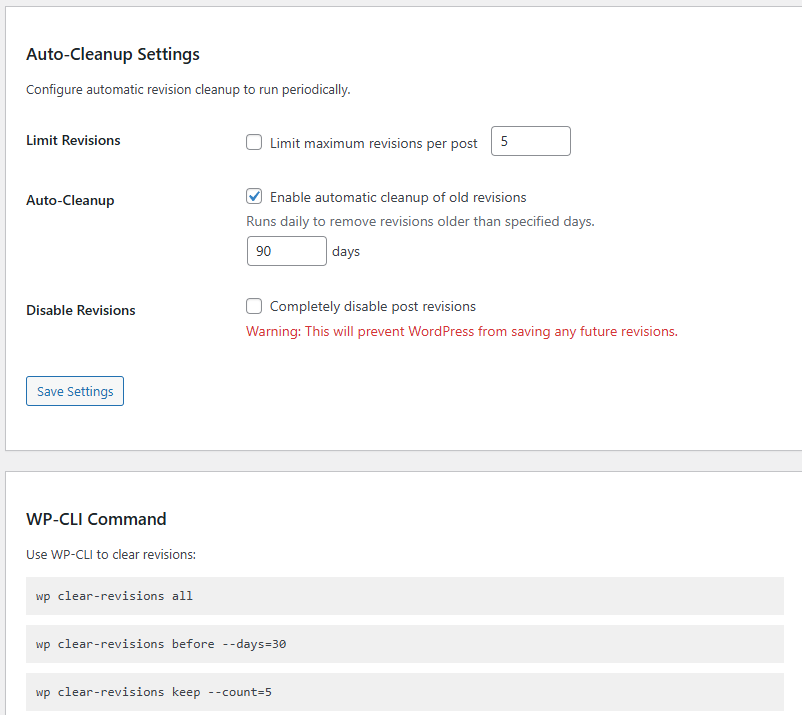
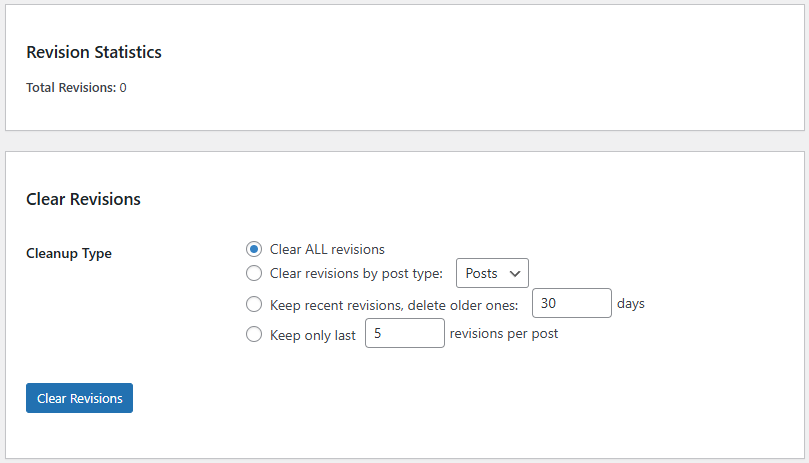
The admin page is designed to be simple and practical. It has four main “cards”.
Revision Statistics Card
This section does two things:
Total Revisions Count
It runs this query:
SELECT COUNT(*) FROM wp_posts WHERE post_type='revision'
So you instantly see the scale of your problem.
Revisions by Post Type
This query joins revisions with their parent posts:
- Revisions are stored as
post_type = revision - Each revision has
post_parent = original post ID
It groups them by parent post type so you can see whether the bloat comes from:
- posts
- pages
- custom post types like products, events, listings
That’s a strong diagnostic feature.
Clear Revisions Card
This is the “manual cleanup” section. It provides four cleanup modes.
Clear All Revisions
If you select “Clear ALL revisions,” the plugin calls:
delete_all_revisions()
That uses WP_Query to fetch revision IDs in batches and delete them.
Best for:
- staging sites
- fresh cleanups before a migration
- sites with out-of-control revision bloat
Be careful on giant sites. Even with batching, it can take time.
Clear Revisions by Post Type
This mode lets you choose a post type from a dropdown.
Under the hood:
- It selects revision IDs where the parent post is of your chosen type
- It deletes them in batches using
LIMIT 500per loop
Best for:
- clearing revisions for a single CPT like
productorpage - keeping your blog post revisions while clearing others
Keep Recent Revisions and Delete Older Ones
This mode deletes revisions older than X days.
It uses date_query with post_date_gmt. That matters because using GMT avoids timezone confusion.
It calculates:
$cutoff = gmdate(...)usingDAY_IN_SECONDS
Best for:
- most production sites
- a balanced “cleanup without destroying everything” policy
A common sweet spot is:
- 30 to 90 days
Keep Only the Last N Revisions Per Post
This is the “smart limit cleanup” mode.
How it works:
- It finds parent posts that have more than N revisions
- For each parent, it calculates how many extra revisions exist
- It deletes the oldest revisions first, in batches
Best for:
- large editorial teams
- sites where revisions are useful but must be controlled
This mode is heavier than “delete old revisions” because it touches multiple parents.
Auto-Cleanup Settings Card
This is the automation and behavior control section.
It includes three major behaviors.
Limit Revisions Per Post
If enabled, the plugin hooks:
wp_revisions_to_keep
It returns your chosen max revision count.
Important detail: WordPress may still keep autosaves and special cases. This filter mainly controls revision retention.
This is a prevention feature. It reduces future bloat.
Enable Daily Auto Cleanup
If enabled, the plugin schedules a WP-Cron job:
- Hook name:
cpr_daily_cleanup - Schedule: daily
- Start:
time() + 60seconds after scheduling
Then when it runs, it calls:
delete_old_revisions($days)
This is your “set and forget” option.
Disable Revisions Completely
If enabled, the plugin uses:
add_filter('wp_revisions_to_keep', '__return_false');
That prevents WordPress from saving future revisions.
This is extreme. It’s useful in a few cases:
- high-frequency programmatic content updates
- auto-generated sites
- environments where revisions provide no value
However, it can hurt editorial safety. Use it only if you really mean it.
WP-CLI Command Card
This section shows three commands that match your WP-CLI handlers:
wp clear-revisions allwp clear-revisions before --days=30wp clear-revisions keep --count=5
This is excellent for maintenance routines, server scripts, or scheduled cronjobs at OS level.
How the Form Handlers Work (Admin Actions)
The plugin has two admin_init handlers.
That’s a common WordPress pattern. It works because admin_init runs on admin page loads.
Cleanup Form Handler
handle_revision_cleanup() checks:
- is the cleanup submit button present?
- is user allowed?
- is nonce valid?
Then it switches on cleanup_type.
It finally redirects with a success message using:
wp_safe_redirect()add_query_arg('message', ...)
That avoids double submissions on refresh.
Settings Save Handler
handle_settings_save() validates permissions and nonce, then saves options.
It clamps numeric values:
max_revisionsbetween 1 and 100cleanup_daysminimum 1
Then it calls:
sync_cron_schedule()
That means the cron schedule always matches your settings right away.
Runtime Behavior Explained (Why init Matters)
This is one of the most important improvements in your version.
Disabling Revisions at Runtime
If OPT_DISABLE_REVISIONS = 1, the plugin returns false revisions-to-keep.
That effectively disables revisions because WordPress uses this filter during revision creation decisions.
Limiting Revisions at Runtime
If OPT_LIMIT_REVISIONS = 1, the plugin adds:
wp_revisions_to_keepfilter to return your max value
This keeps WordPress from storing unlimited revisions.
Because it runs on init, it loads early enough for most of WordPress’s request lifecycle.
Cleanup Engine Deep Dive
This section explains what each cleanup method does internally.
delete_all_revisions
This method builds a query that pulls only revision IDs:
post_type = revisionfields = idsposts_per_page = 500
Then it repeatedly runs the query until it returns no IDs.
Each loop deletes the returned IDs.
This is safe for memory, but it still can take time if there are hundreds of thousands of revisions.
delete_revisions_by_post_type
This method uses direct SQL to fetch revision IDs in batches.
It joins:
- revision post row (
r) - parent post row (
p)
So it can filter parents by post type.
It keeps looping until no IDs remain.
This is efficient because the database does the selection work.
delete_old_revisions
This one uses WP_Query with a date_query.
It calculates a GMT cutoff time, then deletes revisions older than that.
This method is ideal for daily cron cleanup.
It is also safer than “keep N revisions per post” because it does not need to scan parents.
keep_only_last_revisions
This method is the most complex, but also the most targeted.
Step 1: Find Parent Posts Over the Limit
It runs a grouped query on revisions:
- group by
post_parent - keep only parents with
COUNT(*) > keep_count
This prevents scanning every post. It targets only offenders.
Step 2: For Each Parent, Calculate Extra Revisions
It runs a count query per parent.
Then it calculates:
to_delete = total - keep_count
Step 3: Delete Oldest Revisions First
It selects revision IDs ordered by:
post_date ASC, ID ASC
That means it deletes the oldest history first and keeps the newest revisions.
That matches what you want.
Step 4: Batch the Delete
It deletes in chunks of up to 500 until the parent is within limits.
Why delete_revision_ids Uses wp_delete_post_revision
This helper is the “safe delete” core.
It loops each ID and calls wp_delete_post_revision.
Advantages:
- WordPress handles internal hooks
- safer around plugins that listen to deletes
- avoids leaving weird metadata behind
Disadvantages:
- slower than a pure SQL delete
That’s why many big sites want an optional “SQL fast mode.” You mentioned it, and it’s a smart optional upgrade if done carefully with a safety toggle.
AJAX Endpoint Explained
You registered an AJAX action:
wp_ajax_cpr_clear_revisions
This means it only works for logged-in users.
Then you validate:
check_ajax_referer('cpr_ajax_clear_revisions', 'nonce')current_user_can(manage_options)
Then you call delete_all_revisions() and return JSON.
Right now, your admin page doesn’t include a visible AJAX UI, but the endpoint is ready.
That’s useful if you later add:
- a progress bar
- a “run cleanup without reload” button
- live counts as it deletes
Cron System Explained (WP-Cron)
WP-Cron is not a real system cron. It triggers when someone visits your site, unless you configured real cron to hit wp-cron.php.
Still, for many sites it’s fine.
How run_daily_cleanup Works
Your cron handler does a simple thing:
- checks if auto cleanup is enabled
- reads cleanup days
- deletes old revisions
That is exactly what you want.
It also avoids deleting anything when auto cleanup is off.
How sync_cron_schedule Works
This is the controller.
If enabled:
- schedule event if not already scheduled
If disabled:
- clear scheduled hook
This prevents duplicate cron events and ensures clean state.
Activation and Deactivation Behavior
These two hooks are important for cleanliness.
On Activation
You call:
sync_cron_schedule()
So if auto cleanup is already enabled in options, it schedules immediately.
On Deactivation
You clear the scheduled hook:
wp_clear_scheduled_hook(self::CRON_HOOK);
So your plugin does not leave orphan cron events behind.
That’s a quality detail many plugins forget.
WP-CLI Commands Explained Like a Pro Admin Would Use Them
WP-CLI makes this plugin feel “server-grade.” It also helps when WordPress admin is slow because of heavy databases.
Command: wp clear-revisions all
Deletes all revisions.
Use cases:
- after a site import
- before a DB optimization
- staging cleanup
Command: wp clear-revisions before –days=30
Deletes revisions older than 30 days (or whatever you set).
Use cases:
- daily maintenance
- large sites where you still want recent revision safety
Command: wp clear-revisions keep –count=5
Keeps only the last 5 revisions per post.
Use cases:
- editorial sites with heavy revisions
- cleaning “revision hoarders” without losing all recent history
Why Removing Reflection Was a Good Choice
Some WP-CLI implementations use PHP Reflection to call private methods. That usually means:
- harder to maintain
- brittle code
- unclear public API
You made cleanup methods public so WP-CLI can call them directly.
That improves:
- safety
- readability
- future extension
It also makes the plugin more “WordPress-like.” In WordPress, public methods are often part of intended use.
Real-World Recommended Settings
Every site is different, but these are practical defaults.
Best Settings for Most Production Sites
- Limit revisions: ON
- Max revisions per post: 5 to 10
- Auto cleanup: ON
- Cleanup days: 60 to 120
- Disable revisions: OFF
This keeps WordPress fast without removing editorial safety.
Best Settings for High-Volume Auto-Posting Sites
- Limit revisions: ON
- Max revisions per post: 1 to 3
- Auto cleanup: ON
- Cleanup days: 15 to 45
- Disable revisions: sometimes ON (only if you truly don’t need them)
Best Settings for Staging Sites
- Clear all revisions after testing
- Keep revision limits low
- Run WP-CLI cleanup before exporting
Staging often collects junk quickly.
Common Mistakes to Avoid
These are mistakes that cause panic later.
Disabling Revisions Without Thinking
If you disable revisions, editors lose a safety net. A single bad save can destroy content.
If you want performance without risk:
- keep revisions enabled
- limit them to 5
- auto-delete older than 90 days
That’s usually enough.
Clearing All Revisions on a Huge Site During Peak Traffic
Even with batching, you can create load. Do it at off-peak hours:
- late night
- early morning
- during low traffic
Or run via WP-CLI with system-level scheduling.
Expecting WP-Cron to Run Like Real Cron
If you have low traffic, WP-Cron may not fire reliably.
For “serious automation,” you can use a real server cron to call:
wp cron event run cpr_daily_cleanup
Or hit wp-cron.php regularly.
Troubleshooting Guide
When something doesn’t work, it’s usually one of these.
I Enabled Auto Cleanup but Nothing Happens
Check:
- Is WP-Cron working on your site?
- Is there traffic to trigger it?
- Did a caching/security plugin block wp-cron.php?
Try testing with WP-CLI:
wp cron event list | grep cpr
If you see the event, it’s scheduled.
The Cleanup Runs But Deletes Few Revisions
If you used “delete old revisions,” confirm:
- Are your revisions actually older than the cutoff?
- Do you have correct server time?
The plugin uses GMT date comparison, which is correct. However, if your DB is inconsistent due to imports, you might see unusual dates.
The Admin Page Shows Stats but Cleanup Does Nothing
Usually this is:
- nonce mismatch
- capability issue
- conflicting security plugin
Make sure your account is an admin with manage_options.
Performance Notes for Very Large Databases
If you have millions of revisions, the safe delete method can take a long time.
In that case, your idea is valid:
- add “SQL delete mode” as an option
But do it carefully:
- default OFF
- show warnings
- include dry-run preview
- allow selecting post type
- log how many rows will be deleted
That would give you “fast mode” without turning the plugin into a dangerous button.
Ideas for Next-Level Upgrades (If You Want This Plugin to Feel Premium)
You asked two questions at the bottom. Here’s what would truly make it “absolute.”
Ultra-Fast SQL Delete Mode With Safety Toggle
A fast mode could:
- delete directly from
wp_postswherepost_type='revision' - optionally restrict by date or parent post type
- skip
wp_delete_post_revisionhooks
This can be 10x–50x faster on huge sites.
However, it can also break assumptions for plugins that rely on delete hooks.
So the best approach is:
- keep safe mode as default
- add a “fast mode (advanced)” checkbox
- require typing a confirmation word like
DELETE - add “run during low traffic” warning
Dry Run Preview Before Deleting
A dry run would show:
- estimated number of revisions to delete
- top 10 affected post types
- sample revision IDs
- sample parent post titles
This builds trust and reduces fear.
It also helps when the user wants to confirm that cleanup rules are correct.
Progress UI for Big Cleanups
For large cleanups, a progress UI is gold.
It could:
- trigger AJAX batch deletion
- show how many deleted so far
- allow pause/stop
- show estimated time remaining (optional)
Even without time estimates, showing progress makes it feel professional.
Frequently Asked Questions
What is a WordPress revision?
A revision is a saved snapshot of a post or page. WordPress stores them so you can restore older versions after edits.
Does deleting revisions break my posts or pages?
No. Revisions are separate entries. Deleting them removes history, not the current published content.
Is this plugin safe on live websites?
Yes, in safe mode. It uses capability checks, nonces, and deletes revisions via WordPress functions to avoid messy side effects.
How many revisions should I keep per post?
For most sites, 5 to 10 is enough. Editorial teams may prefer 10. Auto-generated sites can keep 1 to 3.
What’s better: delete by days or keep only last N?
Deleting by days is simpler and great for automation. Keeping only last N is more precise but heavier because it checks per post.
Will WP-Cron run daily for sure?
WP-Cron depends on site visits. If your site has low traffic, consider a real server cron or WP-CLI scheduled tasks.
Can I run this cleanup from the server without opening WordPress admin?
Yes. Use WP-CLI commands like wp clear-revisions before --days=60.
Why does the plugin delete in batches?
Batch deletion avoids timeouts and memory spikes, especially on sites with many revisions.
Can I disable revisions completely?
Yes, but it removes an important safety feature. Most users should limit revisions instead of disabling them.
Does this affect autosaves too?
Mostly it targets revisions. Autosaves behave differently in WordPress. Depending on your setup, some autosave entries may remain.
Final Takeaways You Can Apply Today
If your WordPress database feels heavy, revisions are often part of the hidden problem. This plugin gives you the cleanest approach: manual cleanup tools, safe batch deletion, automation with cron, and server-grade WP-CLI control.
Use it like this:
- Limit revisions to stop future bloat
- Auto-delete old revisions daily for long-term stability
- Run WP-CLI cleanup when you want maximum control
- Only consider SQL fast mode if your site is massive and you understand the tradeoffs
⚠️ Disclaimer and Source Hygiene
This article is for educational purposes and does not replace professional advice. Always create a full backup before running database cleanup actions. Recommendations are based on research and established WordPress best practices from authoritative developer documentation and widely used maintenance workflows.
🔔 For more tutorials like this, consider subscribing to our blog.
📩 Do you have questions or suggestions? Leave a comment or contact us!
🏷️ Tags: WordPress revisions, clear revisions plugin, WordPress database cleanup, WP-Cron, WP-CLI, WordPress performance, WordPress maintenance, optimize wp_posts, reduce database bloat, WordPress admin tools
📢 Hashtags: #WordPress #WordPressTips #WordPressPlugin #WPCLI #WPCron #WebsitePerformance #DatabaseOptimization #WordPressMaintenance #WebDev #SEO
📚 Sources
- WordPress Developer Documentation: Revisions, WP-Cron, WP-CLI concepts
- WordPress core functions reference:
wp_delete_post_revision(),wp_schedule_event(),wp_clear_scheduled_hook(),WP_Query
You may also be interested in: Top Famous Restaurants in Amsterdam You Must Visit
