


⏲️ Estimated reading time: 7 min
Table of Contents
Learn how to build an automatic WordPress hit counter plugin that tracks real visitors, excludes bots and admin traffic, and supports per-post views. This step-by-step guide helps you create a reliable, lightweight, and fully customizable traffic tracking solution.
Automatic Site & Post Hits. WordPress Hit Counters
Tracking website traffic is essential for understanding your audience. Many beginners start with manual counters, but these quickly become outdated. An automatic hit counter plugin offers a smarter, scalable solution.
In this guide, you will learn how to build a fully functional WordPress hit counter plugin. It will count real visitors, ignore bots, skip admin views, and track per-post visits. You will also discover how to display counts using shortcodes and add dashboard widgets.
Why You Need an Automatic Hit Counter
Manual counters require constant updates. They also fail to filter invalid traffic. An automatic system solves these problems efficiently.
Key Benefits of Automatic Tracking
- Tracks real user visits in real time
- Ignores bots and crawlers
- Excludes admin and logged-in users
- Supports per-post and site-wide tracking
- Works silently in the background
Moreover, automatic tracking improves accuracy and saves time.
Understanding How Hit Counters Work
A hit counter records each time a page loads. However, not all hits are equal. Bots, refreshes, and admin visits can distort data.
What Should Be Counted
- Unique visitors
- Real page views
- Organic user interactions
What Should Be Ignored
- Search engine bots
- Logged-in administrators
- Repeated rapid refreshes
By filtering these elements, your plugin will deliver meaningful insights.
Planning Your WordPress Plugin
Before coding, define the structure of your plugin.
Core Features to Include
- Automatic hit tracking
- Per-post view count
- Bot filtering system
- Admin exclusion logic
- Shortcode display
- Dashboard widget
Planning ahead ensures clean and scalable code.
Setting Up Your Plugin Folder
Start by creating a plugin directory inside your WordPress installation.
Steps to Create the Plugin
- Navigate to
/wp-content/plugins/ - Create a new folder:
hit-counter-plugin - Add a PHP file:
hit-counter-plugin.php
Basic Plugin Header
<?php
/*
Plugin Name: Blog Hits Counter
Description: Automatic site and post hit counter plugin.
Version: 1.0
Author: Flo
*/
This header allows WordPress to recognize your plugin.
Creating the Database Structure
You need a place to store hit data. WordPress offers multiple options.
Using Post Meta for Per-Post Views
Post meta is simple and effective.
function bhc_increment_post_views($post_id) {
    $views = get_post_meta($post_id, 'bhc_views', true);
    $views = $views ? $views + 1 : 1;
    update_post_meta($post_id, 'bhc_views', $views);
}
This function increases the view count for each post.
Tracking Page Views Automatically
Now, hook your function into WordPress.
function bhc_track_views() {
    if (is_single()) {
        global $post;
        bhc_increment_post_views($post->ID);
    }
}
add_action('wp_head', 'bhc_track_views');
This ensures views are counted when a post loads.
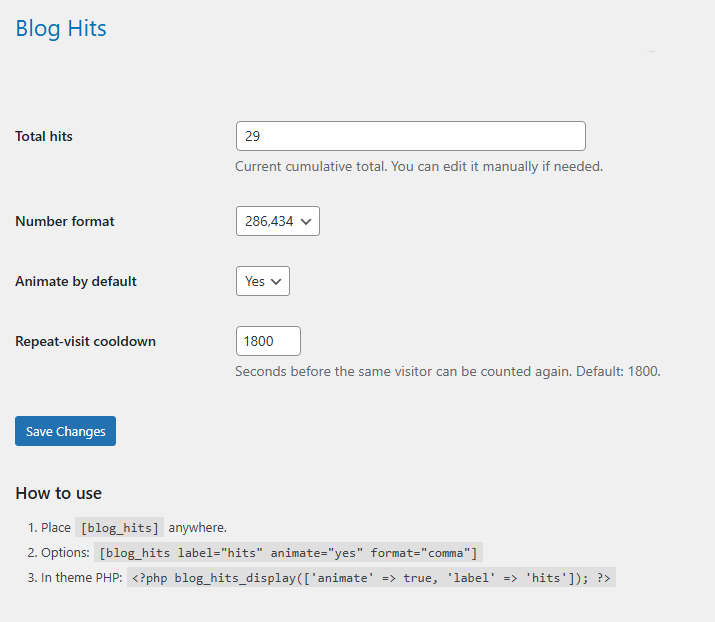
Excluding Admin and Logged-In Users
Admin visits should not count as real traffic.
function bhc_is_admin_user() {
    return current_user_can('manage_options');
}
Modify Tracking Logic
if (!bhc_is_admin_user()) {
    bhc_increment_post_views($post->ID);
}
This prevents inflated statistics.
Filtering Bots and Crawlers
Bots can significantly skew data.
Basic Bot Detection
function bhc_is_bot() {
    $user_agent = $_SERVER['HTTP_USER_AGENT'];
    $bots = ['bot', 'crawl', 'spider', 'slurp'];

    foreach ($bots as $bot) {
        if (stripos($user_agent, $bot) !== false) {
            return true;
        }
    }
    return false;
}
Apply Bot Filter
if (!bhc_is_bot() && !bhc_is_admin_user()) {
    bhc_increment_post_views($post->ID);
}
This ensures only human visitors are counted.
Adding Site-Wide Hit Counter
Tracking total visits across the entire site is useful.
function bhc_increment_site_hits() {
    $hits = get_option('bhc_site_hits', 0);
    update_option('bhc_site_hits', $hits + 1);
}
Hook it into page loads:
add_action('wp_head', 'bhc_increment_site_hits');
Displaying Hit Counts with Shortcodes
Shortcodes make your plugin user-friendly.
Post Views Shortcode
function bhc_post_views_shortcode() {
    global $post;
    return get_post_meta($post->ID, 'bhc_views', true);
}
add_shortcode('post_views', 'bhc_post_views_shortcode');
Site Views Shortcode
function bhc_site_views_shortcode() {
    return get_option('bhc_site_hits', 0);
}
add_shortcode('site_views', 'bhc_site_views_shortcode');
Creating a Dashboard Widget
Dashboard widgets provide quick insights.
function bhc_dashboard_widget() {
    wp_add_dashboard_widget(
        'bhc_dashboard_widget',
        'Site Hits Overview',
        'bhc_dashboard_widget_display'
    );
}
add_action('wp_dashboard_setup', 'bhc_dashboard_widget');
Display Function
function bhc_dashboard_widget_display() {
    echo '<p>Total Hits: ' . get_option('bhc_site_hits', 0) . '</p>';
}
Improving Accuracy with Cookies
Prevent duplicate counts from rapid refreshes.
function bhc_set_cookie() {
    if (!isset($_COOKIE['bhc_visited'])) {
        setcookie('bhc_visited', '1', time() + 3600, COOKIEPATH, COOKIE_DOMAIN);
        return true;
    }
    return false;
}
Use this before counting hits.
Enhancing Security with Nonces
Security is crucial in plugin development.
wp_nonce_field('bhc_nonce_action', 'bhc_nonce_field');
Nonces protect against unauthorized requests.
Optimizing Performance
Efficient code improves user experience.
Best Practices
- Avoid heavy database queries
- Cache frequently accessed data
- Use WordPress hooks properly
Performance optimization ensures scalability.
Customizing Display Styles
You can style hit counters using CSS.
.bhc-counter {
    font-size: 18px;
    color: #333;
}
This enhances visual appeal.
Testing Your Plugin
Testing ensures reliability.
Checklist
- Verify counts increase correctly
- Confirm bots are excluded
- Test with multiple browsers
- Check shortcode output
Thorough testing prevents future issues.
Common Mistakes to Avoid
Avoid these pitfalls:
- Counting admin visits
- Ignoring bot traffic
- Not using caching
- Overcomplicating code
Keeping things simple improves maintainability.
Advanced Features to Consider
Once your plugin works, you can expand it.
Ideas for Enhancement
- Unique visitor tracking
- Daily and monthly stats
- Graphical analytics dashboard
- REST API integration
These features add significant value.
Real-World Use Cases
A hit counter plugin is useful in many scenarios.
Examples
- Bloggers tracking post popularity
- Businesses analyzing engagement
- Developers monitoring traffic trends
It provides actionable insights.
Frequently Asked Questions
What is a WordPress hit counter plugin?
A hit counter plugin tracks the number of visits to your website or specific posts automatically.
Does this plugin track unique visitors?
Basic versions track views. You can extend it to track unique visitors using cookies or sessions.
How do I exclude bots from tracking?
You can filter bots using user-agent detection in your plugin code.
Can I track views for each post separately?
Yes, using post meta allows per-post tracking easily.
Will this plugin slow down my site?
Not if optimized correctly. Use caching and efficient queries.
Can I display views anywhere on my site?
Yes, shortcodes allow flexible placement.
Is this plugin secure?
Using WordPress nonces and best practices ensures good security.
Do I need coding skills to use it?
Basic PHP knowledge helps, but you can follow this guide step by step.
Can I extend this plugin later?
Absolutely. WordPress plugins are highly customizable.
Is it better than third-party analytics tools?
It complements them by providing simple, internal tracking.
Thoughts That Truly Matter
Building your own WordPress hit counter plugin gives you full control over your data. You avoid third-party dependencies and gain deeper insights into user behavior. With the right structure, filters, and optimizations, your plugin becomes a powerful tool for growth and analysis.
⚠️ Disclaimer and Source Hygiene
This article is for educational purposes only. Always test code in a staging environment before using it on a live site. The information provided is based on best practices and research from reputable WordPress development resources.
🔔 For more tutorials like this, consider subscribing to our blog.
📩 Do you have questions or suggestions? Leave a comment or contact us!
🏷️ Tags: WordPress plugin, hit counter, WordPress development, post views, traffic tracking, WordPress shortcode, dashboard widget, plugin tutorial, WordPress coding, site analytics
📢 Hashtags: #WordpressPlugin #HitCounterPlugin #WordpressViewsCounter #AutomaticHitCounter #PerPostViewsWordpress #WordpressShortcodePlugin #WordpressAdminNonce #CustomWordpressPlugin #WordpressDashboardWidget #WordpressDevelopmentTutorial
📚 Sources and References
- WordPress Developer Documentation
- PHP Official Documentation
- OWASP Security Guidelines
- Google Web Performance Best Practices
🕊️ Secondary Sources and Testimonials
Developers across the WordPress community recommend lightweight custom plugins for better control and performance. Many professionals prefer internal tracking systems for privacy and simplicity.
