


⏲️ Estimated reading time: 23 min
Table of Contents
What have you been working on?
I worked like crazy all day to get this post ready, and just when I was about to publish it, the daily prompt showed up!
Got hundreds of WordPress tags without descriptions? Fix them in minutes safely, at scale, and without plugins that bloat your site. This guide shows a one-click custom plugin, a WP-CLI method, and a temporary functions.php snippet. SEO-friendly. AdSense-safe. Future-proof.
Why Empty Tag Pages Hurt SEO
Tags help users and search engines navigate related content. Yet empty descriptions weaken those pages. Google may view them as thin content. That lowers quality signals. Consequently, crawl budget gets wasted, and rankings can drop.
The fix is simple. Add concise, useful descriptions to every tag. Do it once. Keep it automated. Protect performance and AdSense compliance.
What a Good Tag Description Looks Like
Aim for clear and helpful copy. Explain what the reader will find under that tag. Keep it short. Use natural language. Avoid keyword stuffing. Here is a simple pattern you can adapt:
“Explore posts about {Tag Name} on HelpZone practical tips, step-by-step guides, and solutions that save you time.”
This line gives context, intent, and value. It also reads well on archive pages and in SERP snippets.
Your Three Best Options (From Easiest to Most Advanced)
Option 1 A Minimal One-Time Plugin (Recommended)
Use a tiny custom plugin that runs once. It fills descriptions for all tags that are currently empty. After it completes, deactivate and delete it. The descriptions remain in the database.
Why this works well
- Zero dependency bloat.
- Executes on demand.
- Leaves no footprint after cleanup.
- Scales to hundreds or thousands of tags.
Code hz-auto-tag-descriptions.php (drop-in plugin):
<?php
/**
 * Plugin Name: Auto Tag Descriptions – HelpZone (Reversible)
 * Description: Batch-fills empty tag descriptions with customizable templates. Includes CSV backup before changes.
 * Version: 1.2.0
 * Author: Tokyo Blade
 * Text Domain: hz-auto-tags
 */

if ( ! defined( 'ABSPATH' ) ) exit;

class HZ_Auto_Tag_Descriptions {

    private static $instance = null;

    private $option_key  = 'hz_tag_desc_batch_offset';
    private $batch_size  = 50; // Prevent timeouts on large sites
    private $page_slug   = 'hz-tag-filler';
    private $nonce_ajax  = 'hz_tag_filler_nonce';

    public static function init() {
        if ( null === self::$instance ) {
            self::$instance = new self();
        }
        return self::$instance;
    }

    private function __construct() {
        add_action( 'admin_menu', [ $this, 'add_admin_page' ] );
        add_action( 'admin_enqueue_scripts', [ $this, 'enqueue_assets' ] );

        add_action( 'wp_ajax_hz_process_tag_batch', [ $this, 'ajax_process_batch' ] );

        // IMPORTANT: handle export/reset/save BEFORE any HTML is printed
        add_action( 'admin_init', [ $this, 'handle_admin_actions' ] );

        // Settings API for template
        add_action( 'admin_init', [ $this, 'register_settings' ] );
    }

    public function register_settings() {
        register_setting(
            'hz_tag_filler_settings',
            'hz_tag_template',
            [
                'type'              => 'string',
                'sanitize_callback' => [ $this, 'sanitize_template' ],
                'default'           => 'Explore posts about %s on HelpZone - practical tips, step-by-step guides, tutorials, and updates.',
            ]
        );
    }

    public function sanitize_template( $value ) {
        $value = wp_strip_all_tags( (string) $value );
        $value = trim( $value );
        // Keep it reasonable; you can adjust
        if ( strlen( $value ) > 300 ) {
            $value = substr( $value, 0, 300 );
        }
        // Ensure placeholder exists; if not, append it safely
        if ( false === strpos( $value, '%s' ) ) {
            $value .= ' %s';
        }
        return $value;
    }

    public function add_admin_page() {
        add_management_page(
            __( 'Tag Description Filler', 'hz-auto-tags' ),
            __( 'Tag Descriptions', 'hz-auto-tags' ),
            'manage_options',
            $this->page_slug,
            [ $this, 'render_admin_page' ]
        );
    }

    public function enqueue_assets( $hook ) {
        if ( 'tools_page_' . $this->page_slug !== $hook ) return;

        wp_enqueue_script(
            'hz-tag-filler',
            plugin_dir_url( __FILE__ ) . 'assets/filler.js',
            [ 'jquery' ],
            '1.2.0',
            true
        );

        wp_localize_script( 'hz-tag-filler', 'hzTagFiller', [
            'ajaxUrl' => admin_url( 'admin-ajax.php' ),
            'nonce'   => wp_create_nonce( $this->nonce_ajax ),
            'strings' => [
                'processing' => __( 'Processing batch...', 'hz-auto-tags' ),
                'done'       => __( 'Complete! Reloading...', 'hz-auto-tags' ),
                'error'      => __( 'Error occurred.', 'hz-auto-tags' ),
            ],
        ] );
    }

    /**
     * Handle CSV export and reset actions + template save redirect
     */
    public function handle_admin_actions() {
        if ( ! is_admin() ) return;
        if ( ! current_user_can( 'manage_options' ) ) return;

        // Only on our page
        if ( empty( $_GET['page'] ) || $this->page_slug !== sanitize_key( $_GET['page'] ) ) {
            return;
        }

        $action = isset( $_GET['action'] ) ? sanitize_key( $_GET['action'] ) : '';

        // Export CSV
        if ( 'export' === $action ) {
            $nonce = isset( $_GET['_wpnonce'] ) ? $_GET['_wpnonce'] : '';
            if ( ! wp_verify_nonce( $nonce, 'hz_export_csv' ) ) {
                wp_die( esc_html__( 'Invalid nonce.', 'hz-auto-tags' ) );
            }
            $this->export_csv();
        }

        // Reset progress
        if ( 'reset' === $action ) {
            $nonce = isset( $_GET['_wpnonce'] ) ? $_GET['_wpnonce'] : '';
            if ( ! wp_verify_nonce( $nonce, 'hz_reset' ) ) {
                wp_die( esc_html__( 'Invalid nonce.', 'hz-auto-tags' ) );
            }
            delete_option( $this->option_key );
            delete_option( 'hz_tags_processed_total' );

            wp_safe_redirect( admin_url( 'tools.php?page=' . $this->page_slug . '&reset=1' ) );
            exit;
        }

        // After saving via Settings API, redirect to avoid resubmits
        if ( isset( $_GET['settings-updated'] ) && 'true' === $_GET['settings-updated'] ) {
            wp_safe_redirect( admin_url( 'tools.php?page=' . $this->page_slug . '&saved=1' ) );
            exit;
        }
    }

    public function render_admin_page() {
        if ( ! current_user_can( 'manage_options' ) ) return;

        $template  = get_option( 'hz_tag_template', 'Explore posts about %s on HelpZone - practical tips, step-by-step guides, tutorials, and updates.' );
        $processed = (int) get_option( 'hz_tags_processed_total', 0 );

        ?>
        <div class="wrap">
            <h1><?php esc_html_e( 'Auto Tag Description Filler', 'hz-auto-tags' ); ?></h1>

            <?php if ( isset( $_GET['saved'] ) ) : ?>
                <div class="notice notice-success"><p><?php esc_html_e( 'Template saved.', 'hz-auto-tags' ); ?></p></div>
            <?php endif; ?>

            <?php if ( isset( $_GET['reset'] ) ) : ?>
                <div class="notice notice-info"><p><?php esc_html_e( 'Progress reset. You can run again.', 'hz-auto-tags' ); ?></p></div>
            <?php endif; ?>

            <div class="card">
                <h2><?php esc_html_e( 'Settings', 'hz-auto-tags' ); ?></h2>
                <p><?php esc_html_e( 'Use %s as placeholder for the tag name.', 'hz-auto-tags' ); ?></p>

                <form method="post" action="options.php">
                    <?php
                        settings_fields( 'hz_tag_filler_settings' );
                        // We registered hz_tag_template in that group, so options.php will save it.
                    ?>
                    <table class="form-table">
                        <tr>
                            <th><label for="hz_template"><?php esc_html_e( 'Description Template', 'hz-auto-tags' ); ?></label></th>
                            <td>
                                <input type="text"
                                       name="hz_tag_template"
                                       id="hz_template"
                                       value="<?php echo esc_attr( $template ); ?>"
                                       class="regular-text"
                                       style="width: 100%; max-width: 600px;">
                            </td>
                        </tr>
                    </table>
                    <?php submit_button( __( 'Save Template', 'hz-auto-tags' ) ); ?>
                </form>
            </div>

            <div class="card" style="margin-top: 20px;">
                <h2><?php esc_html_e( 'Actions', 'hz-auto-tags' ); ?></h2>

                <p>
                    <a href="<?php echo esc_url( wp_nonce_url( admin_url( 'tools.php?page=' . $this->page_slug . '&action=export' ), 'hz_export_csv' ) ); ?>"
                       class="button button-secondary">
                        <?php esc_html_e( '1. Export Current Tags (CSV Backup)', 'hz-auto-tags' ); ?>
                    </a>
                    <span class="description" style="margin-left: 10px;">
                        <?php esc_html_e( 'Always backup before running!', 'hz-auto-tags' ); ?>
                    </span>
                </p>

                <p id="hz-status" style="display:none;color:#0073aa;font-weight:bold;"></p>
                <div id="hz-progress" style="display:none;margin:10px 0;">
                    <div class="hz-progress-bar" style="background:#f0f0f0;border-radius:3px;height:20px;width:100%;max-width:400px;">
                        <div id="hz-progress-fill" style="background:#2271b1;height:100%;width:0%;transition:width 0.3s;"></div>
                    </div>
                    <p id="hz-progress-text" style="margin-top:5px;color:#666;"></p>
                </div>

                <button type="button"
                        id="hz-start-process"
                        class="button button-primary"
                        <?php echo $processed > 0 ? 'disabled' : ''; ?>>
                    <?php esc_html_e( '2. Fill Empty Descriptions', 'hz-auto-tags' ); ?>
                </button>

                <?php if ( $processed > 0 ) : ?>
                    <div class="notice notice-warning inline" style="margin-top: 10px;">
                        <p>
                            <?php
                            printf(
                                esc_html__( 'Already processed %d tags.', 'hz-auto-tags' ),
                                $processed
                            );
                            echo ' ';
                            echo '<a href="' . esc_url( wp_nonce_url( admin_url( 'tools.php?page=' . $this->page_slug . '&action=reset' ), 'hz_reset' ) ) . '">'
                                . esc_html__( 'Reset to run again', 'hz-auto-tags' )
                                . '</a>';
                            ?>
                        </p>
                    </div>
                <?php endif; ?>
            </div>

            <div class="card" style="margin-top: 20px; background: #f6f7f7;">
                <h3><?php esc_html_e( 'What This Does', 'hz-auto-tags' ); ?></h3>
                <ul style="list-style: disc; margin-left: 20px;">
                    <li><?php esc_html_e( 'Processes tags in batches of 50 to avoid timeouts', 'hz-auto-tags' ); ?></li>
                    <li><?php esc_html_e( 'Only updates tags with truly empty descriptions', 'hz-auto-tags' ); ?></li>
                    <li><?php esc_html_e( 'Uses ucwords() to capitalize tag names properly', 'hz-auto-tags' ); ?></li>
                    <li><?php esc_html_e( 'Creates reversible CSV backup before changes', 'hz-auto-tags' ); ?></li>
                </ul>
            </div>
        </div>
        <?php
    }

    private function export_csv() {
        // No output before headers, because this runs on admin_init now.
        header( 'Content-Type: text/csv; charset=utf-8' );
        header( 'Content-Disposition: attachment; filename=helpzone-tags-backup-' . gmdate( 'Y-m-d' ) . '.csv' );

        $output = fopen( 'php://output', 'w' );
        fputcsv( $output, [ 'term_id', 'name', 'slug', 'description', 'count' ] );

        $tags = get_terms( [
            'taxonomy'   => 'post_tag',
            'hide_empty' => false,
            'number'     => 0,
        ] );

        if ( ! is_wp_error( $tags ) ) {
            foreach ( $tags as $tag ) {
                fputcsv( $output, [
                    (int) $tag->term_id,
                    (string) $tag->name,
                    (string) $tag->slug,
                    (string) $tag->description,
                    (int) $tag->count,
                ] );
            }
        }

        fclose( $output );
        exit;
    }

    public function ajax_process_batch() {
        check_ajax_referer( $this->nonce_ajax, 'nonce' );

        if ( ! current_user_can( 'manage_options' ) ) {
            wp_send_json_error( [ 'message' => 'Unauthorized' ], 403 );
        }

        $offset         = (int) get_option( $this->option_key, 0 );
        $template       = get_option( 'hz_tag_template', 'Explore posts about %s on HelpZone - practical tips, step-by-step guides, tutorials, and updates.' );
        $total_processed = (int) get_option( 'hz_tags_processed_total', 0 );

        $tags = get_terms( [
            'taxonomy'   => 'post_tag',
            'hide_empty' => false,
            'number'     => (int) $this->batch_size,
            'offset'     => $offset,
            'fields'     => 'all',
        ] );

        if ( is_wp_error( $tags ) || empty( $tags ) ) {
            update_option( 'hz_tags_processed_total', $total_processed );
            wp_send_json_success( [ 'done' => true, 'total' => $total_processed ] );
        }

        $processed = 0;

        foreach ( $tags as $tag ) {
            $desc = trim( (string) $tag->description );

            if ( $desc !== '' ) {
                continue;
            }

            $name = sanitize_text_field( (string) $tag->name );
            if ( $name === '' ) {
                continue;
            }

            $final_desc = sprintf( $template, ucwords( strtolower( $name ) ) );

            $result = wp_update_term( (int) $tag->term_id, 'post_tag', [
                'description' => $final_desc,
            ] );

            if ( ! is_wp_error( $result ) ) {
                $processed++;
                $total_processed++;
            }
        }

        update_option( $this->option_key, $offset + $this->batch_size );
        update_option( 'hz_tags_processed_total', $total_processed );

        wp_send_json_success( [
            'done'      => false,
            'processed' => $processed,
            'next'      => $offset + $this->batch_size,
            'total'     => $total_processed,
        ] );
    }
}

HZ_Auto_Tag_Descriptions::init();
Code filler.js (drop-in plugin):
jQuery(function ($) {
  const $btn = $("#hz-start-process");
  const $status = $("#hz-status");
  const $progress = $("#hz-progress");
  const $fill = $("#hz-progress-fill");
  const $text = $("#hz-progress-text");

  // Tuning
  const DELAY_MS = 150;          // small throttle between batches
  const MAX_RETRIES = 5;         // retry transient failures
  const RETRY_BASE_MS = 600;     // exponential backoff base
  const MAX_EMPTY_BATCHES = 10;  // safety if many batches update 0

  let totalProcessed = 0;
  let retries = 0;
  let emptyBatches = 0;

  function setError(msg) {
    $status.text(msg || hzTagFiller.strings.error).css("color", "#dc3232").show();
    $btn.prop("disabled", false);
  }

  function updateUI(data) {
    const processedNow = data.processed || 0;
    totalProcessed += processedNow;

    if (processedNow === 0) emptyBatches++;
    else emptyBatches = 0;

    const next = typeof data.next !== "undefined" ? data.next : null;
    const total = typeof data.total !== "undefined" ? data.total : totalProcessed;

    // We show both updated count and where we are in batches (next offset)
    let line = "Updated descriptions: " + totalProcessed;
    if (next !== null) line += " | Next offset: " + next;
    line += " | Total updated: " + total;

    $text.text(line);
  }

  function processBatch() {
    $.ajax({
      url: hzTagFiller.ajaxUrl,
      type: "POST",
      dataType: "json",
      timeout: 30000,
      data: {
        action: "hz_process_tag_batch",
        nonce: hzTagFiller.nonce
      }
    })
      .done(function (response) {
        if (!response || !response.success || !response.data) {
          setError(hzTagFiller.strings.error);
          return;
        }

        retries = 0;
        updateUI(response.data);

        // Safety: if we keep getting 0 processed for too long, stop and show message
        if (emptyBatches >= MAX_EMPTY_BATCHES && !response.data.done) {
          setError("Stopped: too many batches with 0 updates. Check template/permissions or tag descriptions.");
          return;
        }

        if (response.data.done) {
          $fill.css("width", "100%");
          $status.text(hzTagFiller.strings.done).css("color", "#0073aa").show();
          setTimeout(function () {
            window.location.reload();
          }, 1200);
        } else {
          // Optional progress animation: advance a little each batch (visual feedback)
          // We don't know total tags here, so we just "pulse" forward up to 95%
          const currentWidth = parseFloat(($fill[0].style.width || "0").replace("%", "")) || 0;
          const nextWidth = Math.min(95, currentWidth + 3);
          $fill.css("width", nextWidth + "%");

          setTimeout(processBatch, DELAY_MS);
        }
      })
      .fail(function (xhr) {
        // Retry transient errors
        if (retries < MAX_RETRIES) {
          retries++;
          const wait = RETRY_BASE_MS * Math.pow(2, retries - 1);
          $status
            .text("Temporary error. Retrying (" + retries + "/" + MAX_RETRIES + ") in " + Math.round(wait / 1000) + "s…")
            .css("color", "#dba617")
            .show();
          setTimeout(processBatch, wait);
          return;
        }

        // Hard fail
        let msg = hzTagFiller.strings.error;
        if (xhr && xhr.status) msg += " (HTTP " + xhr.status + ")";
        setError(msg);
      });
  }

  $btn.on("click", function () {
    $btn.prop("disabled", true);
    $status.text(hzTagFiller.strings.processing).css("color", "#0073aa").show();
    $progress.show();
    $fill.css("width", "0%");
    $text.text("");

    totalProcessed = 0;
    retries = 0;
    emptyBatches = 0;

    processBatch();
  });
});
How to use it
- Create a folder named
hz-auto-tag-descriptionson your computer. - Create a file
hz-auto-tag-descriptions.phpand paste the code. - Create a folder named assets/ INSIDE ASSETS create
file filler.js - Zip the folder.
- Upload and activate it in Plugins → Add New → Upload Plugin.
- Visit any admin page once. The code runs in the background.
- Deactivate and delete the plugin.
Safety tips
- Export your terms first if you want a backup. Use a taxonomy export plugin or WP-CLI.
- The code touches only tag descriptions that are empty.
- Already filled descriptions remain unchanged.
Option 2 WP-CLI Script (Fast for Power Users)
If you have SSH access, WP-CLI is perfect. It is fast and precise. Use it when you manage many sites or very large taxonomies.
# List empty tag IDs, then fill each with a friendly template
wp term list post_tag --format=json
| jq -r '.[] | select(.description=="") | .term_id'
| while read id; do
  name=$(wp term get post_tag $id --field=name)
  desc="Explore posts about ${name} on HelpZone practical tips, step-by-step guides, tutorials, and updates."
  wp term update post_tag $id --description="$desc" >/dev/null
  echo "Updated tag #$id (${name})"
done
Notes
- Requires
jq. - Works only on empty descriptions.
- You can customize the template string.
- To roll back, import your earlier CSV export or re-run with a different template.
Option 3 Temporary Snippet in functions.php
You can also paste a small snippet into your child theme’s functions.php, load the site once, and remove it. This avoids installing anything new. However, a one-time plugin is neater and safer.
add_action('init', function () {
	if ( ! is_admin() || ! current_user_can('manage_options') ) return;

	if ( get_option('hz_tag_fill_once') ) return;

	$tags = get_terms(['taxonomy' => 'post_tag', 'hide_empty' => false]);
	foreach ($tags as $tag) {
		if (!trim($tag->description)) {
			$desc = 'Explore posts about ' . ucfirst($tag->name) . ' on HelpZone practical tips, step-by-step guides, tutorials, and updates.';
			wp_update_term($tag->term_id, 'post_tag', ['description' => $desc]);
		}
	}
	update_option('hz_tag_fill_once', 1);
});
Remember to delete the snippet after it runs.
Build a Better Description Template (Without Keyword Stuffing)
Use one of these micro-templates. Rotate them to keep things natural:
- “Explore posts about {Tag} on HelpZone tutorials, answers, and best practices.”
- “Your quick guide to {Tag}: tips, how-tos, and troubleshooting from HelpZone.”
- “Learn {Tag} the easy way. Bite-size guides, examples, and practical checklists.”
- “Everything about {Tag} for beginners and pros clear, useful, up-to-date.”
Keep it human. Keep it short. Avoid repetitive keywords. Do not promise what the tag does not deliver.
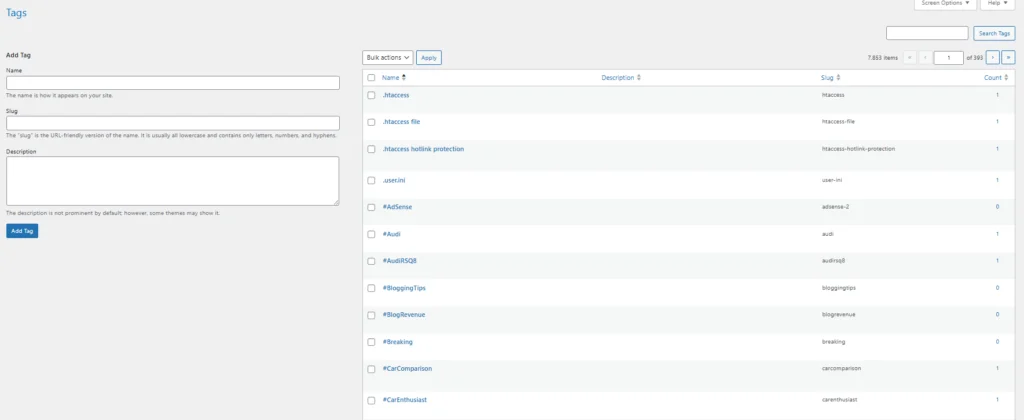
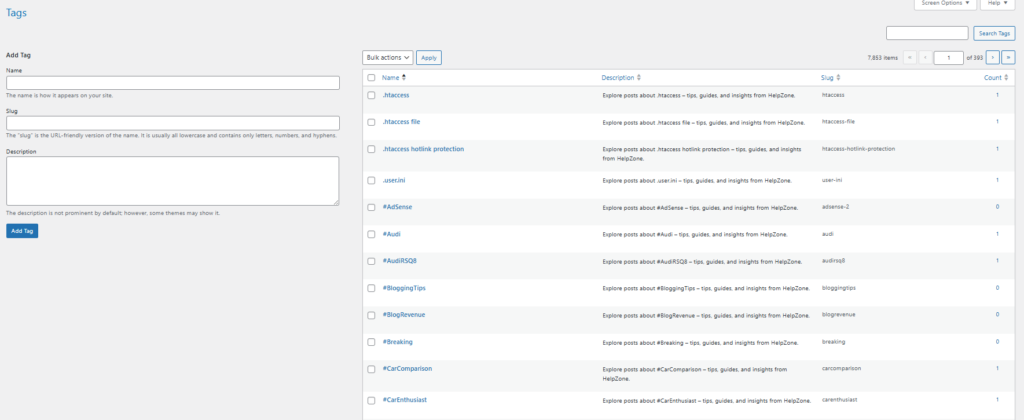
One click diference
AdSense-Friendly Copywriting Guidelines
Follow these rules to keep descriptions clean and compliant:
- Use neutral, helpful language.
- Avoid sensational claims.
- Avoid adult, violent, or shocking terms.
- Do not include prohibited words.
- Do not place sponsored or affiliate language inside tag descriptions.
- Keep it informative and non-deceptive.
These principles also help E-E-A-T. You signal usefulness, clarity, and consistency.
How to Audit Your Tags Before and After
Pre-fix audit
- Count tags with empty descriptions.
- Sample a few tag archives.
- Check indexing in Search Console.
- Note load times and template output.
Post-fix audit
- Re-crawl a few tag pages.
- Confirm the new description shows in your theme.
- Inspect HTML for duplicates or markup issues.
- Monitor Search Console coverage and impressions.
If your theme does not display tag descriptions, enable it in the archive template or with a small hook.
Displaying Tag Descriptions on Archive Pages
Many themes already output the description. If not, add this near your tag archive title:
<?php if ( is_tag() ) : ?>
  <div class="archive-intro">
    <h1 class="archive-title"><?php single_tag_title(); ?></h1>
    <?php if ( term_description() ) : ?>
      <p class="archive-description"><?php echo wp_kses_post( term_description() ); ?></p>
    <?php endif; ?>
  </div>
<?php endif; ?>
Style it with simple CSS:
.archive-description {
  margin-top: .5rem;
  font-size: 0.95rem;
  line-height: 1.6;
  opacity: .9;
}
This gives users instant context. It also improves time on page and reduces pogo-sticking.
Keep Descriptions Fresh with a Gentle Review Cycle
You do not need to revise often. However, set a quarterly reminder. Review top tags by traffic or conversions. Improve any generic lines. Add unique value where it helps users decide.
You can also create a tiny admin tool to spot empty or extremely short descriptions:
add_action('admin_menu', function(){
	add_management_page('Tag Description Audit','Tag Description Audit','manage_options','hz-tag-audit', function(){
		$tags = get_terms(['taxonomy'=>'post_tag','hide_empty'=>false,'fields'=>'all']);
		echo '<div class="wrap"><h1>Tag Description Audit</h1><table class="widefat"><thead><tr><th>Tag</th><th>Description Length</th></tr></thead><tbody>';
		foreach ($tags as $tag) {
			$len = mb_strlen(trim($tag->description));
			printf('<tr><td><a href="%s">%s</a></td><td>%d</td></tr>',
				esc_url(get_edit_term_link($tag->term_id, 'post_tag')),
				esc_html($tag->name),
				$len
			);
		}
		echo '</tbody></table></div>';
	});
});
This page lists description lengths and links to quick edits.
Should You Noindex Tag Archives?
In many sites, tag archives add value. Users navigate them. Search engines can too. If your tags are thin or duplicate, consider noindex. If they carry unique value, keep them indexable.
A balanced rule:
- Keep categories indexable.
- Keep tags indexable if they group content meaningfully.
- Noindex tags that mirror categories or have few posts.
You can manage this with your SEO plugin or a small conditional in wp_head.
Performance and Caching Considerations
Filling descriptions is a one-time operation. It does not affect runtime. Archive pages will include one more line of text. That is negligible.
Still, clear any page cache after changes. Purge CDN cache if you use Cloudflare or a similar service. Rebuild critical CSS if your stack uses it. Keep everything in sync.
Multisite, Staging, and Rollback Tips
- Multisite: Run the plugin per site. Or adapt it to loop through blogs.
- Staging first: Always test in staging. Then deploy to production.
- Rollback: Export terms before changes. If you need to revert, import the CSV or run a new script that resets descriptions.
Localization Tips (If You Post in Multiple Languages)
- Fill descriptions in the site’s main language.
- For translated sites, run a per-language template.
- Ensure each locale uses a native, natural phrase.
- Avoid mixing languages in the same description.
Example: A Short List of Before/After Descriptions
- Tag: “WordPress Speed”
Before: (empty)
After: “Explore posts about WordPress Speed on HelpZone practical tips, step-by-step guides, and quick wins for faster sites.” - Tag: “Schema Markup”
Before: (empty)
After: “Learn Schema Markup with clear tutorials, examples, and checklists to improve rich results.” - Tag: “AdSense”
Before: (empty)
After: “AdSense basics and monetization guides for beginners and pros setup, optimization, and policy-safe best practices.”
These are short, human, and AdSense-friendly. They set expectations and invite browsing.
Full One-Time Plugin (With Admin Notice)
Here is an extended plugin version that shows a confirmation banner after it runs:
<?php
/**
 * Plugin Name: Auto Tag Descriptions – HelpZone (One-Time + Notice)
 * Description: Fills empty tag descriptions once. Shows a success notice in wp-admin and never runs again.
 * Version: 1.0.1
 * Author: Tokyo Blade
 */

if ( ! defined('ABSPATH') ) exit;

add_action('admin_init', function () {
	if ( ! current_user_can('manage_options') ) return;
	if ( get_option('hz_auto_tags_notice_shown') ) return;

	if ( ! get_option('hz_auto_tags_run_done') ) {

		$tags = get_terms([
			'taxonomy'   => 'post_tag',
			'hide_empty' => false,
			'fields'     => 'all',
		]);

		if ( ! is_wp_error($tags) ) {
			foreach ($tags as $tag) {
				if ( ! trim((string) $tag->description) ) {
					$desc = sprintf(
						'Explore posts about %s on HelpZone practical tips, step-by-step guides, tutorials, and updates.',
						ucfirst($tag->name)
					);
					wp_update_term($tag->term_id, 'post_tag', ['description' => $desc]);
				}
			}
		}

		update_option('hz_auto_tags_run_done', 1);
	}

	add_action('admin_notices', function(){
		echo '<div class="notice notice-success is-dismissible"><p><strong>Auto Tag Descriptions</strong> has filled all empty tag descriptions. You can now safely deactivate and delete this plugin.</p></div>';
		update_option('hz_auto_tags_notice_shown', 1);
	});
});
This version runs once, writes descriptions, and displays a success notice. After that, it never runs again.
Troubleshooting and Common Questions
- “My theme does not show tag descriptions.”
Add the archive code snippet shown earlier. Or switch on the option in your theme if it exists. - “Can I customize the sentence per tag?”
Yes. Export tags. Add a custom description column. Re-import with a tool or WP-CLI. Or conditionally branch by tag slug in PHP. - “Will this affect Yoast or other SEO plugins?”
No. Tag descriptions are native term fields. SEO plugins read them safely. - “Could this trigger AdSense policy issues?”
No, if you use neutral, helpful language. Avoid prohibited topics and avoid misleading claims. - “How long until Google picks it up?”
It varies. Submit affected tag URLs in Search Console to speed up crawling. Keep publishing quality content.
FAQ Short Answers
Does this change existing descriptions?
No. It only fills empty descriptions.
Can I run it again later?
Yes, but it ignores filled descriptions. You can alter the code to force updates if needed.
What about categories?
Use the same approach for categories. Replace post_tag with category.
Will this slow down my site?
No. It runs once in admin, then stops.
Can I create different templates by tag group?
Yes. Add conditional checks for tag slugs or IDs and switch templates accordingly.
Final Checklist Before You Click “Deactivate Plugin”
- Export your terms (optional but smart).
- Activate the one-time plugin.
- Load any admin page.
- Verify a few tag archives.
- Clear page/CDN caches.
- Deactivate and delete the plugin.
That is it. Your site now avoids thin tag pages. Users get context. Search engines get clearer signals. AdSense stays happy.
⚠️ Disclaimer and Source Hygiene
This article provides educational content for informational purposes only. The author and publisher are not responsible for any consequences resulting from the use of this information on your website.
⚠ Important Considerations Before Proceeding:
- Backup Your Site: Always create a complete backup of your database and files before making any changes, especially when adding custom code or running bulk operations.
- Test in a Staging Environment: It is strongly recommended to test all methods (plugin, WP-CLI, or code snippet) on a staging or development copy of your site before applying them to your live production website.
- Understand the Code: Review any code you intend to use. If you are not comfortable with PHP, WordPress functions, or command-line tools, consult with a qualified developer.
- No Guarantee of Results: While the methods aim to be SEO and AdSense-friendly, we cannot guarantee specific outcomes in search rankings, AdSense compliance, or site performance. Platform policies and algorithms change regularly.
- Use at Your Own Risk: You assume full responsibility for implementing any techniques described here. The provided code snippets are examples and may require modification to work with your specific theme, plugins, or hosting environment.
- Plugin & Code Liability: The custom plugin code is provided “as-is.” The author and publisher are not liable for any data loss, security vulnerabilities, or site issues that may arise from its use.
- AdSense Compliance: You are solely responsible for ensuring all content on your site, including auto-generated tag descriptions, complies with Google AdSense Program Policies and all applicable laws. The provided templates are suggestions, not legal advice.
- Third-Party Tools: References to tools like WP-CLI or
jqimply you understand their use and have the necessary server permissions and technical knowledge.
By implementing the steps in this guide, you acknowledge that you are doing so voluntarily and agree that the author, publisher, and associated entities are not liable for any direct or indirect damages.
🔔 For more tutorials like this, consider subscribing to our blog.
📩 Do you have questions or suggestions? Leave a comment or contact us!
🏷️ Tags: WordPress, SEO, Tag Descriptions, Archives, Thin Content, AdSense, WP-CLI, GeneratePress, HelpZone, Tutorials
📢 Hashtags: #WordPress, #SEO, #AdSense, #TagDescriptions, #ContentStrategy, #WPCLI, #SiteSpeed, #Archives, #HelpZone, #BloggingTips
A Different Kind of Wrap-Up: “From Empty to Engaging in One Click”
You may also be interested in: Best Steps for Setting Virtual Memory in Windows
Tag archives rarely get love. Yet they guide readers and shape how search engines view your site. With a single, safe pass you can turn hollow pages into helpful hubs. Keep it short. Keep it human. Keep it consistent. Your users and your rankings will thank you.
