


⏲️ Estimated reading time: 8 min
Table of Contents
Learn how to display the top 3 most viewed posts directly in your WordPress dashboard using a lightweight PHP snippet. Improve editorial decisions, boost content strategy, and track performance without heavy plugins. Simple, fast, and fully customizable for developers and site owners.
How to Show Top 3 Most Viewed Posts in WordPress Dashboard. Why Your Dashboard Should Work Smarter
When you log into your WordPress dashboard, what do you see first?
Most of the time, you see drafts, comments, activity logs, and maybe a few widgets you rarely use. However, what you really need is insight. You need to know what content performs best. You need to see what your audience loves.
If you’re running a growing blog, especially one like HelpZone.blog where content production is consistent and SEO-focused, quick access to top-performing posts is powerful. Instead of opening Google Analytics or Jetpack every time, you can bring the data directly into your dashboard.
This guide will show you exactly how to:
- Track post views
- Store them efficiently
- Display the Top 3 most viewed posts
- Style the widget professionally
- Optimize performance
- Avoid heavy plugins
- Improve editorial strategy
Everything is lightweight, developer-friendly, and optimized for speed.
Let’s build it step by step.
Why Showing Top Posts in the Dashboard Matters
Instant Editorial Awareness
When editors log in, they immediately see what works. That visibility influences content decisions instantly.
Instead of guessing trends, you see them.
Encourages Content Optimization
If an article performs well, you can:
- Update it with fresh information
- Add internal links
- Improve SEO
- Insert affiliate links
- Repurpose it
Seeing top posts daily encourages optimization.
Motivates Writers
Writers feel encouraged when they see their content ranking at the top. It creates healthy competition and improves productivity.
Cleaner Than Heavy Analytics Plugins
Tools like Jetpack or external analytics are great. However, they add overhead.
A small custom function keeps your WordPress fast and efficient.
Understanding How Post Views Work in WordPress
WordPress does not track post views by default.
So we create a simple system:
- Count each single post visit.
- Store the number in post meta.
- Query posts ordered by that number.
- Display the top 3 inside a dashboard widget.
That’s it.
No database tables required. No third-party plugin.
Step 1: Add the Dashboard Widget
Paste this code inside your child theme’s functions.php file or create a small custom plugin.
function top_3_posts_dashboard_widget() {
    wp_add_dashboard_widget(
        'top_3_posts_views_widget',
        '🔥 Top 3 Most Viewed Posts',
        'display_top_3_posts_views'
    );
}
add_action('wp_dashboard_setup', 'top_3_posts_dashboard_widget');

function display_top_3_posts_views() {
    $top_posts = new WP_Query(array(
        'posts_per_page' => 3,
        'meta_key' => 'post_views_count',
        'orderby' => 'meta_value_num',
        'order' => 'DESC',
        'post_type' => 'post',
        'post_status' => 'publish'
    ));

    if ($top_posts->have_posts()) {
        echo '<ul class="top-posts-list">';
        while ($top_posts->have_posts()) {
            $top_posts->the_post();
            $views = get_post_meta(get_the_ID(), 'post_views_count', true);
            echo '<li><a href="' . get_edit_post_link() . '">' . get_the_title() . '</a> <span class="views">(' . intval($views) . ' views)</span></li>';
        }
        echo '</ul>';
    } else {
        echo '<p>No data available.</p>';
    }

    wp_reset_postdata();
}
Now refresh your dashboard.
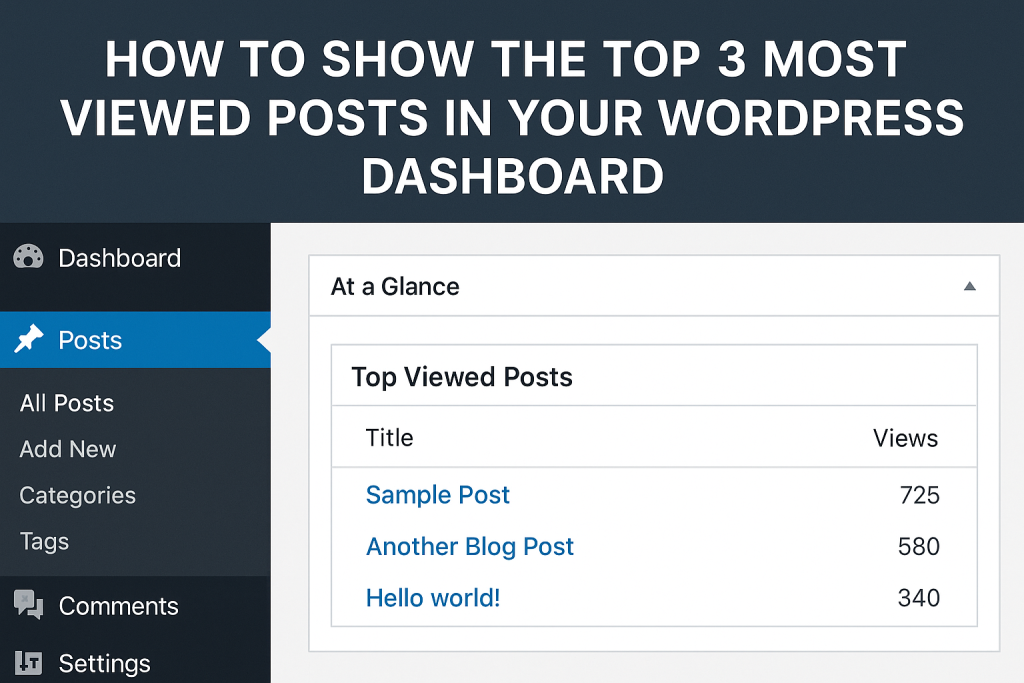
You will see a new widget titled 🔥 Top 3 Most Viewed Posts.
Step 2: Style the Widget for Better Readability
Add this CSS using the admin_head hook:
function top_posts_widget_custom_css() {
    echo '<style>
        #top_3_posts_views_widget .top-posts-list {
            margin: 0;
            padding-left: 1em;
        }
        #top_3_posts_views_widget .top-posts-list li {
            margin-bottom: 8px;
            font-size: 14px;
        }
        #top_3_posts_views_widget .top-posts-list a {
            font-weight: bold;
            text-decoration: none;
            color: #0073aa;
        }
        #top_3_posts_views_widget .top-posts-list a:hover {
            text-decoration: underline;
        }
        #top_3_posts_views_widget .views {
            color: #555;
            font-style: italic;
            margin-left: 6px;
        }
    </style>';
}
add_action('admin_head', 'top_posts_widget_custom_css');
Now your widget looks clean, professional, and readable.
Step 3: Track Post Views Automatically
Without tracking, the widget won’t show data.
Add this function:
function track_post_views($post_id) {
    if (!is_single()) return;

    $views = get_post_meta($post_id, 'post_views_count', true);
    $views = $views ? intval($views) + 1 : 1;
    update_post_meta($post_id, 'post_views_count', $views);
}

add_action('wp_head', function () {
    if (is_single()) {
        global $post;
        if ($post instanceof WP_Post) {
            track_post_views($post->ID);
        }
    }
});
Each time someone visits a single post, the counter increases.
Simple and effective.
Performance Optimization: Avoid Inflated View Counts
Prevent Admin Views from Counting
Add this improvement:
if (is_admin()) return;
Place it inside track_post_views() to avoid counting backend visits.
Prevent Bots from Inflating Numbers
You can check for common bots:
if (preg_match('/bot|crawl|spider/i', $_SERVER['HTTP_USER_AGENT'])) {
    return;
}
This keeps your data cleaner.
Use Transients for High-Traffic Sites
If your site grows large, constantly updating meta values can add database load.
See also: 8 Qualities Women Often Value Most in a Long-Term Partner
You can:
- Store temporary counts in a transient.
- Batch update post meta.
For small and medium sites, the basic method works perfectly.
Advanced Version: Turn It Into a Mini Plugin
Instead of using functions.php, create:
wp-content/mu-plugins/top-posts-dashboard.php
This ensures updates never remove your functionality.
Example plugin header:
<?php
/**
 * Plugin Name: Top 3 Most Viewed Posts Dashboard Widget
 * Description: Displays top 3 posts by view count in WordPress dashboard.
 * Version: 1.0.0
 * Author: Your Name
 */
Paste the full code below it.
Now your feature becomes permanent.
How This Improves Your Content Strategy
When you see top posts daily:
- You understand audience psychology.
- You identify trending topics.
- You optimize internal linking.
- You refresh outdated content.
- You increase ad revenue potential.
Especially for AdSense-focused blogs, knowing which pages attract traffic helps you improve monetization.
Comparing This Method vs Analytics Plugins
| Feature | Custom Snippet | Jetpack | Google Analytics |
|---|---|---|---|
| Lightweight | ✅ Yes | ❌ Heavy | ✅ External |
| Real-time dashboard view | ✅ Yes | ❌ Limited | ❌ No |
| Plugin dependency | ❌ No | ✅ Yes | ❌ External |
| Customizable | ✅ Fully | ❌ Limited | ❌ Limited |
Your custom solution wins for speed and flexibility.
Common Mistakes to Avoid
Counting Archive Views
Always use is_single() to avoid counting homepage or archive visits.
Forgetting wp_reset_postdata()
This can break other queries in admin.
Not Casting Integers
Always use intval() for safety.
Bonus Enhancement: Add Post Thumbnails
Inside the loop:
echo get_the_post_thumbnail(get_the_ID(), array(40,40));
This makes the widget visually stronger.
Bonus Enhancement: Show Views with Thousands Separator
number_format(intval($views));
Now 15000 becomes 15,000.
Cleaner presentation.
Frequently Asked Questions
How does WordPress store post views in this method?
It stores them in the post meta table under the key post_views_count.
Will this slow down my site?
No. For small and medium sites, the performance impact is minimal.
Can I show Top 5 instead of Top 3?
Yes. Change 'posts_per_page' => 3 to 5.
Does this count logged-in users?
Yes, unless you exclude them manually.
Can I reset view counts?
Yes. Use:
delete_post_meta($post_id, 'post_views_count');
Does this work with custom post types?
Yes. Change 'post_type' => 'post' to your CPT slug.
Is this AdSense safe?
Yes. It does not interfere with ads.
Can I track views by day?
That requires a custom table or analytics integration.
Does it count bot traffic?
Only if you don’t filter user agents.
Powerful Takeaways for Smarter Blogging
Your WordPress dashboard should not be passive.
It should guide decisions.
By adding a Top 3 Most Viewed Posts widget:
- You gain clarity.
- You increase productivity.
- You strengthen SEO strategy.
- You enhance monetization focus.
- You reduce plugin bloat.
Small improvements create powerful workflows.
⚠️ Disclaimer and Source Hygiene
This tutorial is based on WordPress core development practices and standard PHP techniques. Always test changes in a staging environment before deploying on a live website. Consult a professional developer if you manage a high-traffic production server.
🔔 For more tutorials like this, consider subscribing to our blog.
📩 Do you have questions or suggestions? Leave a comment or contact us!
🏷️ Tags: WordPress tips, dashboard widgets, PHP snippets, top posts, post views, WordPress admin, WordPress tutorial, developer tools, content strategy, WP functions
📢 Hashtags: #WordPress #WPAdmin #TopPosts #DashboardWidget #PHPCode #WPDevelopment #PostViews #WPPlugin #WebDev #ContentMarketing
