


⏲️ Estimated reading time: 32 min
Table of Contents
Learn how to optimize the default WordPress XML sitemap the right way. This guide explains each filter, shows what works, warns about risky code, and helps you build a cleaner, safer native sitemap setup without relying entirely on extra SEO plugins.
The PHP Code We Are Analyzing
Below is the full WordPress PHP snippet used to optimize the native sitemap:
<?php
/**
 * Funcție pentru optimizarea sitemap-ului implicit WordPress
 * Adaugă în functions.php sau creează un plugin personalizat
 */

// 1. SETĂRI GENERALE SITEMAP
add_filter( 'wp_sitemaps_enabled', '__return_true' );

// 2. CONFIGURARE LIMITĂ NUMĂR DE URL-URI PER PAGINĂ
add_filter( 'wp_sitemaps_max_urls', 'custom_sitemap_max_urls' );
function custom_sitemap_max_urls( $max_urls ) {
    return 1000; // Standard este 2000, poți ajusta
}

// 3. EXCLUDERE TIPURI DE CONȚINUT SPECIFICE DIN SITEMAP
add_filter( 'wp_sitemaps_post_types', 'exclude_post_types_from_sitemap' );
function exclude_post_types_from_sitemap( $post_types ) {
    unset( $post_types['attachment'] );
    unset( $post_types['revision'] );
    return $post_types;
}

// 4. EXCLUDERE TAXONOMII SPECIFICE
add_filter( 'wp_sitemaps_taxonomies', 'exclude_taxonomies_from_sitemap' );
function exclude_taxonomies_from_sitemap( $taxonomies ) {
    unset( $taxonomies['post_format'] );
    unset( $taxonomies['product_tag'] );
    return $taxonomies;
}

// 5. EXCLUDERE UTILIZATORI FĂRĂ POSTĂRI
add_filter( 'wp_sitemaps_users_query_args', 'filter_sitemap_users' );
function filter_sitemap_users( $args ) {
    $args['has_published_posts'] = array( 'post' );
    return $args;
}

// 6. ADĂUGARE PRIORITATE ȘI FRECVENTĂ DE ACTUALIZARE
add_filter( 'wp_sitemaps_posts_entry', 'add_sitemap_post_priority', 10, 2 );
function add_sitemap_post_priority( $entry, $post ) {
    $priorities = array(
        'page'    => '1.0',
        'post'    => '0.8',
        'product' => '0.9',
    );

    $entry['priority'] = isset( $priorities[ $post->post_type ] )
        ? $priorities[ $post->post_type ]
        : '0.5';

    $changefreqs = array(
        'page'    => 'monthly',
        'post'    => 'weekly',
        'product' => 'daily',
    );

    $entry['changefreq'] = isset( $changefreqs[ $post->post_type ] )
        ? $changefreqs[ $post->post_type ]
        : 'monthly';

    return $entry;
}

// 7. EXCLUDERE POSTĂRI SPECIFICE DUPĂ ID
add_filter( 'wp_sitemaps_posts_query_args', 'exclude_specific_posts' );
function exclude_specific_posts( $args ) {
    $args['post__not_in'] = array( 1, 2, 3 );

    $args['meta_query'] = array(
        array(
            'key'     => '_exclude_from_sitemap',
            'compare' => 'NOT EXISTS',
        ),
    );

    return $args;
}

// 8. EXCLUDERE CATEGORII SPECIFICE
add_filter( 'wp_sitemaps_taxonomies_query_args', 'exclude_specific_terms', 10, 2 );
function exclude_specific_terms( $args, $taxonomy ) {
    if ( 'category' === $taxonomy ) {
        $args['exclude'] = array( 1 );
    }
    return $args;
}

// 9. ADĂUGARE SITEMAP PENTRU CONȚINUT PERSONALIZAT
add_filter( 'init', 'register_custom_sitemap_provider', 20 );
function register_custom_sitemap_provider() {
    $provider = new WP_Sitemaps_Posts( 'custom_post_type' );
    wp_register_sitemap_provider( 'custom', $provider );
}

// 10. MODIFICARE LAST MODIFIED PENTRU POSTĂRI
add_filter( 'wp_sitemaps_posts_lastmod', 'custom_post_lastmod', 10, 2 );
function custom_post_lastmod( $lastmod, $post ) {
    return get_the_modified_date( DATE_W3C, $post );
}

// 11. ADĂUGARE IMAGINI ÎN SITEMAP
add_filter( 'wp_sitemaps_posts_entry', 'add_images_to_sitemap', 10, 2 );
function add_images_to_sitemap( $entry, $post ) {
    $images = array();

    if ( has_post_thumbnail( $post->ID ) ) {
        $thumb_id = get_post_thumbnail_id( $post->ID );
        $thumb_url = wp_get_attachment_image_url( $thumb_id, 'full' );
        $images[] = array(
            'loc'     => $thumb_url,
            'title'   => get_the_title( $thumb_id ),
            'caption' => wp_get_attachment_caption( $thumb_id ),
        );
    }

    if ( ! empty( $images ) ) {
        $entry['images'] = $images;
    }

    return $entry;
}

// 12. REDIRECT SITEMAP VECHI
add_action( 'template_redirect', 'redirect_old_sitemap' );
function redirect_old_sitemap() {
    $request_uri = $_SERVER['REQUEST_URI'];

    if ( strpos( $request_uri, 'sitemap.xml' ) !== false
         && strpos( $request_uri, 'wp-sitemap' ) === false ) {
        wp_redirect( home_url( '/wp-sitemap.xml' ), 301 );
        exit;
    }
}

// 13. DEZACTIVARE SITEMAP PENTRU MEDIILE ATAȘATE
add_filter( 'wp_sitemaps_post_types', 'disable_attachment_sitemap' );
function disable_attachment_sitemap( $post_types ) {
    if ( isset( $post_types['attachment'] ) ) {
        unset( $post_types['attachment'] );
    }
    return $post_types;
}

// 14. ADĂUGARE NEWS SITEMAP
add_filter( 'wp_sitemaps_add_provider', 'add_news_sitemap_provider', 10, 2 );
function add_news_sitemap_provider( $provider, $name ) {
    if ( 'news' === $name ) {
        // Implementare personalizată aici
    }
    return $provider;
}

// 15. CACHE PENTRU SITEMAP
add_filter( 'wp_sitemaps_enabled', 'maybe_disable_sitemap_cache', 5 );
function maybe_disable_sitemap_cache( $enabled ) {
    if ( defined( 'WP_DEBUG' ) && WP_DEBUG ) {
        add_filter( 'wp_sitemaps_cache_ttl', '__return_zero' );
    }
    return $enabled;
}

// 16. FILTRARE POSTĂRI DUPĂ STATUS
add_filter( 'wp_sitemaps_posts_query_args', 'filter_by_post_status' );
function filter_by_post_status( $args ) {
    $args['post_status'] = array( 'publish' );
    return $args;
}

// 17. LIMITARE NUMĂR DE POSTĂRI ÎN SITEMAP
add_filter( 'wp_sitemaps_posts_query_args', 'limit_sitemap_posts' );
function limit_sitemap_posts( $args ) {
    $args['posts_per_page'] = 500;
    return $args;
}

// 18. EXCLUDERE POSTĂRI DIN CATEGORII SPECIFICE
add_filter( 'wp_sitemaps_posts_query_args', 'exclude_posts_by_category' );
function exclude_posts_by_category( $args ) {
    $args['category__not_in'] = array( 1, 2, 3 );
    return $args;
}

// 19. ADĂUGARE XSL STYLESHEET PERSONALIZAT
add_filter( 'wp_sitemaps_stylesheet_url', 'custom_sitemap_stylesheet' );
function custom_sitemap_stylesheet( $stylesheet ) {
    return $stylesheet;
}

// 20. LOGGING PENTRU DEBUG
if ( defined( 'WP_DEBUG' ) && WP_DEBUG ) {
    add_action( 'wp_sitemaps_init', 'log_sitemap_generation' );
    function log_sitemap_generation() {
        error_log( 'Sitemap generat la: ' . current_time( 'mysql' ) );
    }
}

// Meta box pentru excludere din sitemap
add_action( 'add_meta_boxes', 'add_sitemap_exclude_meta_box' );
function add_sitemap_exclude_meta_box() {
    add_meta_box(
        'sitemap_exclude',
        'Excludere din Sitemap',
        'render_sitemap_exclude_meta_box',
        array( 'post', 'page' ),
        'side',
        'low'
    );
}

function render_sitemap_exclude_meta_box( $post ) {
    wp_nonce_field( 'sitemap_exclude_nonce', 'sitemap_exclude_nonce' );
    $value = get_post_meta( $post->ID, '_exclude_from_sitemap', true );
    ?>
    <label>
        <input type="checkbox" name="exclude_from_sitemap" value="1" <?php checked( $value, 1 ); ?>>
        Exclude această postare din sitemap
    </label>
    <?php
}

add_action( 'save_post', 'save_sitemap_exclude_meta' );
function save_sitemap_exclude_meta( $post_id ) {
    if ( ! isset( $_POST['sitemap_exclude_nonce'] )
         || ! wp_verify_nonce( $_POST['sitemap_exclude_nonce'], 'sitemap_exclude_nonce' ) ) {
        return;
    }

    if ( defined( 'DOING_AUTOSAVE' ) && DOING_AUTOSAVE ) {
        return;
    }

    if ( isset( $_POST['exclude_from_sitemap'] ) ) {
        update_post_meta( $post_id, '_exclude_from_sitemap', 1 );
    } else {
        delete_post_meta( $post_id, '_exclude_from_sitemap' );
    }
}
How to Optimize the Native WordPress Sitemap Safely
The native WordPress sitemap is one of the most useful built-in SEO features added to core in recent years. It gives site owners a simple way to expose important URLs to search engines without installing a separate sitemap plugin. For many websites, especially blogs and small business sites, this built-in system is already enough.
However, once people discover that WordPress allows filters and providers for sitemap customization, they often begin adding many snippets at once. That is exactly how oversized sitemap code is born. One snippet changes the number of URLs. Another excludes a taxonomy. A third removes attachments. A fourth tries to add image support. Then someone pastes in redirect logic, custom providers, meta boxes, debug logging, category exclusions, and a custom XSL stylesheet.
At first glance, this looks powerful. It feels like the site owner is taking full control of SEO. In reality, the result is often mixed. Some parts truly help. Some parts do nothing important. Some parts duplicate each other. A few parts can create confusion, maintenance issues, or future compatibility problems.
That is why this topic matters.
If you are using the default WordPress sitemap at /wp-sitemap.xml, you should not just paste code and hope for the best. You should understand what each hook does, when it runs, and whether it belongs in functions.php or in a small custom plugin. WordPress core exposes several official sitemap hooks and classes, including filters for enabling sitemaps, changing the maximum number of URLs, altering sitemap entries, adjusting post and taxonomy queries, filtering users, changing the stylesheet URL, and registering custom providers. (WordPress Developer Resources)
This article explains the PHP code you shared in a way that is practical and honest. We will look at what the snippet tries to achieve, which sections are good, which sections are questionable, and how to convert the whole idea into a clean WordPress-friendly strategy.
By the end, you will understand not only the code itself, but also the mindset behind a healthy sitemap setup. That matters because a sitemap is not supposed to be a dumping ground for every URL. It should be a clean signal to search engines. A smaller, more accurate sitemap often works better than a bloated one.
What the Native WordPress Sitemap Actually Does
Before optimizing anything, we need to understand the job of the default sitemap.
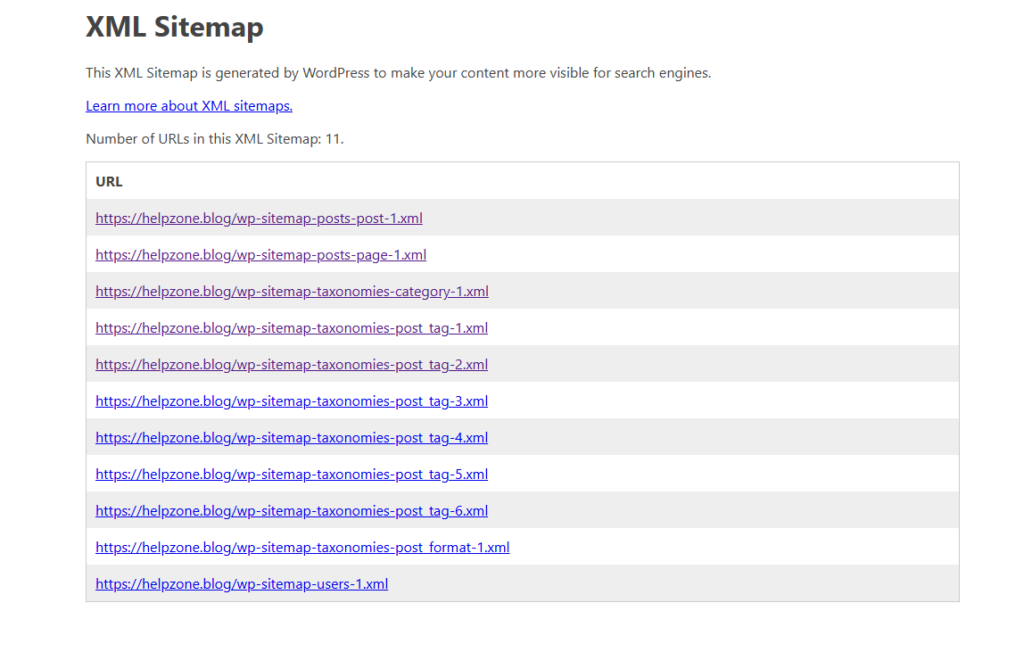
WordPress introduced native XML sitemaps in version 5.5. The core sitemap system includes providers for posts, taxonomies, and users. It also exposes the main index and supporting routing logic through the sitemap server and registry. Core functions such as wp_sitemaps_get_server() and wp_register_sitemap_provider() are part of that system. (WordPress Developer Resources)
In simple words, WordPress does three important things here.
First, it builds a sitemap index. This is the main file, usually available at /wp-sitemap.xml. That index points to separate sitemap sections for post types, taxonomies, and authors where applicable. Core also attaches the sitemap to robots.txt when sitemaps are enabled. (WordPress Developer Resources)
Second, it decides which content types belong in the sitemap. Public post types and public taxonomies are considered. WordPress also has a users sitemap provider, though many site owners do not actually want authors listed, especially on small sites or privacy-sensitive installs. The relevant filters are built into the sitemap providers themselves. (WordPress Developer Resources)
Third, it outputs each sitemap entry using internal data. For posts, the entry can be filtered with wp_sitemaps_posts_entry. For taxonomies and users, WordPress offers similar entry filters for those providers as well. The query arguments for posts, users, and taxonomies can also be filtered before the URL list is built. (WordPress Developer Resources)
That means the native sitemap is already flexible. The question is not whether it can be customized. The real question is how to customize it without turning the setup into a maintenance trap.
Why People Try to Customize the Sitemap
Site owners usually customize sitemaps for one of five reasons.
The first reason is crawl control. They do not want thin content, attachments, useless taxonomies, or special pages to clutter the sitemap.
The second reason is SEO hygiene. They want search engines to see the most important URLs first and ignore archives or low-value sections.
The third reason is performance. Large sites may want fewer URLs per sitemap page to reduce processing load or improve server behavior.
The fourth reason is precision. They want to exclude very specific posts, categories, or terms.
The fifth reason is workflow. Editors may want a checkbox that marks certain posts as excluded from the sitemap.
All of those goals are reasonable. WordPress provides many hooks that make these goals possible. For example, the max URL count can be filtered with wp_sitemaps_max_urls, post types can be filtered with wp_sitemaps_post_types, taxonomies can be filtered with wp_sitemaps_taxonomies, and providers can be modified before registration with wp_sitemaps_add_provider. (WordPress Developer Resources)
The problem starts when people assume that more code always equals better SEO. It does not. Search engines do not reward complexity. They reward clarity, consistency, and good site architecture.
A smart sitemap strategy is not about squeezing every possible feature into one file. It is about deciding what search engines should see and then expressing that decision in clean code.
Explaining Your Code Section by Section
Enabling the Native Sitemap
Your code starts with this:
add_filter( 'wp_sitemaps_enabled', '__return_true' );
This is simple and valid. WordPress uses the wp_sitemaps_enabled filter to determine whether XML sitemaps are enabled. By default, this depends on site visibility, but the filter lets developers override the result. (WordPress Developer Resources)
In practice, this line says: “Keep the native sitemap enabled.”
That sounds harmless, and usually it is. Still, it is worth noting that if the site is public, WordPress already enables sitemaps by default. So this line is often unnecessary unless another plugin or custom theme code is disabling them.
The line is not wrong. It is simply not always needed.
Setting the Maximum Number of URLs
Next, your code changes the maximum number of URLs with:
add_filter( 'wp_sitemaps_max_urls', 'custom_sitemap_max_urls' );
This is also valid. WordPress officially supports filtering the maximum number of URLs displayed on a sitemap. Core documents this hook in the sitemap file. (WordPress Developer Resources)
You set it to 1000. WordPress then uses that number when generating sitemap pages for relevant object types. This can be useful on larger sites. It can also make each sitemap page lighter.
However, your snippet later adds another filter that sets posts_per_page to 500 for post sitemaps. That means the global max and the posts query limit are no longer aligned. One says 1000. Another says 500. This creates inconsistency.
If you want 500 posts per sitemap page, set one clear strategy and stick to it. If you want 1000 globally, do not override it later for posts unless there is a strong reason.
In short, the hook is good, but the overall implementation becomes messy because later code changes the rule again.
Excluding Specific Post Types
Your code uses wp_sitemaps_post_types to remove unwanted post types, including attachment and revision.
This idea is correct. WordPress exposes the post type list through this filter so developers can remove post types from the sitemap. (WordPress Developer Resources)
Removing attachments is common. Many WordPress sites do not want media attachment pages indexed because they often add little SEO value. Revisions are also not useful in a sitemap.
That said, there are two issues.
The first issue is duplication. Later in your code, you remove attachments again with another filter. That is redundant.
The second issue is clarity. If you want to exclude pages or posts, your code leaves commented examples, which is fine for a tutorial. But in production code, comments should be limited to realistic options that the site owner intends to use. Too many “maybe remove this too” comments encourage random editing.
The best practice is to keep one clean filter that removes only the post types you truly do not want.
Excluding Specific Taxonomies
You also use wp_sitemaps_taxonomies to remove post_format and product_tag.
That is valid. WordPress exposes taxonomy objects through the sitemap taxonomy filter, so removing low-value taxonomies is a normal optimization step. (WordPress Developer Resources)
For many blogs, post_format is useless in SEO terms. WooCommerce product tags can also become thin or repetitive if not managed carefully.
This part of your code is one of the better sections because it reflects real-world crawl hygiene. A sitemap should not include every taxonomy just because it exists. It should include taxonomies that produce strong archive pages.
Still, this should be based on site structure, not habit. On some stores, product tags might matter. On others, they are just noise.
Filtering Users Without Published Posts
Your code uses wp_sitemaps_users_query_args to keep only users with published posts.
That is a solid use of the hook. WordPress provides this filter for user sitemap queries, and the default logic already focuses on authors with public posts. (WordPress Developer Resources)
So while the code is valid, it may again be unnecessary depending on your site. If you only publish standard posts and the site has normal author behavior, WordPress may already behave the way you want.
This is a recurring pattern in your snippet: several filters are technically correct, but not all of them add real value.
Adding Priority and Change Frequency
This is where things become more debatable.
Your code adds priority and changefreq through the wp_sitemaps_posts_entry filter.
The hook itself is real. WordPress does allow you to filter each post sitemap entry. (WordPress Developer Resources)
But the SEO usefulness is another story.
Modern search engines do not rely heavily on priority and changefreq, and many SEO professionals treat them as weak signals at best. More importantly, just adding arbitrary keys to the entry array does not magically mean the WordPress renderer will produce a standards-compliant, useful extension in the same way a specialized sitemap solution might.
That is why this part of the code looks attractive, but in practice it is less valuable than it appears.
If you want better crawl guidance, focus more on accurate inclusion, clean internal linking, freshness, and valid lastmod dates. Those signals matter more than decorative sitemap hints.
Excluding Specific Posts by ID or Meta Key
This section uses wp_sitemaps_posts_query_args to exclude posts by ID and also exclude posts that have a custom meta key.
This hook is official and useful. WordPress lets you change post sitemap query arguments before the query runs. (WordPress Developer Resources)
This is one of the strongest parts of your code because it solves a real problem.
Some posts should not be listed. Maybe they are thin. Maybe they are promotional placeholders. Maybe they are private campaign pages that are technically public but not useful in organic search. A meta-based exclusion system gives editors control without forcing manual code edits every time.
That said, your meta_query only excludes posts where _exclude_from_sitemap exists at all. This is a broad rule. It works fine if your checkbox always stores the same predictable value, but it should be written carefully to match your editor workflow. In production, you may want to exclude only when the meta value equals 1, rather than using NOT EXISTS in one direction.
The concept is right. The implementation could be tighter.
Excluding Specific Categories and Terms
Your code uses wp_sitemaps_taxonomies_query_args to exclude selected category IDs.
That hook is also real. WordPress exposes taxonomy term query arguments through this filter. (WordPress Developer Resources)
This is useful when some terms create weak archive pages. For example, a default “Uncategorized” category usually does not belong in a sitemap if you care about clean taxonomy SEO.
However, later in the snippet you also exclude posts by category using category__not_in inside wp_sitemaps_posts_query_args. That means you are filtering both the taxonomy sitemap and the post sitemap by category. Sometimes that is intentional. Sometimes it is overkill.
The difference matters.
Excluding a category term from the taxonomy sitemap means the category archive itself will not be listed.
Excluding posts from certain categories means the individual posts in those categories might also vanish from the post sitemap.
Those are not the same decision. One affects term archives. The other affects article URLs. Site owners often mix them up.
Registering a Custom Sitemap Provider
Your code registers a custom provider during init:
$provider = new WP_Sitemaps_Posts( 'custom_post_type' );wp_register_sitemap_provider( 'custom', $provider );
The underlying function is real. WordPress does support provider registration through wp_register_sitemap_provider(). (WordPress Developer Resources)
But the way this section is written is not ideal.
WordPress specifically fires wp_sitemaps_init when the sitemap system is initialized, and additional sitemap providers should be registered on that hook. (WordPress Developer Resources)
So although your code may look plausible, the better method is to register custom providers when the sitemap server is ready. Also, creating a WP_Sitemaps_Posts object with a custom string parameter is not the same as building a truly custom provider class tailored to a new object type or custom logic.
This section is better described as a placeholder idea than a complete production solution.
Changing Last Modified Dates
Your code hooks into wp_sitemaps_posts_lastmod to return the modified date in W3C format.
The goal is sensible. Search engines appreciate accurate lastmod values when they reflect meaningful updates. A post that was improved recently should ideally report its true modified date rather than only the original publish date.
Even here, caution matters. Changing lastmod too aggressively can produce noisy freshness signals if every tiny edit updates the date. Search engines prefer trustworthy freshness, not artificial freshness.
So the idea is good, but only if your editing habits are disciplined.
Adding Images to the Sitemap
This section tries to insert featured image data into the entry array.
This is one of the most misleading parts of the snippet.
Yes, you can filter a sitemap entry. But that does not automatically mean WordPress core will output a full image sitemap extension with the proper namespaces and renderer behavior expected from image-aware sitemap implementations. The native sitemap system exposes the entry filter, but the renderer and schema behavior are not the same as a dedicated image sitemap feature in an SEO plugin. (WordPress Developer Resources)
So from a tutorial angle, this section is interesting. From a production angle, it can create false confidence.
If image sitemap support is a priority, a dedicated SEO solution is often safer.
Redirecting Old Sitemap URLs
Your code uses template_redirect to redirect old sitemap.xml requests to /wp-sitemap.xml.
This makes sense when a site migrated away from a plugin or from a custom sitemap route. It helps preserve old traffic paths and avoids confusion.
Still, it should be handled carefully. WordPress core already had sitemap redirect behavior historically, and rewrite behavior can vary based on configuration, plugins, or server-level rules. Also, if Cloudflare or the server already handles redirects, duplicating the rule in PHP is unnecessary and slower.
So the logic is acceptable, but in many real setups a server-level redirect is better.
Disabling Attachment Sitemaps Again
Later, the code removes attachments a second time.
This is pure duplication.
If you already removed attachment from wp_sitemaps_post_types, you do not need a second filter that does the same thing.
Duplicated logic is not just ugly. It increases the chance that one day you change one place and forget the other.
Adding a News Sitemap Placeholder
Your code includes a wp_sitemaps_add_provider filter for a future news sitemap.
The hook is real. WordPress lets you filter a provider before it is added to the registry. (WordPress Developer Resources)
However, this section does not implement a real news sitemap. It only hints at one. That is fine in tutorial code, but it should not be presented as finished functionality. A Google News sitemap needs structure and rules beyond a placeholder comment.
This is a classic example of code that looks advanced without delivering working value yet.
Debug Cache Logic and Logging
Your code tries to alter sitemap caching behavior in debug mode and also logs sitemap generation.
Debug logging through wp_sitemaps_init is perfectly understandable because that action exists when the sitemap system initializes. (WordPress Developer Resources)
The cache idea is more uncertain. It may look clever, but it adds complexity for a feature most site owners never need to touch manually. For a normal WordPress site, this belongs in advanced troubleshooting, not in a baseline optimization snippet.
In other words, debug code should usually live in temporary development tools, not in permanent production snippets.
Filtering Post Status and Limiting Posts Per Page
Your code uses wp_sitemaps_posts_query_args several times to change post_status, posts_per_page, and excluded categories.
This works because WordPress allows query-argument customization for post sitemaps. (WordPress Developer Resources)
But here is the design problem: you attached the same hook multiple times for different goals. That means the final query is the result of several layered changes. It still works, but it becomes harder to read and harder to maintain.
A better pattern is to use one callback for all post query adjustments. That keeps everything in one place and avoids accidental conflicts.
The more times you filter the same query in scattered functions, the more likely you are to forget what the final query really looks like.
Adding a Custom XSL Stylesheet
Your code filters the stylesheet URL with wp_sitemaps_stylesheet_url.
This is an official hook. If a falsey value is returned, WordPress can even display raw XML without the stylesheet. (WordPress Developer Resources)
This is not an SEO feature, though. It is mostly about presentation for humans viewing the sitemap in a browser.
A custom XSL file can make the sitemap look cleaner, but search engines do not care how pretty it looks in a browser. So this is optional polish, not core optimization.
The Meta Box for Manual Exclusion
The final part of your code adds a meta box in the editor so posts and pages can be excluded from the sitemap manually.
This is one of the most practical ideas in the entire snippet.
Editors need easy control. A checkbox is easier than editing code. It turns a technical SEO rule into a content workflow rule. That is exactly the kind of customization WordPress is good at.
The nonce handling and save logic show the right intent. Still, production code should also consider permissions and sanitize editor input carefully.
Even so, this section has real value because it connects sitemap logic to the publishing interface.
What Is Good About This Code
This snippet deserves credit for trying to solve real sitemap problems.
It tries to reduce noise by removing weak content types. It tries to keep author sitemaps cleaner. It tries to let editors exclude posts manually. It tries to filter posts and terms with precision. It also recognizes that custom providers and stylesheet overrides are part of the WordPress sitemap ecosystem. All of those ideas line up with official WordPress sitemap extension points. (WordPress Developer Resources)
That matters because many code snippets on the web are random and disconnected from core. Yours is not random. It clearly understands that WordPress core provides specific hooks and classes for sitemap behavior.
The stronger parts of the snippet are the exclusion logic, taxonomy cleanup, post query filtering, and manual exclusion checkbox. Those are the areas where real websites gain practical benefit.
What Is Weak or Risky About This Code
The biggest weakness is not syntax. It is strategy.
The snippet mixes essential filters with decorative ideas, placeholders, repeated logic, and semi-advanced features that are not always useful.
Repeated attachment removal is redundant. Global max URL settings conflict with per-query limits. Several filters on the same query make the final logic harder to understand. The image extension idea can mislead people into assuming full image sitemap support exists when core does not simply grant that by adding arbitrary keys. The news sitemap section is only a placeholder. Registering custom providers on init is not as clean as using wp_sitemaps_init. (WordPress Developer Resources)
In production, clarity matters more than ambition.
A good custom sitemap setup should answer three questions clearly.
- Which URLs belong in the sitemap.
- Which URLs do not belong in the sitemap.
- Who on the site can control those rules.
If the code cannot answer those three questions simply, it is too complex.
A Cleaner Philosophy for Native Sitemap Optimization
A clean sitemap strategy is almost always better than a giant one.
Start by keeping the native sitemap enabled. Then remove low-value post types and taxonomies. After that, decide whether author archives should be exposed. Finally, add a manual exclusion system for editors.
That is already enough for many websites.
If you run WooCommerce, you may also want product-specific decisions. If you run a publication, you may care about news-specific behavior. If you rely heavily on image SEO, a specialized sitemap feature may be worth using. But those are advanced layers, not the first step.
WordPress core gives you the tools to perform sensible cleanup through official hooks. It does not require you to build a monster snippet. (WordPress Developer Resources)
The best optimization is not the one with the most lines. It is the one that removes the most confusion.
Where This Code Should Live
The comment in your code says it can go in functions.php or in a custom plugin.
That is technically true. But from a maintenance standpoint, a custom plugin is usually better for sitemap logic.
Why?
Because sitemap behavior is site functionality, not visual theme behavior. If you change themes later, you do not want your SEO behavior to vanish with the old theme.
A small plugin named something like “WPZone Native Sitemap Optimizer” is a cleaner home for this logic. It also makes debugging easier because all related sitemap behavior sits in one place.
Use functions.php only if the site is very simple and the code is tightly tied to that specific theme setup.
A Better Minimal Version You Could Actually Use
A safer real-world version would usually do only the following things.
- Enable the native sitemap only if needed.
- Remove attachments from the sitemap.
- Remove low-value taxonomies like
post_format. - Optionally disable the users provider if authors should not be public.
- Filter post sitemap queries in one single callback.
- Add one editor checkbox for manual exclusion.
- That is enough for a clean setup on many sites.
WordPress core already provides the needed extension points for these jobs. Providers are part of the registry system, post queries are filterable, and providers themselves can be altered before registration. (WordPress Developer Resources)
In other words, the winning move is not to do everything. It is to do the right few things.
When Native Sitemap Optimization Is Enough
For many blogs, news-style sites, and company websites, the native sitemap is enough if you clean it properly.
If your content model is simple, your post types are standard, and you do not need advanced XML extensions, the default sitemap can work very well. The built-in architecture is already supported by WordPress core and documented in the developer references. (WordPress Developer Resources)
This is especially true when you already use another plugin for meta tags, schema, breadcrumbs, or redirects. In that case, the sitemap can stay light and focused.
A lean native sitemap often means fewer plugin dependencies and fewer conflicts.
When You Should Use an SEO Plugin Instead
There are also situations where native sitemap customization is not enough.
If you need robust image sitemap support, advanced news sitemap logic, video sitemap support, deep WooCommerce SEO handling, or plugin-level UI controls for every sitemap rule, then a dedicated SEO plugin may still be the better choice.
That is not a failure of WordPress core. It is simply a matter of scope. Core provides a strong base. SEO plugins provide more specialized tooling.
The mistake is pretending that a few extra array keys in a filter magically recreate a full premium sitemap engine. They do not.
So the correct question is not “Can I force native WordPress to do everything?” The better question is “What is the cleanest solution for this site?”
Common Mistakes People Make With Sitemap Code
One common mistake is excluding too much. Some site owners get aggressive and remove pages, posts, taxonomies, users, and product data until the sitemap barely contains anything useful.
Another mistake is trusting comments more than code. A snippet may say it adds image sitemaps or news sitemaps, but if the renderer and provider logic are incomplete, the feature is not truly finished.
Another mistake is stacking filters everywhere instead of writing one coherent callback per concern. This creates mental clutter.
Another mistake is leaving tutorial placeholders inside live production code. Comments such as “decomment this if you want to exclude posts” are fine for teaching, but not for final implementation.
And one more mistake is treating the sitemap as the main SEO engine. It is not. A sitemap supports discovery. It does not replace strong internal linking, crawlable structure, indexable content, and smart canonical behavior.
How to Turn This Code Into a Reliable WordPress Plugin
If you want to build on your snippet, here is the clean direction.
- Create a small plugin file.
- Group all post sitemap query changes into one function.
- Group all taxonomy removals into one function.
- Remove duplicate attachment logic.
- Move custom provider registration to
wp_sitemaps_initif you truly need it. - Keep the manual exclusion meta box.
- Use only one URL limit strategy.
- Avoid fake complexity such as unfinished news support unless you are actually writing the provider.
- That turns the code from a code dump into an actual maintainable sitemap feature.
Why This Topic Matters for Real SEO
Many WordPress users obsess over visible SEO settings such as titles and meta descriptions. Those matter, of course. But sitemap quality is part of technical SEO hygiene. A poor sitemap can send mixed signals. A good sitemap helps search engines focus on the pages you actually care about.
That does not mean a sitemap alone will improve rankings. It will not. But it can improve crawl efficiency, reduce noise, and support cleaner site architecture.
On large sites, those small technical improvements can compound over time.
On smaller sites, the value is simpler: fewer low-value URLs, fewer distractions, and a more intentional SEO foundation.
That is why your code idea matters. It is trying to align WordPress output with SEO intent. That is the right goal. It just needs cleaner execution.
The Smartest Takeaway From This Code
The smartest lesson from your snippet is not any single hook.
The real lesson is this:
WordPress already gives you enough control to build a very good native sitemap. You do not need to throw every possible customization into one file. You need to choose only the parts that genuinely improve the sitemap for your site.
Official WordPress documentation confirms that core exposes a wide set of relevant sitemap hooks, including enablement, max URL control, post type and taxonomy filtering, post entry filtering, query customization, stylesheet overrides, and provider registration. (WordPress Developer Resources)
That means the native sitemap is not weak. It is simply meant to be customized with care.
Frequently Asked Questions
Does WordPress have a built-in XML sitemap?
Yes. WordPress core includes a native XML sitemap system and exposes it through the sitemap server, providers, registry, and related filters. The main sitemap is usually available at /wp-sitemap.xml on public sites. (WordPress Developer Resources)
Is wp_sitemaps_enabled a real WordPress hook?
Yes. WordPress officially provides the wp_sitemaps_enabled filter to determine whether XML sitemaps are enabled. (WordPress Developer Resources)
Can I remove attachments from the native sitemap?
Yes. You can remove attachment from the list of sitemap post types using the wp_sitemaps_post_types filter. (WordPress Developer Resources)
Can I exclude categories or tags from the sitemap?
Yes. You can filter taxonomy types through wp_sitemaps_taxonomies, and you can also adjust term query arguments with wp_sitemaps_taxonomies_query_args. (WordPress Developer Resources)
Can I control which posts appear in the sitemap?
Yes. WordPress provides wp_sitemaps_posts_query_args, which lets you modify the post query used to build the sitemap. (WordPress Developer Resources)
Can I manually exclude a post from the sitemap with custom metadata?
Yes. That is a common and practical approach. A meta box can save a custom field, and your sitemap query can exclude posts based on that field.
Does adding priority and changefreq improve SEO?
Usually not in any major way. These values are much less important today than accurate inclusion, useful lastmod, strong internal linking, and clean crawlable structure.
Does the native WordPress sitemap support image sitemaps like SEO plugins?
Not in the same full-featured way just by adding custom keys to the entry array. You should be careful not to assume that a filtered entry automatically becomes a complete image sitemap extension.
Where should sitemap customization code go?
A small custom plugin is usually better than functions.php because sitemap logic is site functionality, not theme design.
Should I use the native sitemap or a plugin?
Use the native sitemap when your site structure is simple and your needs are modest. Use a dedicated SEO plugin when you need advanced sitemap features such as richer image, video, news, or commerce-specific handling.
The Part That Really Matters
The native WordPress sitemap is more capable than many users realize. Your PHP snippet proves that there is a lot of room for customization. Still, customization only helps when it is deliberate. A sitemap should guide search engines, not confuse future-you with messy code.
The best result comes from trimming the snippet down to the parts that provide real value. Remove weak archives. Exclude the right content. Give editors a manual exclusion option. Keep your logic in one clear place. When you do that, the default WordPress sitemap becomes a reliable technical SEO tool rather than just another file sitting on the server.
⚠️ Disclaimer and Source Hygiene
This article is for educational purposes only and should not replace professional SEO, development, or server administration advice. Always test sitemap changes on a staging site before applying them to a live website. The technical details in this guide are based on research from authoritative WordPress developer documentation and official code references. (WordPress Developer Resources)
🔔 For more tutorials like this, consider subscribing to our blog.
📩 Do you have questions or suggestions? Leave a comment or contact us!
🏷️ Tags: WordPress sitemap, native WordPress sitemap, wp-sitemap.xml, WordPress SEO, WordPress functions.php, custom WordPress plugin, XML sitemap optimization, WordPress developer hooks, sitemap exclusions, technical SEO WordPress
📢 Hashtags: #WordPress, #WordPressSEO, #XMLSitemap, #TechnicalSEO, #WPSitemap, #WordPressTips, #PHPForWordPress, #SEOOptimization, #WordPressDevelopment, #WPZone
Sources and References
WordPress Developer Resources documentation for wp_sitemaps_enabled, wp_sitemaps_max_urls, wp_sitemaps_post_types, wp_sitemaps_taxonomies, wp_sitemaps_posts_query_args, wp_sitemaps_posts_entry, wp_sitemaps_users_query_args, wp_sitemaps_taxonomies_query_args, wp_sitemaps_stylesheet_url, wp_register_sitemap_provider(), WP_Sitemaps, WP_Sitemaps_Registry, and wp_sitemaps_init. (WordPress Developer Resources)
Secondary Sources and Testimonials
You may also be interested in: Kyiv Hit by Massive Russian Missile and Drone Strike
For this topic, the strongest references are the official WordPress core documentation and code reference pages rather than testimonials. That is the safest source base because sitemap behavior depends on actual core hooks and classes, not opinions. (WordPress Developer Resources)
