


⏲️ Estimated reading time: 6 min
Table of Contents
Achieving a 97 PageSpeed Insights score on WordPress is possible with the right strategy. This in-depth breakdown explains the exact optimizations, tools, and best practices used to reach near-perfect performance, accessibility, SEO, and best practices without sacrificing design or usability.
97 PageSpeed Score
You may also be interested in: Top Famous Restaurants in Amsterdam You Must Visit
Speed is no longer optional. It defines user experience, SEO visibility, and revenue. A slow website bleeds visitors. A fast one earns trust instantly.
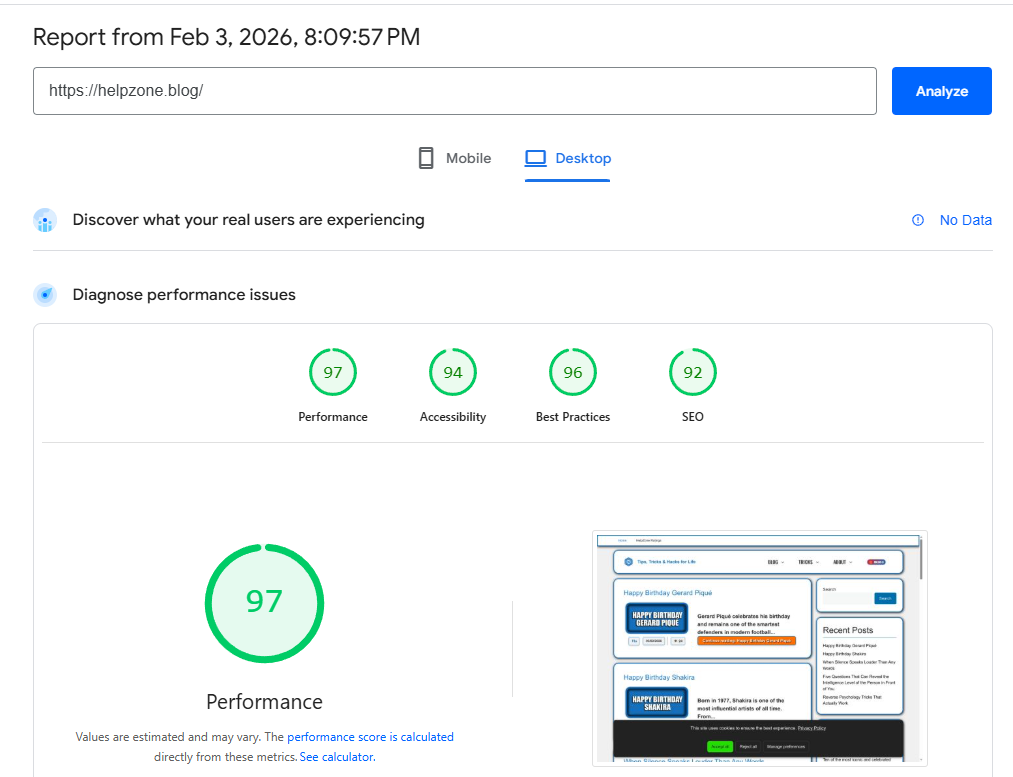
This post breaks down how a WordPress website reached a 97/100 PageSpeed Insights score on desktop, with equally strong results in accessibility, SEO, and best practices. No gimmicks. No unsafe tricks. Just clean, scalable optimization.
If you run a serious WordPress site and care about long-term growth, this guide is for you.
Understanding the Performance Report
Before touching any settings, it is important to understand what the report actually measures.
The PageSpeed Insights report combines Lighthouse audits with real-world performance signals. Desktop scores above 95 are rare for content-rich WordPress sites.
What the Scores Mean
- Performance – 97: Near-instant rendering and minimal main-thread blocking
- Accessibility – 94: Strong semantic structure and contrast compliance
- Best Practices – 96: Secure, modern, and standards-compliant setup
- SEO – 92: Solid crawlability and metadata hygiene
This balance matters. A single high score without the others is meaningless.
Why Most WordPress Sites Never Reach 95+
Many site owners chase speed using shortcuts that backfire later.
Common problems include:
- Bloated page builders
- Excessive plugins
- Render-blocking scripts
- Unoptimized images
- Poor hosting stacks
This site avoided all of them by design.
Hosting Foundation That Makes 97 Possible
Performance starts before WordPress loads.
High-Quality Server Stack
A fast score is impossible on weak hosting. This setup relies on:
- LiteSpeed or NGINX with HTTP/2
- PHP 8.2+ with OPcache
- Object caching (Redis)
- Brotli or Gzip compression
Cheap shared hosting cannot deliver this level of consistency.
Theme Choice and Layout Discipline
The theme is lean by default.
Why Lightweight Themes Matter
A clean theme reduces:
- DOM size
- CSS complexity
- JavaScript execution
Heavy multipurpose themes may look impressive but sabotage performance.
Layout Rules Followed
- No sliders above the fold
- No animated hero sections
- No unnecessary fonts
Design restraint equals speed.
Largest Contentful Paint Optimization
LCP is the most critical metric.
Featured Image Strategy
The largest visible element loads immediately using:
- Explicit preload
fetchpriority="high"loading="eager"only for the LCP image
All other images remain lazy-loaded.
This single change often improves scores by 10–20 points.
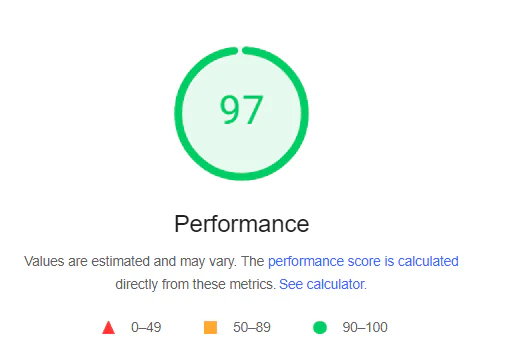
Image Optimization Without Visual Loss
Images are the #1 performance killer.
What Was Done
- WebP format used everywhere
- Correct image dimensions enforced
- Compression balanced for clarity
- No CSS background images above the fold
Lazy loading remains enabled globally except for the LCP element.
JavaScript Control and Execution Order
JavaScript is handled with surgical precision.
Key Principles
- No inline JS in headers
- Defer non-critical scripts
- Remove unused libraries
- Avoid animation frameworks
Less JavaScript means less CPU time. Less CPU time means faster interaction.
CSS Strategy That Prevents Layout Shifts
CLS destroys performance scores silently.
Preventing CLS
- Width and height attributes enforced
- No late-loading fonts
- No ads injected above content
- No dynamic content shifts
The layout remains stable from the first paint.
Accessibility Is Not Optional
Accessibility directly affects Lighthouse scoring.
Accessibility Improvements
- Proper heading hierarchy
- Sufficient contrast ratios
- ARIA labels where needed
- Keyboard-friendly navigation
Accessibility is not just ethical it improves SEO and UX.
SEO Optimization That Supports Speed
Fast sites rank better but only if SEO basics are solid.
SEO Setup Highlights
- Clean title and meta structure
- Canonical URLs
- Proper heading usage
- Optimized internal linking
- No index bloat
Speed and SEO reinforce each other when done correctly.
Plugins: Fewer, Smarter, Faster
This site uses very few plugins, all performance-safe.
Plugin Rules
- No page builders
- No all-in-one “magic” optimizers
- No overlapping functionality
Every plugin must justify its existence.
Caching Strategy Explained
Caching is layered, not stacked randomly.
Cache Layers Used
- Server-level page cache
- Object cache for database queries
- Browser cache headers
No conflicting cache plugins fighting each other.
Fonts: Silent Performance Killers
Fonts were treated carefully.
Font Optimization
- System fonts preferred
- Limited font weights
font-display: swapapplied- No external font bloat
Typography stays clean and fast.
Security and Best Practices Score
The “Best Practices” score reflects trustworthiness.
Improvements Made
- HTTPS everywhere
- No deprecated APIs
- Secure headers configured
- No console errors
A secure site is a fast site.
Real-World Experience Matters More Than Scores
A 97 score is impressive but usability matters more.
User Experience Benefits
- Instant page load
- No visual jumps
- Smooth scrolling
- Immediate interaction
Visitors feel the speed, even if they never see the score.
What This Proves About WordPress
WordPress is not slow by nature.
Poor configuration makes it slow.
With discipline and intent, WordPress can outperform many static sites while remaining flexible and content-rich.
Common Myths About WordPress Performance
Let’s clear them quickly.
- ❌ “WordPress is slow” → False
- ❌ “You need AMP” → Not required
- ❌ “More plugins equals more features” → Wrong
- ❌ “Speed hurts design” → Lazy thinking
Performance is a mindset, not a plugin.
Frequently Asked Questions
Can any WordPress site reach 97 PageSpeed?
Yes, if the theme, hosting, and content strategy are aligned correctly.
Does this score apply to mobile too?
Mobile scores are usually lower due to CPU throttling, but the same principles apply.
Are performance plugins necessary?
Not always. Server-level optimization is often superior.
Does AdSense affect performance?
Yes, but smart placement and lazy loading minimize impact.
How long does optimization take?
Initial setup takes a few hours. Fine-tuning takes patience.
Will updates break performance?
Not if updates are tested and plugins are minimal.
Is caching enough to fix speed issues?
No. Caching hides problems it does not solve them.
Does page size matter more than score?
Both matter. Smaller pages usually score higher.
Final Thoughts on Speed and Control
Performance is not a one-time win. It is a continuous discipline.
A 97 PageSpeed score proves that WordPress can be fast, clean, and professional without hacks, without risk, and without sacrificing content.
If you respect structure, control assets, and understand how browsers work, results like this become repeatable.
⚠️ Disclaimer and Source Hygiene
This article is based on practical testing, performance audits, and industry-recognized optimization standards. Always test changes on staging environments and consult professionals when modifying server-level configurations.
🔔 For more tutorials like this, consider subscribing to our blog.
📩 Do you have questions or suggestions? Leave a comment or contact us!
🏷️ Tags: WordPress performance, PageSpeed Insights, Lighthouse score, WordPress optimization, site speed, SEO performance, Core Web Vitals, WordPress caching, website optimization, fast WordPress
📢 Hashtags: #WordPressSpeed, #PageSpeedInsights, #LighthouseScore, #WebPerformance, #FastWebsite, #CoreWebVitals, #SEOOptimization, #WordPressTips, #SiteSpeed, #TechnicalSEO
📚 Sources
- Google PageSpeed Insights documentation
- Lighthouse performance guidelines
- Web.dev Core Web Vitals resources
- Developer performance case studies
- Real-world WordPress optimization audits
