


⏲️ Estimated reading time: 5 min
Table of Contents
Caching can dramatically speed up a WordPress site, but incorrect settings often break login pages, previews, or SEO files like sitemap.xml and robots.txt. This guide explains the correct cache configuration using Cloudflare, Redis Object Cache, and WordPress best practices step by step, without risks.
WordPress Cache Settings Explained: The Correct Way to Configure Cache Without Breaking Login or SEO. Why Cache Is Both a Blessing and a Risk
Caching is one of the most powerful performance optimizations for WordPress.
When configured correctly, it reduces server load, improves page speed, and boosts Core Web Vitals.
However, when cache rules are applied blindly, they can:
- break login sessions
- cause redirect loops
- show outdated content
- confuse search engines
This article explains how to configure cache the right way, using a real-world, production-safe setup.
Understanding the Types of Cache in WordPress
Page Cache
Page cache stores full HTML pages and serves them without hitting PHP or the database.
Good for:
- public pages
- blog posts
- archives
Dangerous for:
- login
- admin
- previews
- user-specific content
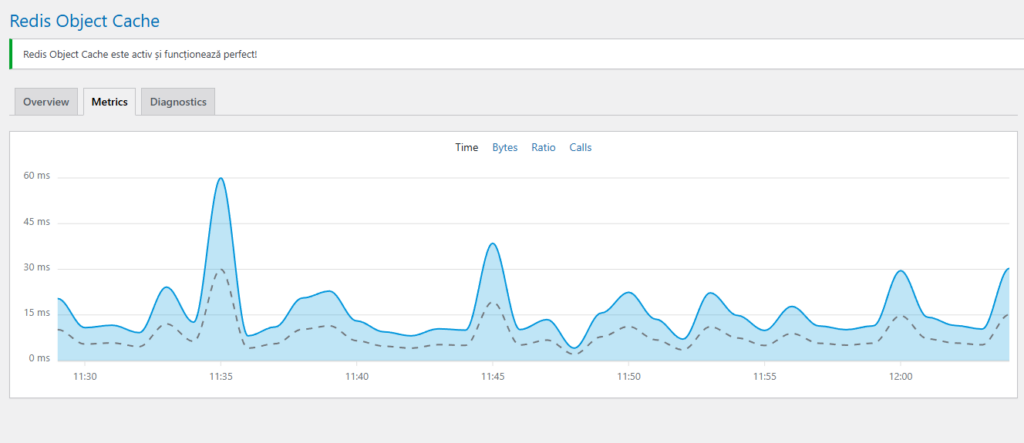
Object Cache (Redis)
Object cache stores database query results and WordPress objects in memory.
Safe for:
- admin
- login
- dynamic pages
Redis does not cache HTML.
It accelerates WordPress internally.
CDN Cache (Cloudflare)
Cloudflare caches content at the edge, closer to visitors.
Extremely powerful, but also the easiest place to break WordPress if rules are wrong.
The Golden Rule of WordPress Caching
Never cache pages that depend on cookies or user sessions.
This single rule prevents 90% of cache-related WordPress problems.
Pages That Must NEVER Be Cached
These paths must always bypass cache:
/wp-admin/*/wp-login.php/login/*(custom login)/register/*/lost-password/*- preview URLs
- editor URLs
Cloudflare Expression Example
(http.host eq "helpzone.blog") and (
  starts_with(http.request.uri.path, "/wp-admin") or
  http.request.uri.path eq "/wp-login.php" or
  starts_with(http.request.uri.path, "/login") or
  starts_with(http.request.uri.path, "/register") or
  starts_with(http.request.uri.path, "/lost-password") or
  lower(http.request.uri.query) contains "preview"
)
Action: Bypass cache
Correct Cache Settings for Static Assets
Static files should always be cached aggressively.
Examples:
- CSS
- JavaScript
- Images
- Fonts
Recommended Rule
(http.host eq "helpzone.blog") and (
  starts_with(http.request.uri.path, "/wp-content/") or
  starts_with(http.request.uri.path, "/wp-includes/")
)
Recommended TTL:
- Edge TTL: 1 month
- Browser TTL: 1 month
How to Cache sitemap.xml Safely
Sitemaps are read frequently by search engines and should be fast, but not overcached.
Expression for sitemap.xml
(http.host eq "helpzone.blog") and (http.request.uri.path eq "/sitemap.xml")
Recommended Settings
- Cache eligibility: Eligible
- Edge TTL: 1–6 hours
- Browser TTL: Respect origin
- Ignore query string: ON
- Cookies excluded from cache key
This ensures:
- fast crawling
- fresh sitemap updates
- no cache poisoning
robots.txt: Cache or Not?
robots.txt controls crawling behavior and should reflect changes immediately.
Expression
(http.request.uri.path eq "/robots.txt")
Recommended Action
Bypass cache
robots.txt is tiny and does not need performance optimization.
Redis Object Cache: Correct Configuration
Redis should be used for object caching only, not page caching.
Benefits of Redis
- faster admin dashboard
- faster login
- reduced database load
- stable dynamic behavior
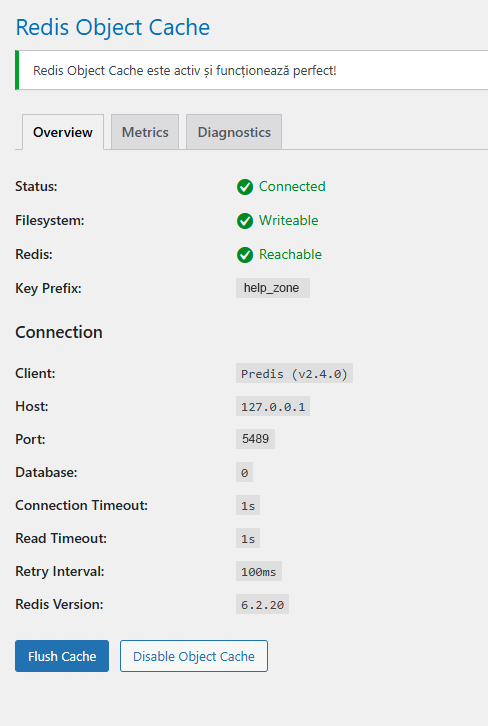
Recommended Redis Settings
define( 'WP_REDIS_CLIENT', 'predis' );
define( 'WP_REDIS_HOST', '127.0.0.1' );
define( 'WP_REDIS_PORT', 5489 );
define( 'WP_REDIS_DATABASE', 0 );
define( 'WP_REDIS_PREFIX', 'help_zone' );
define( 'WP_REDIS_TIMEOUT', 1 );
define( 'WP_REDIS_READ_TIMEOUT', 1 );
define( 'WP_REDIS_RETRY_INTERVAL', 100 );
define( 'WP_REDIS_SERIALIZER', 'php' );
Important rule:
If Redis is down, disable
object-cache.phpimmediately.
Common Cache Mistakes That Break WordPress
Caching Login Pages
Results in:
- infinite redirects
- users being logged out
- failed authentication
Caching robots.txt Aggressively
Results in:
- outdated crawl rules
- SEO confusion
- temporary deindexing risks
Mixing Page Cache and Object Cache
Redis is not a replacement for page cache.
Each cache layer has a specific role.
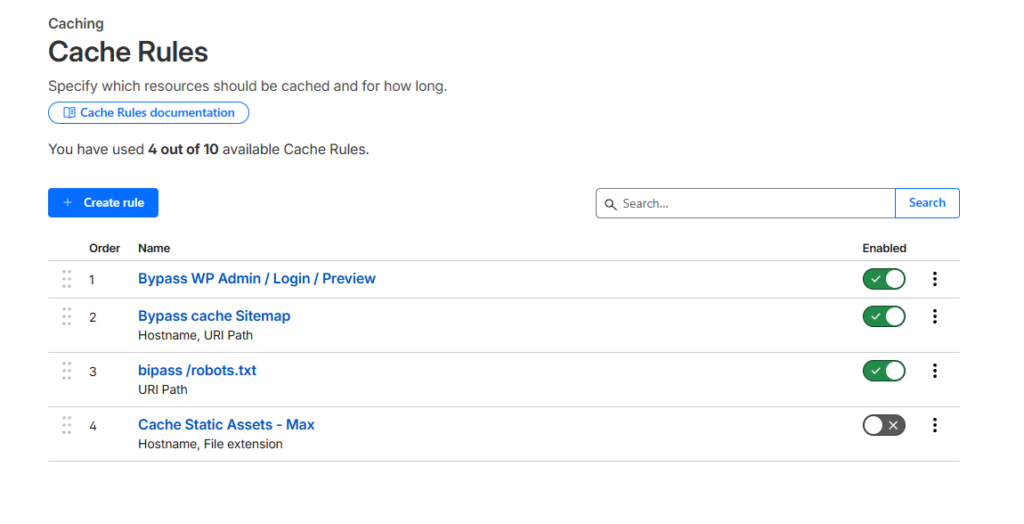
Recommended Cache Rule Order in Cloudflare
Cloudflare processes rules top to bottom.
Correct order:
- Login/Admin bypass
- Static assets cache
- robots.txt rule
- sitemap.xml rule
- Optional HTML cache
Final Thoughts: Cache Smart, Not Aggressive
Read also: Camp Nou Inauguration
Caching should support WordPress, not fight it.
A correct cache setup:
- improves speed
- protects login
- respects SEO
- avoids mysterious bugs
If your site is fast but broken, cache is misconfigured.
If your site is stable and fast, cache is working correctly.
⚠️ DISCLAIMER
This article is based on practical experience, WordPress documentation, and CDN best practices. Always test cache changes on staging environments and consult hosting providers or system administrators before applying server-level modifications.
🔔 For more tutorials like this, consider subscribing to our blog.
📩 Do you have questions or suggestions? Leave a comment or contact us!
🏷️ Tags: wordpress cache, cloudflare cache, redis object cache, wordpress performance, cache settings, seo optimization, wp admin cache, sitemap cache, robots txt cache
📢 Hashtags: #WordPress #Cloudflare #Redis #Caching #WebPerformance #SEO #WPAdmin #SiteSpeed #WebHosting #Optimization
