


⏲️ Estimated reading time: 12 min
Table of Contents
Learn how to safely export Fail2ban status (blocked IPs) and display it in a WordPress dashboard widget without sudo or shell_exec. We’ll schedule a root/user cron, write JSON to uploads, then build a fast, secure, and scalable admin widget.
Why a “JSON Export Dashboard” Is the Right Approach
Showing system-level data (like Fail2ban blocked IPs) inside WordPress raises the classic permissions problem. WordPress (PHP-FPM) runs under a limited user and should not run privileged commands (e.g., fail2ban-client). The elegant, safe pattern is to move data collection into cron (root or a properly-privileged user) and publish the result as JSON in wp-content/uploads. Inside WP, we only read that JSON no shell_exec, no sudo, no risky escapes.
Benefits:
- Security: zero command execution from PHP; WP only reads a file.
- Performance: data is precomputed; WP just renders it.
- Portability: the JSON can feed other sites, charts, alerts, etc.
- Scalability: you can add more metrics to the export over time.
Architecture at a Glance
- Cron Script (bash): runs
fail2ban-client status sshd, extracts IPs (IPv4/IPv6), computescurrently_bannedandtotal_banned, then writes clean JSON intowp-content/uploads/f2b-status.json. - Cron Job: executes the script every 5 minutes (or your preferred interval).
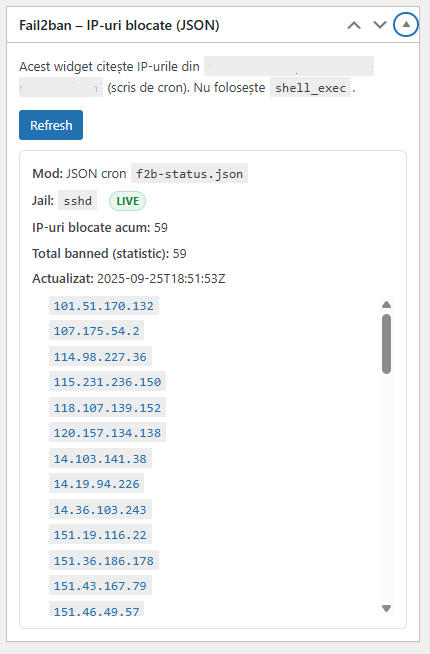
- WordPress Plugin: reads the JSON from uploads and renders a dashboard widget in wp-admin, with a Refresh button via AJAX (re-reads JSON; it does not trigger cron).
1) Cron Script That Exports JSON to Uploads
Create /usr/local/bin/f2b-status.sh:
#!/usr/bin/env bash
set -euo pipefail

# Fail2ban jail
JAIL="sshd"

# Where to write JSON (your WP uploads)
OUT="/home/USER/public_html/wp-content/uploads/f2b-status.json"  # ← change USER + path

# Ensure directory exists
install -d -m 0755 "$(dirname "$OUT")"

# 1) Raw jail status
RAW="$(fail2ban-client status "$JAIL" 2>/dev/null || true)"

# 2) Extract all IPs (IPv4 + typical IPv6 forms) from any line
IPS_LIST="$(
  printf '%sn' "$RAW"
  | grep -Eo '([0-9]{1,3}.){3}[0-9]{1,3}|([0-9a-fA-F:]{2,}:[0-9a-fA-F:]+)'
  | sed '/^$/d'
  | sort -u
)"

# 3) Current unique IP count
CURR_COUNT="$(printf '%sn' "$IPS_LIST" | sed '/^$/d' | wc -l | tr -d '[:space:]')"

# 4) Total banned (cumulative) reported by Fail2ban
TOTAL_BANNED="$(
  printf '%sn' "$RAW" | awk -F':' '/Total banned/ {print $2}' | xargs || true
)"

# 5) ISO timestamp
NOW="$(date -u +"%Y-%m-%dT%H:%M:%SZ")"

# 6) Emit JSON (prefer jq; fallback to pure bash)
if command -v jq >/dev/null 2>&1; then
  jq -n
    --arg jail "$JAIL"
    --arg updated "$NOW"
    --arg total "$TOTAL_BANNED"
    --arg ips_line "$(printf '%sn' "$IPS_LIST")" '
    {
      jail: $jail,
      updated: $updated,
      total_banned: ($total | tonumber? // $total),
      ips: ($ips_line | split("n") | map(select(length>0)))
    } | . + { currently_banned: (.ips | length) }' > "$OUT.tmp"
else
  {
    echo "{"
    echo ""jail":"$JAIL","
    echo ""updated":"$NOW","
    echo ""total_banned":"$TOTAL_BANNED","
    echo ""ips":["
    first=1
    while IFS= read -r ip; do
      [ -z "$ip" ] && continue
      if [ $first -eq 0 ]; then printf ","; fi
      printf '"%s"' "$ip"
      first=0
    done <<< "$IPS_LIST"
    echo "],"
    echo ""currently_banned":$CURR_COUNT"
    echo "}"
  } > "$OUT.tmp"
fi

# Atomic move + safe permissions
mv -f "$OUT.tmp" "$OUT"
chmod 0644 "$OUT"
Configuration notes:
- Replace
USERand theOUTpath to match your hosting/domain. - Make the script executable:
chmod +x /usr/local/bin/f2b-status.sh
Quick test:
/usr/local/bin/f2b-status.sh
cat /home/USER/public_html/wp-content/uploads/f2b-status.json
You should get a JSON like:
{
  "jail": "sshd",
  "updated": "2025-09-25T16:45:00Z",
  "total_banned": 59,
  "ips": ["43.134.36.84", "172.174.72.225", "..."],
  "currently_banned": 59
}
2) Schedule the Cron (Root or User)
Recommended variants
A. Root cron (system-wide):
crontab -e
Add:
*/5 * * * * /usr/bin/bash /usr/local/bin/f2b-status.sh >/dev/null 2>&1
B. User cron (e.g., help_zone) – good for separation per account:
crontab -u help_zone -e
Add:
*/5 * * * * /usr/local/bin/f2b-status.sh >/dev/null 2>&1
Verify:
crontab -l                 # as root
crontab -u help_zone -l     # as that user
ls -l wp-content/uploads/f2b-status.json
3) WordPress Plugin: JSON-Only Dashboard
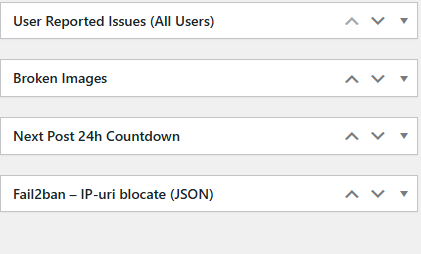
Create the folder:
wp-content/plugins/wp-fail2ban-dashboard-json/
Main file: wp-fail2ban-dashboard-json.php
<?php
/**
 * Plugin Name: WP Fail2ban Dashboard (JSON)
 * Description: Dashboard widget that displays blocked IPs for the sshd jail by reading /wp-content/uploads/f2b-status.json written by cron. No shell_exec.
 * Version: 1.1.0
 * Author: Help Zone
 */

if ( ! defined('ABSPATH') ) exit;

class WP_F2B_Dashboard_JSON {
    const CAP = 'manage_options';
    const NONCE_ACTION = 'wp_f2b_refresh';

    // Relative path in uploads
    const JSON_REL_PATH = 'f2b-status.json';
    // Consider data stale after X minutes
    const STALE_MINUTES = 15;

    public function __construct() {
        add_action('wp_dashboard_setup', [$this, 'add_widget']);
        add_action('admin_enqueue_scripts', [$this, 'assets']);
        add_action('wp_ajax_wp_f2b_refresh', [$this, 'ajax_refresh']);
    }

    public function assets($hook) {
        if ($hook !== 'index.php') return;
        wp_enqueue_script('wp-f2b-dashboard', plugin_dir_url(__FILE__) . 'wp-f2b.js', ['jquery'], '1.0.0', true);
        wp_localize_script('wp-f2b-dashboard', 'WP_F2B', [
            'ajaxurl' => admin_url('admin-ajax.php'),
            'nonce'   => wp_create_nonce(self::NONCE_ACTION),
        ]);
        wp_enqueue_style('wp-f2b-dashboard', plugin_dir_url(__FILE__) . 'wp-f2b.css', [], '1.0.0');
    }

    public function add_widget() {
        if ( ! current_user_can(self::CAP) ) return;
        wp_add_dashboard_widget('wp_f2b_widget', 'Fail2ban – Blocked IPs (JSON)', [$this, 'render_widget']);
    }

    public function render_widget() {
        echo '<div id="wp-f2b-wrap">';
        echo '<p>This widget reads IPs from <code>wp-content/uploads/'.esc_html(self::JSON_REL_PATH).'</code>, a JSON file written by cron (root or a user). No <code>shell_exec</code> is used.</p>';
        echo '<button id="wp-f2b-refresh" class="button button-primary">Refresh</button>';
        echo '<div id="wp-f2b-result" style="margin-top:10px;"><em>Loading…</em></div>';
        echo '</div>';

        $html = $this->get_status_html();
        echo "<script>window.addEventListener('load',function(){document.getElementById('wp-f2b-result').innerHTML=".wp_json_encode($html).";});</script>";
    }

    public function ajax_refresh() {
        if ( ! current_user_can(self::CAP) ) wp_send_json_error('unauthorized', 403);
        check_ajax_referer(self::NONCE_ACTION, 'nonce');
        $html = $this->get_status_html();
        wp_send_json_success(['html' => $html]);
    }

    private function get_status_html() {
        $data = $this->read_json_status();

        $html  = '<div class="wp-f2b-box">';
        $html .= '<div><strong>Mode:</strong> JSON cron <code>'.esc_html(self::JSON_REL_PATH).'</code></div>';

        if ( isset($data['error']) ) {
            $html .= '<p style="color:#b32d2e; margin:8px 0;">'.$data['error'].'</p>';
            $html .= $this->help_hints();
            $html .= '</div>';
            return $html;
        }

        $updated = !empty($data['updated']) ? esc_html($data['updated']) : '-';
        $jail    = !empty($data['jail']) ? esc_html($data['jail']) : 'sshd';
        $total   = isset($data['total_banned']) ? esc_html((string)$data['total_banned']) : '-';
        $ips     = is_array($data['ips'] ?? null) ? array_values(array_filter($data['ips'])) : [];
        $curr    = count($ips);

        $html .= '<div style="margin:6px 0;"><strong>Jail:</strong> <code>'.$jail.'</code></div>';
        $html .= '<div style="margin:6px 0;"><strong>Currently banned:</strong> '.$curr.'</div>';
        $html .= '<div style="margin:6px 0;"><strong>Total banned (cumulative):</strong> '.$total.'</div>';
        $html .= '<div style="margin:6px 0;"><strong>Updated:</strong> '.$updated.$this->stale_warning($data).'</div>';
        $html .= $this->render_ip_list($ips);
        $html .= '</div>';
        return $html;
    }

    private function render_ip_list($ips) {
        if (empty($ips)) return '<p><em>No IPs listed.</em></p>';
        $out = '<ul class="wp-f2b-ul">';
        foreach ($ips as $ip) {
            $out .= '<li><a href="https://ipinfo.io/'.rawurlencode($ip).'" target="_blank" rel="noreferrer"><code>'.esc_html($ip).'</code></a></li>';
        }
        $out .= '</ul>';
        return $out;
    }

    private function read_json_status() {
        $uploads = wp_get_upload_dir();
        if ( empty($uploads['basedir']) ) {
            return ['error' => 'Cannot determine uploads base directory (wp_get_upload_dir).'];
        }
        $file = trailingslashit($uploads['basedir']) . ltrim(self::JSON_REL_PATH, '/');

        if ( ! file_exists($file) ) {
            return ['error' => 'JSON file is missing: <code>'.esc_html(str_replace(ABSPATH,'',$file)).'</code>. Start the cron job.'];
        }
        if ( ! is_readable($file) ) {
            return ['error' => 'JSON exists but is not readable (permissions). Recommended: <code>0644</code>.'];
        }

        $raw = @file_get_contents($file);
        if ( ! is_string($raw) || $raw === '' ) {
            return ['error' => 'Could not read JSON contents.'];
        }

        $data = json_decode($raw, true);
        if ( json_last_error() !== JSON_ERROR_NONE ) {
            return ['error' => 'Invalid JSON: '.json_last_error_msg().'.'];
        }

        $data['jail'] = $data['jail'] ?? 'sshd';
        $data['ips']  = is_array($data['ips'] ?? null) ? $data['ips'] : [];
        $data['updated'] = $data['updated'] ?? '';
        $data['_filemtime'] = @filemtime($file) ?: null;

        return $data;
    }

    private function stale_warning($data) {
        $warn = '';
        $now  = time();
        $limit = self::STALE_MINUTES * 60;

        $age = null;
        if (!empty($data['updated'])) {
            $ts = strtotime($data['updated']);
            if ($ts) $age = $now - $ts;
        }
        if ($age === null && !empty($data['_filemtime'])) {
            $age = $now - intval($data['_filemtime']);
        }

        if ($age !== null && $age > $limit) {
            $mins = floor($age / 60);
            $warn = ' <span style="color:#b32d2e;">(warning: data ~'.$mins.' minutes old)</span>';
        }
        return $warn;
    }

    private function help_hints() {
        $uploads = wp_get_upload_dir();
        $target  = !empty($uploads['basedir']) ? trailingslashit($uploads['basedir']).self::JSON_REL_PATH : 'wp-content/uploads/'.self::JSON_REL_PATH;
        $hint  = '<div style="margin-top:8px; opacity:.8;"><strong>Setup hint:</strong>';
        $hint .= '<pre style="white-space:pre-wrap;"># Script that generates JSON (example):
/usr/local/bin/f2b-status.sh

# JSON target:
'.esc_html(str_replace(ABSPATH,'',$target)).'

# Cron (every 5 minutes):
*/5 * * * * /usr/bin/bash /usr/local/bin/f2b-status.sh >/dev/null 2>&1
</pre></div>';
        return $hint;
    }
}

new WP_F2B_Dashboard_JSON();
wp-f2b.js
jQuery(function ($) {
  $('#wp-f2b-refresh').on('click', function () {
    const $btn = $(this);
    const $out = $('#wp-f2b-result');
    $btn.prop('disabled', true).text('Refreshing...');
    $.post(WP_F2B.ajaxurl, { action: 'wp_f2b_refresh', nonce: WP_F2B.nonce })
      .done(function (res) {
        if (res && res.success && res.data && res.data.html) {
          $out.html(res.data.html);
        } else {
          $out.html('<p style="color:#b32d2e;">Error: invalid response.</p>');
        }
      })
      .fail(function () {
        $out.html('<p style="color:#b32d2e;">AJAX error.</p>');
      })
      .always(function () {
        $btn.prop('disabled', false).text('Refresh');
      });
  });
});
wp-f2b.css
#wp-f2b-wrap { line-height: 1.5; }
.wp-f2b-box { background:#fff; border:1px solid #e0e0e0; padding:12px; border-radius:6px; }
.wp-f2b-ul { max-height: 280px; overflow:auto; margin:8px 0 0; padding-left:1.2em; }
.wp-f2b-ul li { font-family: ui-monospace, SFMono-Regular, Menlo, Consolas, "Liberation Mono", monospace; }
Activate the plugin under Plugins → Installed Plugins.
4) Testing & Debugging
- Check the JSON:
cat wp-content/uploads/f2b-status.json - Check cron execution:
grep CRON /var/log/cron | tail -n 20 - Check Fail2ban status:
fail2ban-client status sshd
If the widget shows “No IPs listed” while Fail2ban shows otherwise, compare the “Updated” timestamp and file permissions (should be 0644). If timestamps lag, verify the cron schedule and that only one job writes the JSON to avoid conflicts.
5) Security & Best Practices
- Do not let PHP run
fail2ban-client. Keep logic in cron; export a readable JSON only. - Use minimal permissions:
0644on the JSON;0755on its directory. - Avoid duplicate jobs: run one cron that writes the JSON (prevent race conditions).
- If you intend to expose the JSON externally, add access rules (Apache/Nginx) to restrict or authenticate as needed.
- Sanitize and escape everything you render in the widget (already handled in the sample).
6) Helpful Extensions (Optional)
- Status badge (green/amber/red) based on JSON freshness.
- Search filter in the IP list (small JS input to live-filter items).
- List limiter (e.g., show first 100 IPs with a “Show more” button).
- Export CSV from WordPress (button compiles
ipsinto a downloadable CSV). - Webhooks: if
currently_bannedexceeds a threshold, post a Slack/Discord alert. - Multiple jails: extend the bash to iterate a list of jails and write
f2b-<jail>.jsonper jail, or a single aggregatedf2b-status-all.json.
Final Notes
By separating data collection (cron + bash) from display (WordPress widget that reads JSON), you get a clean, safe, and maintainable Export Dashboard. We avoid shell_exec in PHP, respect principle of least privilege, reduce server load, and still provide a friendly UI in wp-admin. The solution is easy to extend (add more security metrics) and portable across sites. With these steps, you’ve got a production-ready Fail2ban Dashboard that plays nicely with shared hosting, VPS, or dedicated servers.
🔔 For more tutorials like this, consider subscribing to our blog.
📩 Do you have questions or suggestions? Leave a comment or contact us!
🏷️ Tags: WordPress security, Fail2ban, JSON export, cron job, dashboard widget, wp-admin, server hardening, Bash script, VPS, sysadmin
📢 Hashtags: #WordPress, #Security, #Fail2ban, #Cron, #DevOps, #VPS, #SysAdmin, #PHP, #Bash, #Dashboard
Read also: What Does It Mean When You Dream About a Person
